A student attendance management system is software that records, tracks, and reports who is present in class each day. Schools use it to replace paper registers, spot absence patterns early, and keep parents informed.
This guide explains how it works, which features matter, how to compare options, and how to roll one out without disrupting teachers.
LearnPress – WordPress LMS Plugin
We provide an amazing WordPress LMS plugin to create & sell online courses. Let’s find out!
Try NowTable of Contents
What is a student attendance management system?
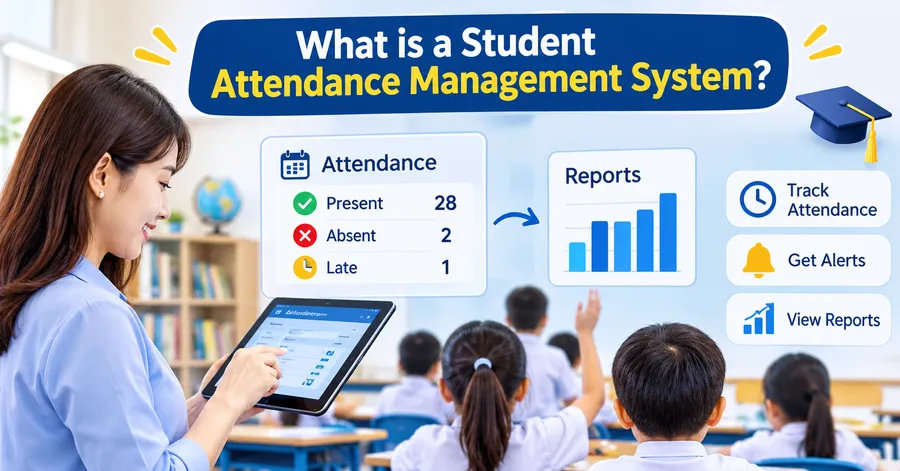
A student attendance management system is a digital tool that lets teachers mark attendance, stores the records in one place, and turns them into reports. It replaces the paper register and the end-of-week spreadsheet with a single, searchable record for every student.
Definition and core purpose
At its simplest, the system answers three questions: who was present, who was absent, and why. Teachers mark attendance on a phone, tablet, or computer. The system saves the data, sends alerts when needed, and builds reports for the office, the principal, and parents.
Most products are sold as student attendance software or attendance software for schools. The names differ, but the job is the same: capture accurate data quickly and make it useful.
How it differs from a paper register
A paper register only records a mark. A digital system records the mark, the time, the class, and often the reason for absence. It can also compare one student against the whole year level. That comparison is what turns a list of marks into early warning data.
Why schools need attendance software
Schools need attendance software because accurate records protect both learning and compliance. When absences are logged late or lost in paper files, problems stay hidden until grades drop.
Spotting chronic absenteeism early
Chronic absenteeism is commonly defined as missing 10 percent or more of school days, according to the U.S. Department of Education. For a 180-day school year, that is about 18 days. A student attendance tracking system can flag a student at 5 or 6 absences, long before the 18-day mark. That gives staff time to call home and offer support.
Saving teacher and office time
Manual attendance usually means three steps: the teacher marks a register, the office re-enters it, and someone phones parents about unexplained absences. A digital system removes the second step and automates most of the third. In practice, the morning roll call shrinks from several minutes to under one minute once teachers are used to the interface.
Meeting reporting and safety requirements
Schools must keep reliable attendance records for funding, inspections, and student safety. A student attendance management system keeps a dated record of every change, so you can show who edited a mark and when. In an emergency, a live list of who is on site is also far more useful than a paper register left in a classroom.
Key features to look for
The best student attendance management software focuses on speed, accuracy, and clear communication. Before you book a demo, list the features below and mark which ones are essential for your school.
Fast marking by period or by day
Primary schools usually need one mark per day. Secondary schools need a mark for every lesson. Check that the class attendance tracking software supports both, and that a teacher can mark a class of 30 in a few taps. If marking is slow, teachers will stop using it.
Real-time alerts for parents and staff
When a student is marked absent, the system should send a text, email, or app notification to the parent. It should also alert the year coordinator if a pattern appears, such as three Monday absences in a row. Look for templates you can edit, so messages sound like your school.
Reports and analytics
Good class attendance tracking software gives you ready-made reports: daily absentee lists, attendance by class, by year level, and by student over time. Export options such as CSV and PDF save hours during reporting season. Dashboards help principals see trends at a glance without opening a spreadsheet.
Integrations with your existing systems
A system that does not connect to your student information system (SIS) creates double entry. Ask about integrations with your SIS, timetable tool, and learning platform. An open API or a clear import and export process is a strong sign of a mature product.
Mobile access and offline mode
Teachers often mark attendance on a tablet in a hallway or on an excursion with weak Wi-Fi. An offline mode that syncs later prevents lost data. A responsive web app or a native mobile app both work, as long as the screen is easy to use with one hand.
Data privacy and access control
Student records are sensitive. Check that the vendor supports role-based access, so teachers see only their own classes. Ask where data is stored, how it is backed up, and which privacy rules the vendor follows, such as FERPA in the United States, GDPR in Europe, or the Australian Privacy Principles.
Attendance tracking methods compared
There are four common ways to track attendance: paper registers, spreadsheets, dedicated software, and learning management system (LMS) tracking. The right choice depends on school size, budget, and whether classes are in person, online, or both.
| Method | Setup cost | Speed of marking | Parent alerts | Reporting | Best for |
|---|---|---|---|---|---|
| Paper register | Very low | Slow, needs re-entry | Manual calls | Manual counting | Very small classes |
| Spreadsheet | Low | Medium | Manual | Basic, formula based | Small schools with a tech-confident admin |
| Dedicated student attendance tracking system | Medium | Fast | Automatic | Detailed, real time | Primary and secondary schools |
| LMS-based tracking (course progress, logins, lesson completion) | Low to medium | Automatic for online lessons | Depends on setup | Course level | Online and hybrid learning |
Paper and spreadsheets are cheap, but they make errors easy and reporting slow. A dedicated student attendance management system costs more, yet it pays back in time saved and faster follow-up. LMS tracking is not a full replacement for a school register, but it adds useful data for online classes.
How to choose the right system
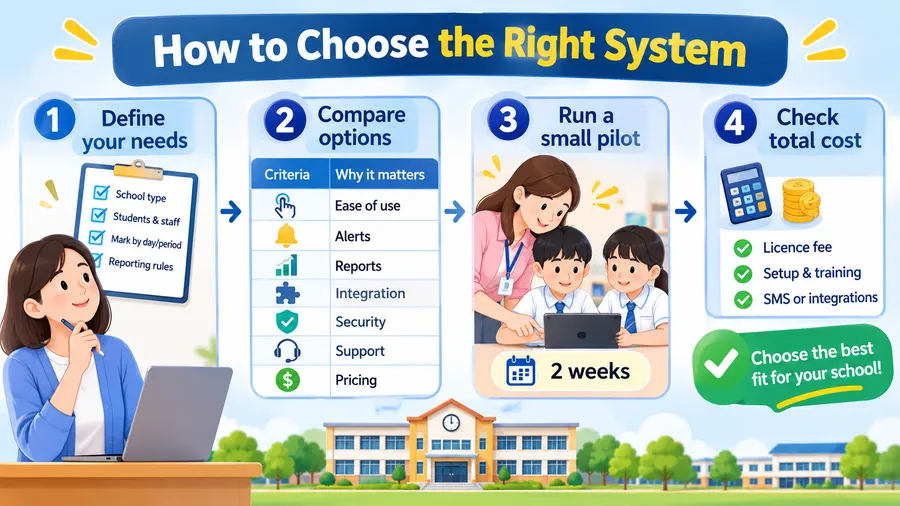
Choose a system by matching it to your school’s real workflow, not by counting features. A shorter feature list that teachers actually use beats a long list that nobody opens.
Step 1: Define your needs
Write down your school type, number of students, number of teachers, and whether you mark by day or by period. Add any legal reporting rules you must follow. This list becomes your checklist for every vendor demo.
Step 2: Compare shortlisted options
Pick three products and compare them against the same criteria. Use the table below as a simple scorecard.
| Criteria | Questions to ask the vendor | Why it matters |
|---|---|---|
| Ease of use | Can a new teacher mark a class without training? | Adoption decides success |
| Alerts | Can parents choose SMS, email, or app messages? | Faster follow-up on absences |
| Reports | Can I export reports in CSV and PDF? | Saves time at reporting season |
| Integration | Does it connect to our SIS and timetable? | Prevents double entry |
| Security | How is data stored and who can access it? | Protects student privacy |
| Support | Is there a help desk and onboarding? | Reduces launch problems |
| Pricing | Is pricing per student, per teacher, or flat? | Avoids surprise costs |
Step 3: Run a small pilot
Ask two or three teachers to use the system for two weeks. Collect feedback on speed, clarity, and any missing features. A pilot shows problems that a sales demo never will, such as a confusing absence reason list or slow loading on older tablets.
Step 4: Check total cost
Count the licence fee, setup fee, training, and any extra charges for SMS messages or integrations. Some school attendance management system vendors advertise a low price but bill separately for each text message. Ask for a full quote in writing.
How to set up and roll out
A smooth rollout depends on clean data and clear habits. Plan for four to six weeks from decision to full use, and keep the first stage small.
Prepare your student data
Export student lists, class groups, and parent contact details from your SIS. Check for duplicate names, wrong phone numbers, and missing guardians. Bad contact data is the most common reason parent alerts fail, so fix it before launch.
Train teachers in short sessions
Run a 30-minute hands-on session instead of a long presentation. Show three tasks: mark a class, correct a mistake, and add an absence reason. Give every teacher a one-page quick guide they can keep at their desk.
Set clear attendance rules
Agree on when a student counts as late, how long teachers have to mark a class, and who approves absence reasons. Write these rules into your attendance policy. Without clear rules, the data will look different from class to class and reports lose value.
Review the data every week
Assign one person, such as a year coordinator, to review the weekly attendance report. Look for students with three or more absences and for classes where marking is often late. Small weekly checks prevent large problems at the end of term.
Using LearnPress and Eduma for online and hybrid classes
LearnPress and Eduma suit schools that deliver part of their teaching online, but they are not a replacement for a full school register. If your classes are fully in person, a dedicated student attendance management system is the better main tool. If you run online or hybrid courses, LearnPress can add useful tracking on top.
LearnPress is a free WordPress LMS plugin for building and selling courses. It lets you create courses, lessons, and quizzes, enrol students, and see their progress. For online lessons, enrolment records and lesson completion give you a clear view of who is taking part and who has gone quiet. Many schools use that data alongside their main attendance records to follow up with students who are falling behind.
Eduma is a WordPress education theme built to work with LearnPress. It gives you ready-made layouts for course pages, teacher profiles, and events, so you can launch a school or training website without writing code. Because it runs on WordPress, you can add contact forms, parent notices, and timetable pages on the same site.
A practical setup looks like this:
- Keep your main student attendance tracking system for daily in-person registers.
- Use LearnPress to run online courses, homework, and quizzes.
- Use LearnPress reports to see enrolment and lesson completion for online work.
- Review both data sets together each week to spot students who need support.
Check the LearnPress and Eduma documentation for the current version requirements before you install, since features and compatibility change between releases.
Common mistakes to avoid
Most attendance projects fail because of people and process, not technology. Avoid these four mistakes to protect your investment.
Buying on price alone
The cheapest option often lacks parent alerts or reports, which are the two features that save the most time. Compare the cost of the school attendance management system with the staff hours it replaces.
Skipping the pilot
Schools that go live with all classes on day one often face teacher frustration and patchy data. A two-week pilot costs little and avoids that outcome.
Ignoring parents
If parents do not know how alerts work, many will ignore them. Send a short letter explaining the system, the types of messages they will receive, and how to report an absence.
Collecting data without acting on it
Reports only matter if someone follows up. Set a simple routine: a phone call after three absences, a meeting after five, and a support plan after ten.
FAQs
What is the best student attendance management system for small schools?
The best choice for a small school is a simple, low-cost tool with fast marking and automatic parent alerts. Small schools rarely need complex timetable features. Look for a flat monthly price, a free trial, and an easy import from a spreadsheet.
Can attendance software integrate with a student information system?
Yes, most modern attendance software for schools integrates with common SIS platforms through an API or a scheduled file import. Integration keeps student lists and class groups in sync and removes double entry. Always ask the vendor which SIS products they support before you sign.
How accurate is digital attendance compared with paper?
Digital attendance is usually more accurate because it removes re-typing and records the time of each change. Errors still happen if teachers mark late or choose the wrong student. Clear marking rules and weekly report checks keep accuracy high.
How much does student attendance software cost?
Pricing varies by vendor, school size, and features. Many products charge per student per year, while others charge a flat monthly fee. Add the cost of SMS messages, training, and integrations to the quote to see the true total.
Conclusion
A student attendance management system gives schools accurate records, faster parent communication, and early warning of absence patterns. The best choice is the one your teachers will use every day, so start with your workflow, test with a small pilot, and check the full cost. Pair your main student attendance management software with clear attendance rules and a weekly review habit. For online and hybrid courses, LearnPress and Eduma can add enrolment and progress data to give you a fuller picture of student engagement.