Running a school on spreadsheets, paper forms, and five different apps gets harder every term. An online school management system puts admissions, attendance, fees, grades, and parent communication in one place, so your staff spend less time chasing data and more time supporting students.
This guide explains what these platforms do, which features matter, how the main options compare, and how to roll one out without disrupting your school year. It is written for principals, administrators, and tutoring centre owners who need a practical answer, not a sales pitch.
LearnPress – WordPress LMS Plugin
We provide an amazing WordPress LMS plugin to create & sell online courses. Let’s find out!
Try NowWhat is an online school management system?
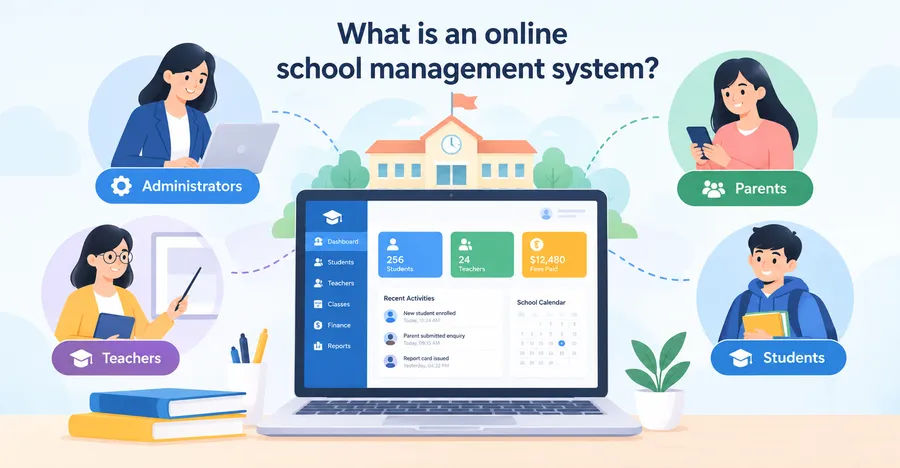
An online school management system is a cloud-based platform that handles the daily administration of a school, from the first enquiry to the final report card. This section covers the definition, how it differs from a learning platform, and who uses it.
Definition
An online school management system is web-based software that stores student, staff, and financial records in one database and gives each user group its own login. Administrators see the whole school, teachers see their own classes, and parents see only their own children. Because it runs in a browser, nobody needs to install programs or maintain a server in the school office.
How it differs from a learning management system
A learning management system (LMS) delivers lessons, quizzes, and assignments. School management system software covers the business side of a school: who is enrolled, who has paid, who was absent, and which grade belongs on which report. Many schools need both. Some connect the two tools, and smaller online academies sometimes run course delivery and basic administration from one WordPress site, which we cover later in this guide.
Who uses this kind of software
Primary schools, secondary schools, colleges, language institutes, homeschool co-ops, and online academies all use these platforms. Small tutoring centres often start with tuition management software that focuses on class schedules and fee collection, then add records and reporting modules as they grow. The right scope depends on your size, your budget, and how many tasks are still done by hand.
Core features to look for
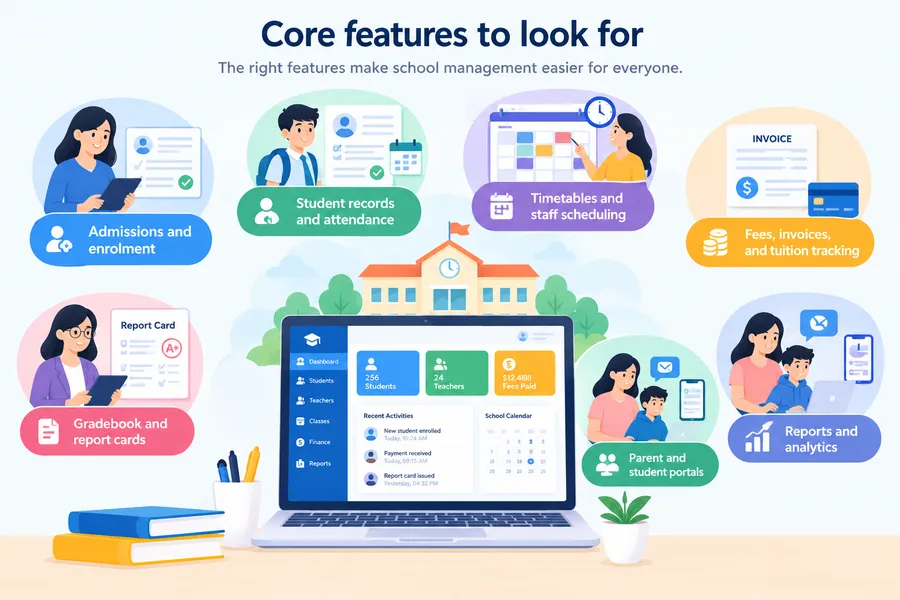
Vendors list dozens of modules, but only a handful decide whether a good online school management system works in daily life. Check each feature below against the real tasks your office and teachers do every week.
Admissions and enrolment
Online forms should replace paper applications. Look for custom fields, document uploads, application status tracking, and automatic emails to families. Strong application management software for schools lets staff move an applicant from enquiry to interview to offer to enrolled student without retyping any details. Also check that an accepted applicant converts into a full student record with one click, because double entry is where most admissions errors start.
Student records and attendance
Every student needs one central profile that holds contact details, guardians, medical notes, previous schools, and uploaded documents. Attendance should take a teacher under a minute on a phone or laptop, and absences should trigger an automatic message to the parent. Ask to see attendance reports by class, by student, and by lesson period, since truancy patterns often show up at period level first.
Timetables and staff scheduling
A timetable module should warn you when a teacher or room is booked twice. Drag-and-drop editing saves hours during term planning, and substitute teacher assignment should take a few clicks. If your school has shared rooms, labs, or online classes with meeting links, confirm the tool handles them without workarounds.
Fees, invoices, and tuition tracking
Tuition management software should create fee plans, generate invoices, accept online payments, record part payments, and apply discounts such as sibling rates or scholarships. It should also send payment reminders automatically. Ask which payment gateways it supports in your country, and check that receipts and reports export cleanly, because your accountant will want them at the end of the year.
Gradebook and report cards
Look for custom grading scales, weighted assessments, and report card templates that match your school’s format. Comment banks help teachers write feedback faster. Reports should export as PDF so families can download or print them, and the system should keep past terms available for transcripts.
Parent and student portals
Portals give families a single place to see notices, timetables, attendance, fee status, and results. A mobile-friendly layout matters more than a separate app for most schools, since parents will open links from their phones. Check whether parents can message teachers inside the platform, and whether staff can turn that feature off for younger year groups.
Reports and analytics
Leaders need numbers without asking someone to build a spreadsheet. Useful reports include attendance trends, fee collection rates, enrolment by year level, and class performance. Good education administration software makes these views available as live dashboards and lets you export the raw data to CSV for deeper analysis.
Benefits for schools, teachers, and families
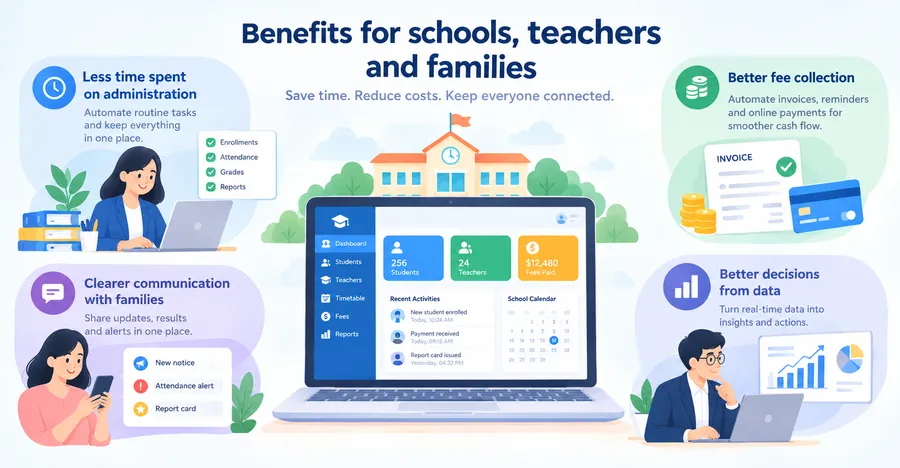
Schools that adopt an online school management system usually see gains in three areas: time, money, and communication. The points below explain where those gains come from and what they look like in practice.
Less time spent on administration
Office staff no longer re-enter the same details in three places. Teachers mark attendance and enter grades once, and the data flows to reports, parent portals, and dashboards. Tasks that used to take an afternoon, such as producing a class list with contact numbers, take seconds. The time saved is largest in the weeks around enrolment and end-of-term reporting.
Better fee collection
Automatic invoices and reminders reduce the awkward phone calls about late payments. Online payments shorten the time between invoice and cash, and clear records show exactly who owes what. Schools that rely on tuition income gain a clearer picture of cash flow, which makes budgeting less stressful.
Clearer communication with families
Parents receive notices, results, and attendance alerts in one predictable place. That reduces missed messages and repeated questions at the front desk. It also creates a searchable record of what the school communicated and when, which helps if a dispute comes up later.
Better decisions from data
When attendance, grades, and enrolment sit in one database, patterns become visible. You can spot a class with falling attendance, a year group with weaker results, or a fee plan that most families struggle to pay. Modern online school administration software turns these patterns into charts that a principal can read in a few minutes and act on the same week.
Comparison of the main options
A modern online school management system is not the only route. The table below compares five common approaches, so you can match each one to your school’s size, budget, and technical skills.
| Option | Best for | Typical setup time | Cost model | Main strength | Main limit |
|---|---|---|---|---|---|
| Dedicated cloud school management system software | Schools with 200+ students that need every module | 4 to 12 weeks | Per-student or annual subscription | Covers admissions, records, fees, and reports in one tool | Recurring cost and less design freedom |
| Tuition management software | Tutoring centres and small academies | 1 to 3 weeks | Monthly fee per centre | Simple scheduling and fee tracking | Limited academic records and reports |
| WordPress with LearnPress and add-ons | Online academies built around courses | 1 to 4 weeks | Free core plugin plus paid add-ons and hosting | Full control and strong course delivery | Needs WordPress skills and is not a full records system |
| Enterprise ERP for education | Large school groups and universities | 3 to 9 months | Custom licence | Deep finance and HR integration | High cost and long rollout |
| Spreadsheets and email | Very small groups | Same day | Free | No upfront cost | Errors, no portals, and privacy risk |
Where LearnPress fits
LearnPress is a free WordPress LMS plugin, and it suits some schools very well and others not at all. If your school teaches mainly through online courses, it deserves a look. If you need attendance registers, timetables, and printed report cards, you will need more than LearnPress alone.
What LearnPress does well
LearnPress lets you build courses with lessons and quizzes, manage a question bank, assign instructors, and track student progress. The core plugin is free on WordPress.org, and paid add-ons extend it with features such as WooCommerce payments, certificates, and course reviews. It works with Gutenberg and popular page builders like Elementor, and many education themes ship with ready-made LearnPress layouts, which shortens design time. For an online academy that sells courses and wants full control of its brand and data, this is a practical starting point.
Where LearnPress falls short
LearnPress is a learning platform, so it is not a complete online school management system. It does not include a native attendance register, a timetable builder, or a formal report card module. You can close some of those gaps with other plugins, but each addition raises maintenance work and the chance of plugin conflicts. Schools with several hundred students, multiple campuses, or strict record-keeping duties should treat LearnPress as the course layer and pair it with dedicated records software.
A practical setup for small online academies
If you decide to build on WordPress, a sensible stack looks like this:
- Install LearnPress on a fast, well-supported host, and use a child theme before you customize anything.
- Add WooCommerce or a supported payment add-on so families can pay tuition online.
- Use a form plugin for admission enquiries, which works as lightweight application management software for schools with a small intake.
- Set up user roles carefully so students, teachers, and administrators see only what they need.
- Add a backup and security plugin, and test a restore before you go live.
Used this way, the stack works as simple online school administration software for course-based schools. This walkthrough is based on the LearnPress 4.x series. Features and add-on pricing change between releases, so check the current listing on WordPress.org before you buy anything.
How to choose the right system
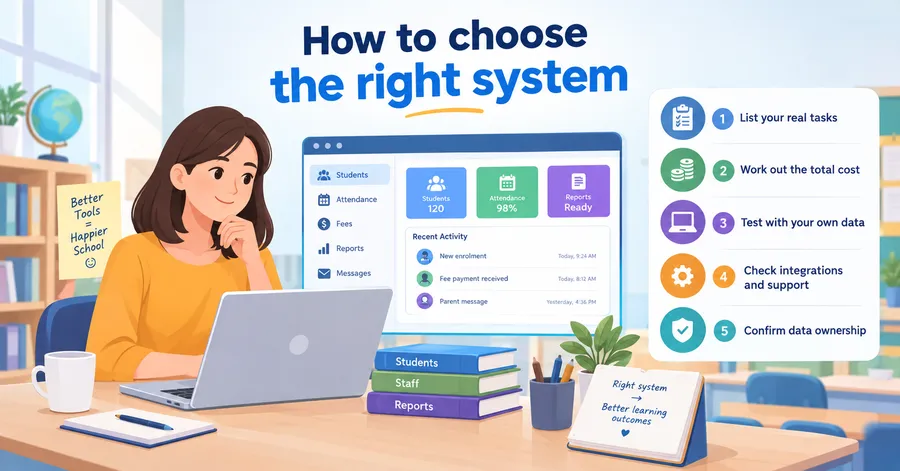
The best online school management system is the one your staff will actually use every day. Work through the five steps below before you talk to any vendor, and you will avoid most costly mistakes.
Step 1: List your real tasks
Write down what your office and teachers do each week: enrol students, mark attendance, chase fees, produce reports, and message parents. Rank each task by pain and by frequency. This list becomes your requirements sheet, and it keeps demos focused on your needs instead of the vendor’s favourite features.
Step 2: Work out the total cost
Ask for the full price, not just the headline rate. Check setup fees, per-student charges, payment gateway fees, storage limits, extra modules, and support plans. For a WordPress route, add hosting, premium add-ons, and developer time. Compare the three-year cost of each option, since a cheap start can become expensive at renewal.
Step 3: Test with your own data
Request a trial and load a small sample: one class, ten students, and a few invoices. Ask a teacher and an office worker to complete their normal tasks. If a simple task such as marking attendance takes more than a few clicks, staff will resist the tool later.
Step 4: Check integrations and support
Confirm the platform connects with the tools you already use, such as your accounting software, email provider, video meeting tool, and payment gateway. Ask about support hours, response times, and whether help is included in the price. A vendor that answers a trial-stage question slowly will not improve after you sign.
Step 5: Confirm data ownership
Your student records belong to your school. Ask how you can export all data, in what format, and what happens to it if you cancel. Good school management system software lets you download everything in standard formats such as CSV without extra fees.
Implementation plan
A good system fails if the rollout is rushed. Use the plan below to move from decision to daily use in a way that keeps teachers and families on side.
- Appoint an owner. Choose one person, usually an administrator, to lead the project and make decisions quickly.
- Clean your data first. Remove duplicates, fix spelling, and standardize class names before you import anything. Errors you carry over will follow you into every report.
- Set up the structure. Create academic years, terms, classes, subjects, grading scales, and fee plans before you add students.
- Import and check. Load student and staff records, then review a sample of profiles line by line against the originals.
- Train in small groups. Give teachers a short session on attendance and grades, and give office staff a separate session on admissions and fees. Short, task-based training works better than a single long session.
- Run a pilot. Start with one year group or one campus for a term. Collect feedback and fix problems while the group is small.
- Launch to everyone. Send parents a short guide with screenshots, and keep the old process available for a few weeks as a safety net.
Most schools do best when they launch at the start of a term, not mid-term. Whichever education administration software you choose, keep a simple checklist for each phase so nothing falls through the gaps.
How to measure whether your system is working
Installing an online school management system is only the first step. School leaders should also check whether the platform is actually reducing work and improving daily operations. Set a few simple measures before the launch so you can compare the old process with the new one.
Start with administrative time. Track how long staff spend creating class lists, recording attendance, sending payment reminders, and preparing reports. After the system has been running for a term, compare those times with your original figures.
You can also monitor practical measures such as attendance reporting speed, outstanding fee payments, application processing time, and the number of support requests from parents. These numbers can show whether the system is solving the problems it was purchased to address.
Staff feedback matters too. Ask teachers and administrators which tasks have become easier and which still require unnecessary steps. Parents can also provide useful feedback about logging in, checking results, receiving notices, and making payments.
Do not expect every problem to disappear immediately. Use the first term as a testing period, identify the biggest remaining issues, and make small improvements. A successful system is not simply one with many features. It is one that makes everyday school administration simpler, clearer, and more reliable.
Security and data privacy
Schools hold sensitive information about children, so security is not optional when you pick an online school management system. Look for role-based permissions, two-factor authentication, encryption in transit, regular automated backups, and audit logs that show who changed what.
Privacy laws differ by country. Examples include FERPA in the United States, GDPR in the European Union and the United Kingdom, and national privacy acts elsewhere. Ask each vendor where data is stored, how long it is kept, and how they handle a data breach. Read the data processing terms yourself, and have a legal adviser review them if your school handles records across borders. This article gives general guidance and is not legal advice.
If you run WordPress, keep core, themes, and plugins updated, use strong admin passwords, limit the number of administrator accounts, and never store sensitive records in a plugin you have not reviewed.
Common mistakes to avoid
Most failed projects share the same few problems. Watch for these early.
- Buying on features alone. A long feature list does not help if teachers find the tool slow or confusing.
- Skipping the data cleanup. Messy records produce messy reports, and fixing them later costs more time.
- Ignoring parents. If families cannot log in easily, the office will field the same calls as before.
- Over-customizing on day one. Start with the default setup, then adjust after a term of real use.
- Forgetting backups and exit plans. Test a data export before you sign, and keep your own copy of key records.
- Mixing too many tools. Each extra app adds logins, costs, and points of failure. Choose online school administration software that covers your core needs before you add extras.
FAQs
How much does an online school management system cost?
Pricing varies widely, from free open-source tools to custom enterprise contracts. Most cloud vendors charge per student per year or a flat annual subscription, and many add fees for extra modules or payment processing. Request written quotes from at least three vendors and compare the three-year total, including tuition management software modules if you plan to collect fees online.
Can a small school or tutoring centre use one?
Yes. Small schools often benefit the most, because one part-time administrator can handle work that used to need extra staff. Choose a plan that scales by student count, so you pay for what you use and can add modules as you grow.
Can I move my old records into a new system?
Yes, in most cases. Good platforms accept CSV or spreadsheet imports for students, guardians, and staff. Clean your files first, import a small test batch, and check the results before you load the full set. Ask the vendor whether they offer paid migration help if your data is in an older system.
Do parents need an app, or is a browser enough?
A mobile-friendly browser portal is enough for most schools. An app can be useful for push notifications, but it is not required. Before you decide, test the parent login on a low-cost phone and a slow connection, since that is the real experience for many families.
Conclusion
An online school management system gives schools one reliable place for admissions, attendance, fees, grades, and family communication. The right choice depends on your size and goals. Larger schools usually need complete school management system software, small tutoring centres may start with focused tuition management software, and online academies built around courses can look at WordPress with LearnPress as a flexible course layer.
Whatever you choose, start with your real tasks, test with your own data, check security and data ownership, and roll out in stages. Good education administration software should save your staff time within the first term, and dependable online school administration software should make life easier for parents too. If your intake process is the biggest headache, put application management software for schools at the top of your shortlist. Take one action this week: write down your top five daily tasks and book two demos against that list.
Read more: AI Tools for Teachers: The 8 Best Options