If you want to add a quiz WordPress can run smoothly, you do not need to hire a developer or move to a separate platform. A good plugin lets you create questions, grade answers, and track results inside your own dashboard.
This guide explains what to look for in an online quiz plugin, how the main options compare, and how to set up your first quiz in a few steps.
LearnPress – WordPress LMS Plugin
We provide an amazing WordPress LMS plugin to create & sell online courses. Let’s find out!
Try NowTable of Contents
What a quiz WordPress setup includes
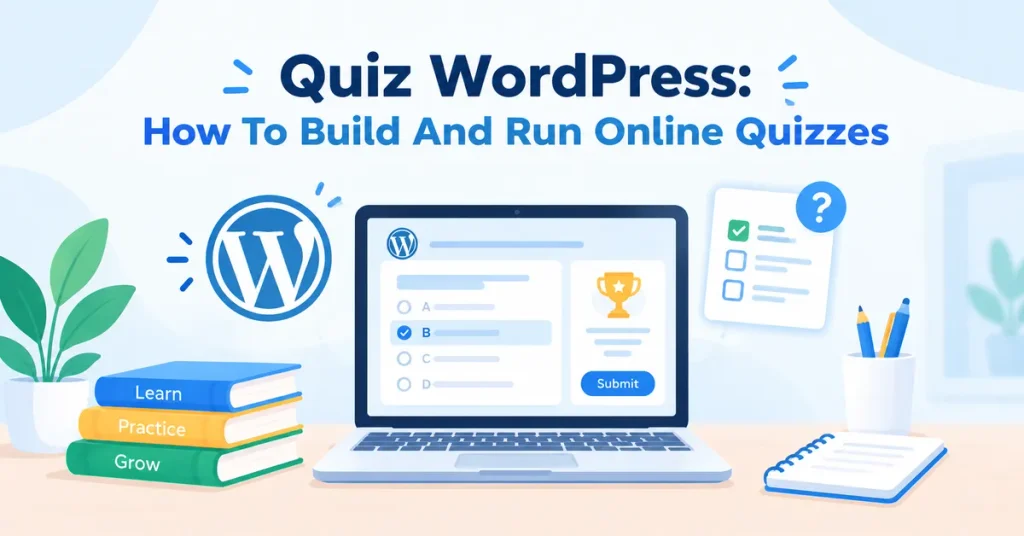
A quiz WordPress setup is a WordPress site with a plugin that adds quiz tools to the block editor or a dedicated builder. You write the questions, set the rules, and publish the quiz on any page or inside a course. The plugin stores each attempt and shows the score to the learner.
Core parts of a quiz system
Every quiz system has the same basic parts: a question editor, an answer checker, a results screen, and a place to store attempts. Some plugins add timers, question banks, and certificates. Others focus on lead generation or fun personality tests. Knowing which type you need saves you from paying for features you will never use.
Who uses quizzes on WordPress
Teachers use quizzes to check understanding after each lesson. Training managers use them to confirm that staff read a policy. Marketers use them to collect email addresses with a short “which product fits you” test. Each group has different needs, so the best choice depends on your goal, not on a single “top” plugin.
Features to look for before you choose
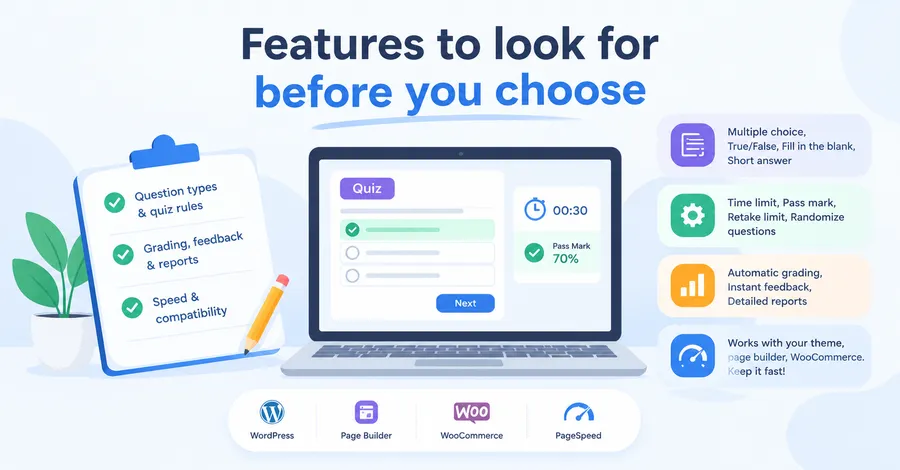
Before you install anything, write down what your quiz must do. A short checklist keeps you from picking a tool that looks good in a demo but fails in daily use.
Question types and quiz rules
Look for multiple choice, true or false, fill in the blank, and short answer questions. For serious testing, you also want a time limit, a pass mark, a retake limit, and the option to randomize questions. These settings matter more than the visual design.
Grading, feedback and reports
Automatic grading saves hours when you have many learners. Instant feedback, such as a short explanation after a wrong answer, helps people learn. Reports should show scores per learner and per question, so you can see which topics confuse most people.
Speed and compatibility
Quiz plugins load scripts and database queries, so poor ones can slow your pages. Check that the plugin works with your theme, your page builder, and WooCommerce if you plan to sell access. A plugin that was updated recently and tested with the latest WordPress version is a safer choice. Always run a speed test with Google PageSpeed Insights after you publish your first quiz, and watch Largest Contentful Paint (LCP) and Cumulative Layout Shift (CLS).
Comparing the main plugin options
The market has dozens of choices, but most fall into three groups: learning management system (LMS) plugins with built-in quizzes, stand-alone quiz builders, and form plugins with quiz add-ons. Choose the group first, then compare plugins inside it.
Quick comparison table
The table below compares widely used options by purpose and pricing model. It does not list exact prices, because vendors change them often. Always check the official pricing page before you buy.
| Plugin | Best for | Quiz depth | Pricing model | Main limit |
|---|---|---|---|---|
| LearnPress | Courses with lessons and quizzes | Good for learning; more features through add-ons | Free core plugin; paid add-ons or bundles | Some advanced features need add-ons |
| LearnDash | Large, professional course sites | Strong, with advanced question settings | Paid yearly license | Higher cost, no free core |
| Tutor LMS | Course sites with a visual builder | Good, with a free and a pro tier | Free core; paid pro version | Best features sit in the pro tier |
| Quiz and Survey Master | Stand-alone quizzes and surveys | Good for simple to medium quizzes | Free core; paid add-ons | Not built for full courses |
| WPForms with quiz add-on | Lead generation and short tests | Basic scoring | Paid yearly plans | Not made for long assessments |
This table is a starting point. If you need quizzes inside a full course, an LMS plugin is usually the better path. If you only need a single fun quiz on a blog post, a stand-alone builder is enough.
How to read the table
Start with the “Best for” column and ignore the rest until it matches your goal. Then look at the pricing model, because a free core can still cost money once you add the features you need. Finally, check the main limit and ask if you can live with it.
WordPress quiz plugin pricing explained
WordPress quiz plugin pricing usually follows one of three models: free with paid add-ons, a yearly license, or a one-time purchase with limited updates. The model matters more than the headline number, because it decides what you pay in year two and year three.
Free core with paid add-ons
Plugins like LearnPress give you the core quiz tools at no cost. You then add features such as certificates, content drip, or extra payment gateways as separate add-ons. LearnPress add-ons are sold as lifetime licenses for one site, with twelve months of updates included. This model works well when you need only a few extras.
Yearly licenses
Premium LMS plugins often charge per year per site. You get updates and support while you pay, and you lose them if you stop. This model is easier to budget, but it costs more over three years than a free core with a small set of add-ons.
What to check before you pay
Ask four questions before you buy. Does the price cover one site or many? Does it include support and updates, and for how long? Are the quiz features you need included, or are they sold separately? What happens to your content if you do not renew? WordPress quiz plugin pricing pages are often clear on the first question and vague on the last, so read the refund and renewal terms.
A note on LearnPress cost
LearnPress is free to install, and its add-ons start at around $19 each according to a 2026 review on Learning Revolution. Prices and bundles change, so confirm the current figures on the official LearnPress site. If you want a full course website with a ready design, the Eduma theme from ThimPress is sold on ThemeForest with a set of premium LearnPress add-ons included in the bundle. Check the latest listing for what is included before you decide.
Online quiz creation with LearnPress, step by step
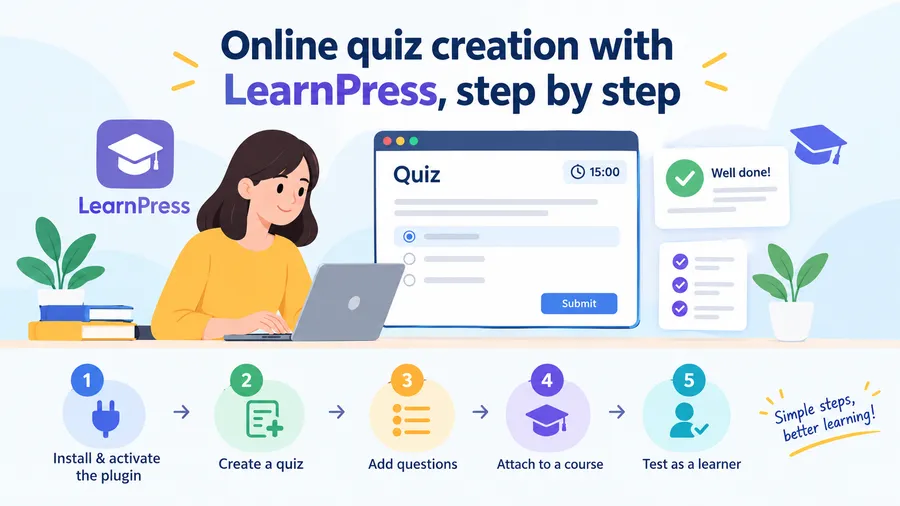
Online quiz creation in LearnPress follows the same path as building a course: install the plugin, create a quiz, add questions, and attach the quiz to a lesson or course. The steps below use the free version and the WordPress dashboard. Menu names may change in newer releases, so treat this as a guide, not a script.
Step 1: install and activate the plugin
Go to Plugins, then Add New, and search for LearnPress. Install and activate it. The setup wizard asks for basic details such as currency and the page for your course list. Complete it, then take a moment to look at the new LearnPress menu in the sidebar.
Step 2: create a quiz
Open LearnPress, then Quizzes, and select Add New. Give the quiz a clear title, such as “Module 1 review”. Set the duration, the pass mark, and how many times a learner may retake it. A short time limit suits memory checks, while a longer limit suits case studies.
Step 3: add and organize questions
Add questions inside the quiz editor. Choose the type that fits each question, write the correct answer, and add a short explanation for feedback. Use the question bank if you plan to reuse questions in several quizzes. Keep the wording simple, and avoid trick answers that test reading skill instead of knowledge.
Step 4: attach the quiz to a course
Open your course, go to the curriculum tab, and add the quiz after the related lesson. This order helps learners test what they just studied. You can also place a final quiz at the end of the course to confirm they met the goal.
Step 5: test as a learner
Log out or use a private browser window and take the quiz yourself. Check the timer, the results screen, and the mobile layout. Fix any unclear question before you share the link. This test takes ten minutes and prevents most support emails.
Where LearnPress fits and where it does not
LearnPress is a good fit if you want quizzes tied to lessons, a free starting point, and room to grow through add-ons. It is not the best fit if you only want a quick personality quiz for a blog post, since a simple stand-alone builder is faster for that. If you are building a full learning site with a polished layout, pairing LearnPress with the Eduma theme is a practical option, because the theme is made to work with LearnPress features.
Quiz website maker or plugin: which is better?
A quiz website maker is a hosted tool that builds and runs quizzes on its own platform, while a plugin adds quiz features to a site you already own. The choice comes down to control, cost, and how much you want your quizzes to sit inside your own brand.
When a hosted quiz website maker makes sense
A hosted quiz website maker is quick to start and needs no server care. It suits one-time quizzes, event games, and short campaigns. The trade-offs are monthly fees, limited design control, and your data living on someone else’s system.
When a WordPress plugin is the better choice
A plugin gives you full control of data, design, and URLs. Quizzes live on your domain, so every visit supports your own SEO. You can also connect quizzes to memberships, courses, and email tools. The trade-off is that you handle updates, backups, and hosting yourself.
A simple rule of thumb
Pick a hosted tool for a short campaign. Pick a plugin if you plan to run quizzes for months or years, or if quiz results are part of a course or paid program.
Tips for better quizzes and better SEO
A good quiz keeps people engaged, and an engaged visitor is good for your site. These tips help both the learner and your search visibility.
Write for the learner first
Keep each quiz short, usually five to fifteen questions. State the goal at the top, such as “Test your knowledge of basic SEO“. Use plain words, and give feedback after each answer. Learners who understand why an answer is right tend to come back.
Make quiz pages easy for search engines to read
Put the quiz inside a page with a clear H1, a short intro, and text around it. Search engines cannot read answers locked inside scripts, so add a summary of what the quiz covers. Use descriptive image file names and alt text, and write a unique meta title and description for each quiz page. Add a short FAQ below the quiz and mark it up with FAQ schema through Rank Math or Yoast.
Keep performance in check
Load quiz scripts only on pages that need them. Use a caching plugin, compress images, and avoid stacking several quiz plugins on one site. After every major plugin update, open one quiz and run a full attempt to confirm nothing broke.
Protect learner data
Quizzes often collect names, emails, and scores. Add a privacy notice, only ask for the data you need, and follow the rules that apply in your region, such as GDPR. Trust is part of E-E-A-T, and it starts with how you treat user data.
FAQs
Can I make a quiz in WordPress without coding?
Yes. Most quiz plugins use a visual editor where you type questions and pick answer types, so no code is needed. You only need code if you want custom styling or unusual scoring rules. A child theme is the safe place for any small CSS changes.
Are free quiz plugins good enough for a small site?
Free plugins are good enough for many small sites, especially for basic scoring and simple results pages. They can fall short on advanced reports, question banks, or certificates. Test the free version first, then upgrade only when you hit a clear limit.
How do I stop learners from cheating on an online quiz?
You cannot stop it completely, but you can reduce it. Randomize question order, draw from a larger question bank, set a time limit, and limit retakes. For high-stakes exams, combine these settings with a proctored or in-person step.
Can I sell access to a quiz on WordPress?
Yes. Connect your quiz or course to a payment method such as WooCommerce, PayPal, or Stripe. LMS plugins like LearnPress let you sell a course that contains quizzes, and you control who can view and attempt them after payment.
Conclusion
Building a quiz WordPress site is simple when you start with your goal. Pick an LMS plugin if your quizzes belong inside courses, a stand-alone builder for short blog quizzes, and a hosted quiz website maker only for quick campaigns. Compare WordPress quiz plugin pricing by looking at year-two costs, not just the first purchase.
If you want to grow from a single quiz into a full learning site, LearnPress is a practical place to start, since the core plugin is free and you can add features as you need them. For a ready-made design, the Eduma theme pairs well with it. Test your first quiz as a learner, check your page speed, and improve each question based on real results.
Read more: 10 Best Online Education Platforms