If you run a school, you already know how much time goes into chasing late fees, matching bank deposits, and answering “did my payment go through?” emails. These tuition management systems reviews explain what the main types of software do, where each one fits, and which questions to ask before you sign a contract. The goal is simple: help you pick a tool that collects tuition on time and does not add more work for your office.
LearnPress – WordPress LMS Plugin
We provide an amazing WordPress LMS plugin to create & sell online courses. Let’s find out!
Try NowTable of Contents
What a tuition management system does
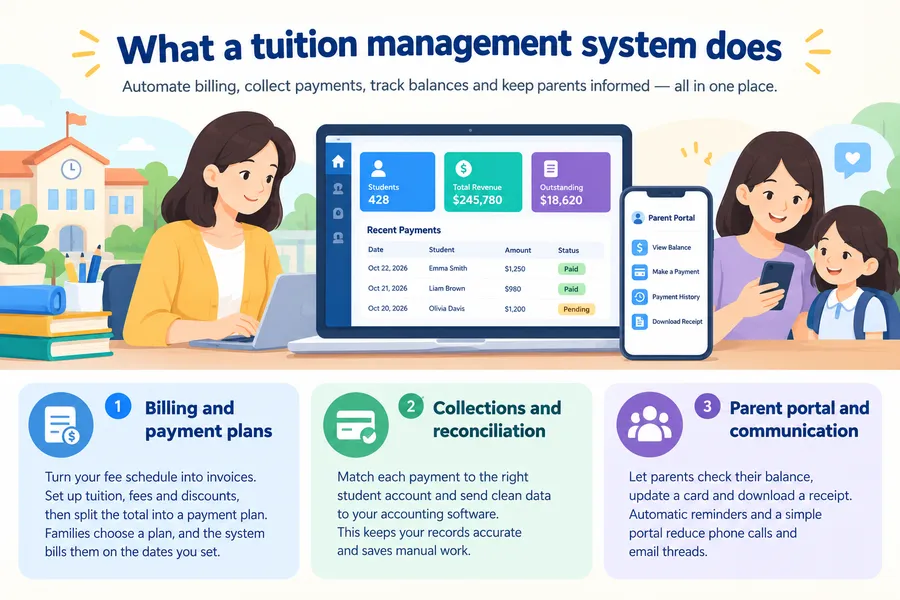
A tuition management system is software that creates tuition invoices, collects payments, tracks balances, and reports on revenue for a school. Most schools use it to replace spreadsheets, paper checks, and manual reminders. The best tools connect billing, parent communication, and accounting in one place.
Before comparing products, it helps to understand the basic jobs the software must handle. Those jobs are the same whether you run a small preschool or a large private K-12 school.
Billing and payment plans
The core job is to turn your fee schedule into invoices. You set up annual tuition, registration fees, activity fees, and discounts, then split the total into a payment plan. Families choose a plan, and the system bills them on the dates you set.
Collections and reconciliation
Collecting money is only half of the work. The system also needs to match each payment to the right student account and send clean data to your accounting software. Without this step, your business office ends up doing manual data entry again.
Parent portal and communication
Parents want to see their balance, update a card, and download a receipt without calling the office. A good parent portal and automatic reminders reduce phone calls and email threads. In many schools, this is the feature that staff notice first after launch.
Key features to look for
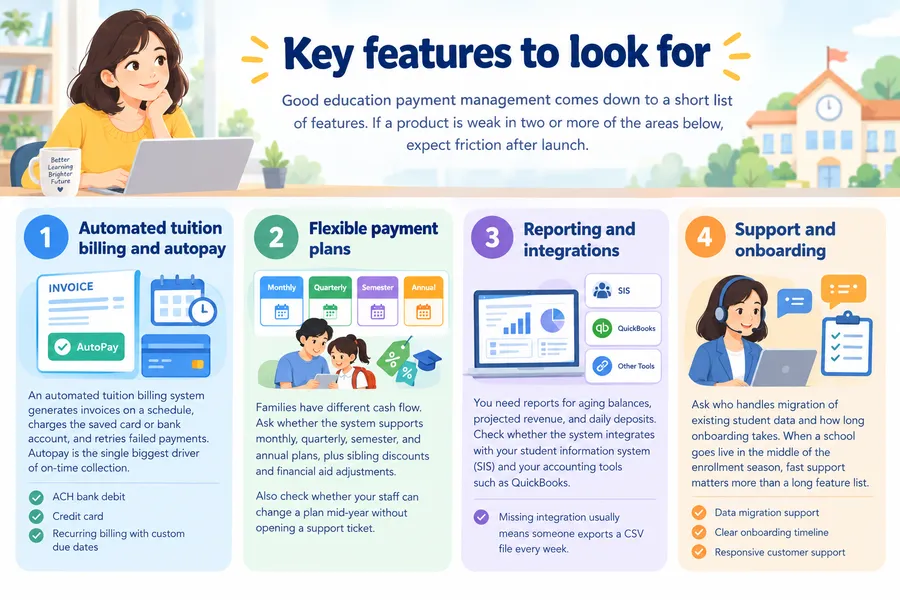
Good education payment management comes down to a short list of features. If a product is weak in two or more of the areas below, expect friction after launch.
Automated tuition billing and autopay
An automated tuition billing system generates invoices on a schedule, charges the saved card or bank account, and retries failed payments. Autopay is the single biggest driver of on-time collection. Look for options such as ACH bank debit, credit card, and recurring billing with custom due dates.
Flexible payment plans
Families have different cash flow. Ask whether the system supports monthly, quarterly, semester, and annual plans, plus sibling discounts and financial aid adjustments. Also check whether your staff can change a plan mid-year without opening a support ticket.
Reporting and integrations
You need reports for aging balances, projected revenue, and daily deposits. Check whether the system integrates with your student information system (SIS) and your accounting tools such as QuickBooks. A missing integration usually means someone exports a CSV file every week.
Support and onboarding
Ask who handles migration of existing student data and how long onboarding takes. When a school goes live in the middle of the enrollment season, fast support matters more than a long feature list.
Tuition management systems reviews: the main types compared
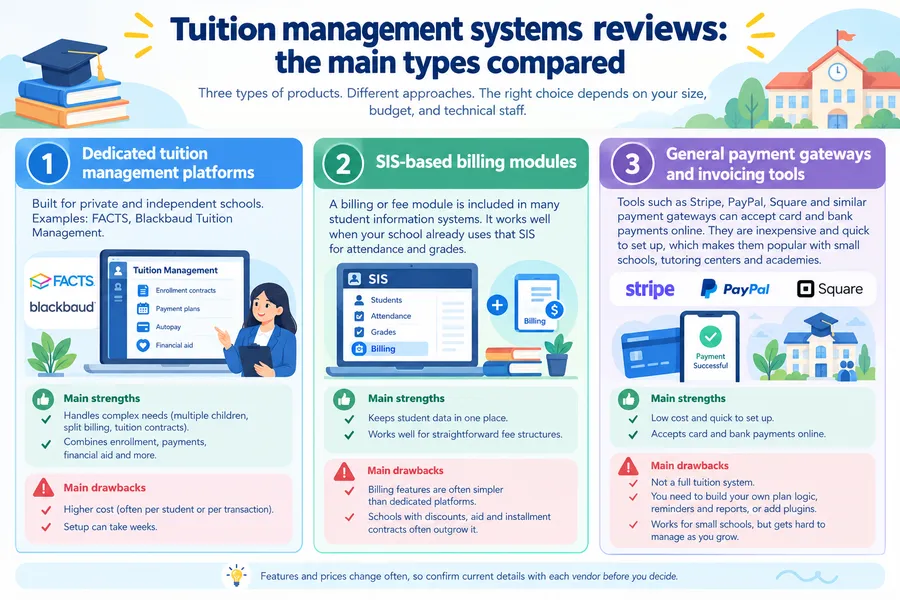
Most schools choose from three kinds of products. Each one solves school payment solutions in a different way, and the right choice depends on your size, budget, and technical staff.
The review notes below are based on how these categories are described in vendor documentation and what business offices commonly report. Features and prices change often, so confirm current details with each vendor before you decide.
Dedicated tuition management platforms
These are built for private and independent schools. Products such as FACTS and Blackbaud Tuition Management fall into this group. They usually combine enrollment contracts, payment plans, autopay, and financial aid workflows.
The main strength is depth. They handle complex needs like multiple children per family, split billing for divorced parents, and tuition contracts. The main drawback is cost and setup time, since pricing is often based on student count or a per-transaction fee, and implementation can take weeks.
SIS-based billing modules
Many student information systems include a billing or fee module. This option works well when your school already uses that SIS for attendance and grades, because the data is already in one place.
The trade-off is that billing features are often simpler than those in a dedicated platform. Schools with straightforward fee structures are happy with this setup. Schools with discounts, aid, and installment contracts often outgrow it.
General payment gateways and invoicing tools
Tools such as Stripe, PayPal, Square, and similar payment gateways can accept card and bank payments online. They are inexpensive and quick to set up, which makes them popular with small schools, tutoring centers, and academies.
The weakness is that a gateway is not a full tuition system. You usually need to build your own plan logic, reminders, and reports, or add plugins. That is fine for a small school with a few dozen students, but it becomes hard to manage as you grow.
Comparison table
The table below summarizes how the three types compare for schools evaluating software for online payments in schools. Use it as a starting point, then ask vendors for a demo.
| Criteria | Dedicated tuition platform | SIS billing module | Payment gateway or plugin |
|---|---|---|---|
| Best for | Private and independent schools | Schools already using one SIS | Small schools, academies, tutoring centers |
| Automated billing | Advanced, contract based | Basic to moderate | Manual or plugin based |
| Autopay (ACH and card) | Yes, with retry rules | Usually yes | Yes, with setup |
| Payment plans | Monthly, quarterly, custom | Limited options | Depends on plugin |
| Financial aid support | Built in | Limited | Not included |
| Parent portal | Full portal | Included in SIS portal | Limited or none |
| Accounting integration | Strong | Moderate | Basic exports |
| Setup time | Weeks | Days to weeks | Hours to days |
| Typical cost model | Per student or per transaction fee | Add-on to SIS license | Per transaction fee |
| Main drawback | Higher cost, longer setup | Less flexible | More manual work |
Software for monthly tuition payments
Many families prefer to pay monthly, so software for monthly tuition payments is one of the most searched topics for school offices. Monthly plans also protect your cash flow, because you receive steady income instead of waiting for a single annual payment.
How monthly plans work
The system divides the total tuition into equal installments, for example ten payments from August to May. On each due date, it charges the saved payment method and sends a receipt. If a payment fails, it should retry automatically and notify the parent.
What to check before you commit
Ask these questions during a demo:
- Can parents pick their own due date, such as the 1st or the 15th?
- Does the system charge a fee for failed payments, and who pays it?
- Can you add a one-time fee, such as a field trip, to a monthly plan?
- What happens when a student withdraws mid-year?
Schools that skip these questions often discover the gaps in the first billing cycle.
Online payments, security, and compliance
Parents will only use online payments if they trust them. Your school is also responsible for protecting family data, so security should be part of every review.
Payment security basics
Look for PCI DSS compliance, which is the standard for handling card data. The vendor should use tokenization, so your staff never sees full card numbers. Ask whether the system supports two-factor authentication for staff accounts.
Student data privacy
If your school is in the United States, student records may fall under FERPA. Schools in other regions have their own rules, such as GDPR in Europe. Ask each vendor where data is stored, who can access it, and how long it is kept. You can read the official overview of FERPA on the U.S. Department of Education website.
Fees and transparency
Some vendors charge families a convenience fee, while others bill the school. Neither model is wrong, but you should decide which one fits your community. Be clear with parents about fees before launch, so there are no surprises on the first statement.
Setting up online courses and payments with WordPress
Not every school needs a full tuition platform. If you run a language school, a training academy, or a school that sells online courses next to its regular classes, a WordPress setup can handle both learning and payments in one site. This is a different use case from managing annual K-12 tuition contracts, so be realistic about what it covers.
Where LearnPress fits
LearnPress is a free WordPress LMS plugin that lets you build courses, lessons, and quizzes. It also has add-ons that connect to payment options, so students can pay for a course online and get access right away. For a small academy, that can replace a manual process of invoices and bank transfers. Keep in mind that LearnPress is a learning management tool, not a full tuition billing system. It does not offer multi-child family accounts, financial aid workflows, or school accounting features. If you need those, use a dedicated platform and keep LearnPress for the course side. You can explore the plugin and its add-ons on the LearnPress website.
Where Eduma fits
Eduma is a WordPress education theme from ThimPress that works with LearnPress. It gives your school website a ready-made layout for course pages, teacher profiles, and events. For schools that want a branded site where parents can browse programs and enroll in paid courses, it saves design time. Because Eduma is a theme, it controls how your site looks, while the payment logic comes from LearnPress and the gateways you connect. If your needs are limited to selling courses, this combination is worth a look. If you need full tuition billing, treat it as the website layer and pair it with a dedicated system.
A quick setup outline
- Install WordPress and activate your theme. Use a child theme if you plan to edit template files.
- Install LearnPress and create your first course.
- Add the payment add-on or gateway you want to use and run a test transaction.
- Set up automatic emails for receipts and course access.
- Test the full path on mobile, since most parents will pay from a phone.
This outline is based on current WordPress 6.x and LearnPress releases. Menu names can change in newer versions, so check the official documentation before you start.
How to choose and roll out a system
Picking software is easier when you follow a clear process. Rushing the decision during enrollment season is the most common mistake.
Step 1: List your must-have features
Write down your fee structure, payment plans, and reports. Mark each item as required or nice to have. This list becomes your scorecard for every demo.
Step 2: Ask for demos and references
Request a demo using your own fee schedule, not a generic sample. Ask for two or three references from schools of a similar size. A short call with another business manager often reveals more than a sales presentation.
Step 3: Compare the full cost
Look at setup fees, per-student fees, per-transaction fees, and charges for extra modules. Add them up for your expected enrollment. A low monthly price can end up costing more than a premium plan once transaction fees are included.
Step 4: Plan the launch
Set a go-live date at least one billing cycle before the busiest period. Send parents a short guide with screenshots on how to create an account and set up autopay. Keep a support contact on hand for the first month.
Step 5: Review results after 90 days
Check your on-time payment rate, the number of support calls, and the time your staff spends on reconciliation. If those numbers have not improved, talk to the vendor or reconsider your setup.
FAQs
What is the best tuition management system for small schools?
The best choice depends on your fee structure and size. Small schools with simple tuition often do well with a gateway such as Stripe or with the billing module in their SIS. Schools with payment plans, siblings, and aid usually need a dedicated platform.
How much does tuition management software cost?
Pricing varies by vendor and model. Many dedicated platforms charge a per-student fee, a per-transaction fee, or both, while gateways charge a percentage per payment. Ask for a written quote based on your expected enrollment so you can compare vendors fairly.
Can parents pay tuition by bank transfer instead of card?
Yes, most systems support ACH or direct debit in addition to cards. Bank payments usually cost the school less per transaction than card payments, and they fail less often than expired cards. Offering both options gives families more choice.
How long does it take to switch to a new tuition system?
Implementation usually takes from a few days for a simple gateway to several weeks for a full platform. The timeline depends on how clean your student data is and how many integrations you need. Plan the switch outside your peak billing period.
Conclusion
Good tuition management systems reviews should help you match a tool to your school, not push you toward the biggest brand. Dedicated platforms suit schools with complex plans and aid, SIS modules suit schools that want one system, and gateways suit small schools with simple needs. Start with your must-have list, test an automated tuition billing system with your own fee schedule, and check security and fees before you sign. If you also sell online courses, a WordPress setup with LearnPress and the Eduma theme can handle the course side while your billing system handles tuition.
Read more: 9 Best Sales Enablement Tools and Platforms