Online education is evolving rapidly across the globe. Delivering a high-quality curriculum is essential, but formally recognizing student achievements is equally important in today’s competitive e-learning market. Whether you are still brainstorming fresh online course ideas or expanding an established academy, learners expect a professional, verifiable reward for their hard work.
This is where the new LearnPress certificate builder becomes your most valuable digital asset. A digital credential is much more than a simple piece of paper to be downloaded; it is a powerful, organic marketing tool that can scale your business. If you want to understand the foundational system before upgrading, exploring what is learnpress will give you a clear picture of how it powers web academies.
Historically, many educators struggled to produce beautiful credentials because they lacked technical graphic design skills. Thankfully, our latest major software update solves this exact problem permanently for all course creators.
The fully integrated LearnPress certificate builder empowers anyone to craft stunning, verifiable documents directly inside their WordPress dashboard. You no longer need to purchase expensive, complex external design software or hire freelance designers. In this comprehensive guide, we will show you exactly how to utilize these powerful new features to upgrade your visual aesthetics.
LearnPress – WordPress LMS Plugin
We provide an amazing WordPress LMS plugin to create & sell online courses. Let’s find out!
Try NowTable of Contents
The Ultimate WordPress Certificate Plugin
Managing a successful e-learning website requires highly reliable, streamlined software. Using a fragmented technology stack often leads to technical conflicts, frustratingly slow loading times, and a poor overall user experience. When weighing your options between learnpress free vs pro, this premium add-on provides the massive, enterprise-grade value you need to scale.
As an educator, you need a robust WordPress certificate plugin that integrates seamlessly with your core Learning Management System. The newest update to our educational ecosystem provides exactly that level of stability, proving why many developers prefer this ecosystem over a learnpress vs tutor lms setup.
Previously, site administrators had to navigate away from the main course editing screen to adjust document settings. This disconnected workflow was inefficient and incredibly time-consuming for busy instructors trying to launch programs quickly.
Now, this top-tier WordPress certificate plugin brings the entire creation process directly into the native course setup interface. You save valuable time, eliminate confusion, and significantly reduce daily administrative friction.
Furthermore, our highly optimized WordPress certificate plugin completely replaces outdated HTML5 canvas rendering with true image generation technology. This crucial structural update ensures maximum visual compatibility across all modern web browsers and mobile devices. A fast, exceptionally reliable software foundation protects your brand reputation and results in much higher student satisfaction rates.
Navigating the LearnPress Certificate Builder
The absolute heart of this major system update is the completely redesigned, modernized user interface. The new LearnPress certificate builder is specifically engineered for maximum user-friendliness and rapid workflow efficiency.
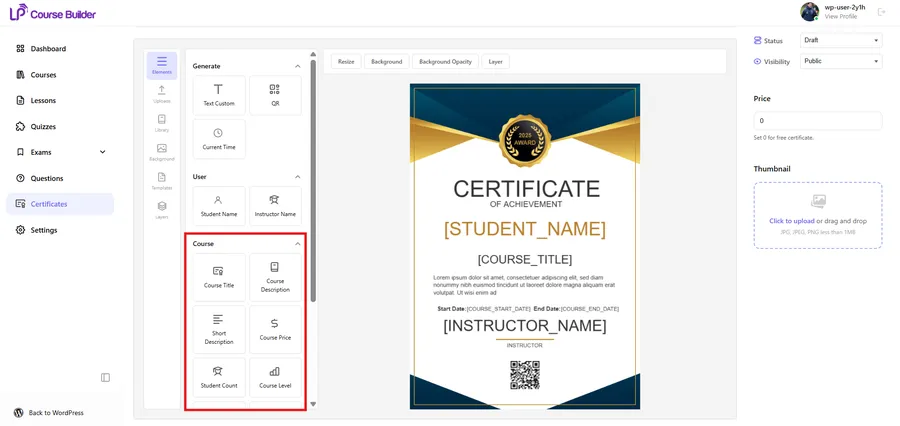
When you open the LearnPress certificate builder, you are immediately greeted with a clean, highly intuitive workspace. All your necessary design tools and formatting options are neatly organized in the left-hand configuration column.
Because it functions as a visual drag and drop certificate builder, you can easily preview your formatting changes in real-time. Compared to other standalone drag and drop course builders, this native system eliminates all traditional guesswork, allowing you to see exactly what your students will receive upon graduation.
We deeply understand that your time is incredibly valuable. Therefore, the LearnPress certificate builder allows you to manage templates, adjust layers, and fine-tune aesthetics without ever leaving the primary course editing screen. This unified, centralized approach keeps your administrative workflow uninterrupted, highly focused, and maximally productive at all times.
The Art of Custom Certificate Design
A generic, plain-text document simply does not inspire pride or a deep sense of accomplishment. To truly stand out in a crowded digital market, you must invest deliberate effort into premium custom certificate design.
Your digital credential should accurately reflect your academy’s unique corporate identity and ethos. Effective custom certificate design strategically incorporates your specific brand color palette, your official high-resolution logo, and professional typography.
With our significantly upgraded visual tools, implementing premium custom certificate design is now incredibly simple for beginners. You can effortlessly upload customized background images and arrange text blocks with pixel-perfect precision.
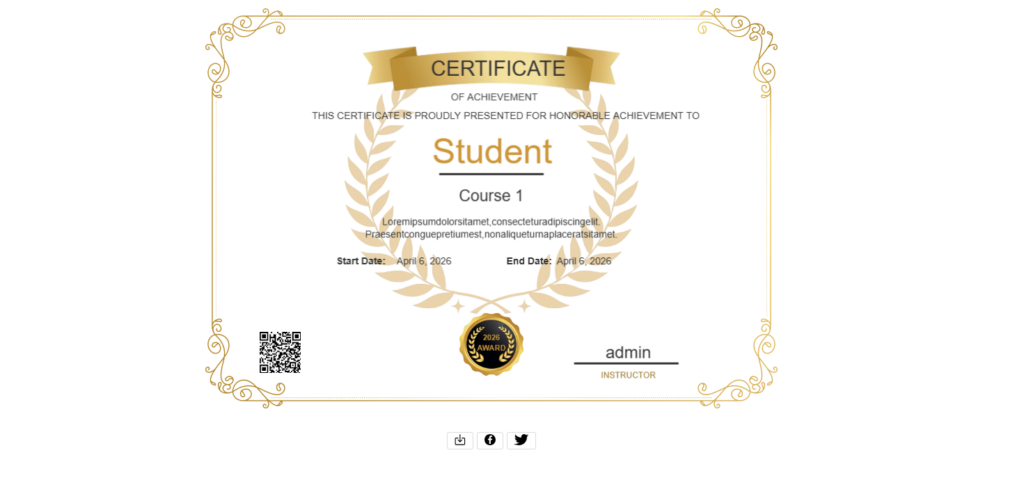
A strong, recognizable custom certificate design immediately adds perceived monetary value to your educational programs. Students are much more likely to proudly share a document that looks prestigious, official, and exclusive to their peers. Do not underestimate the immense marketing power of visual aesthetics, as superior design acts as free, organic advertising when shared on professional networks like LinkedIn.
To make this sharing process even smoother, our update introduces Privacy-Controlled Student Sharing. Once you complete your custom certificate design, students receive a dedicated, shareable link right on their profile. They can easily toggle this link between “Public” and “Private,” giving them complete control over their digital footprint while comfortably promoting your brand to the world.
Unleashing New Custom Certificate Fields
Static, manually typed documents are a relic of the past. Modern digital credentials require dynamic, automated data injection, which is exactly why we introduced powerful new custom certificate fields.
These innovative custom certificate fields automatically pull specific, relevant data directly from your course database. You no longer have to manually type out individual student details for every single course cohort you launch.
Our standard library of custom certificate fields has been massively expanded in this v4.2.3 update. You can now effortlessly drag and drop functional elements like the Course Price or Student Count directly onto the design canvas.
Including highly detailed custom certificate fields—such as the specific Course Level and exact Lesson Count—adds incredible depth to the credential. It visually proves the academic rigor of your specific training program to future employers.
You can even insert specific format tags directly into standard text blocks. The system will flawlessly replace these placeholders with the relevant custom certificate fields upon final document generation, ensuring every single document is highly personalized and technically accurate.
5 Steps to Create Online Course Certificates
Are you ready to significantly upgrade your educational product offerings? It is time to step up and create online course certificates that truly impress your target audience and industry peers.
Before diving into the builder, remember to activate the new “Earn a Certificate” Course Indicator. You now have the option to display a visual “Certificate” badge directly on your external course list (similar to major platforms like Coursera). This immediately signals to potential students that your curriculum offers a verified reward, heavily boosting your enrollment rates before they even see the final design.
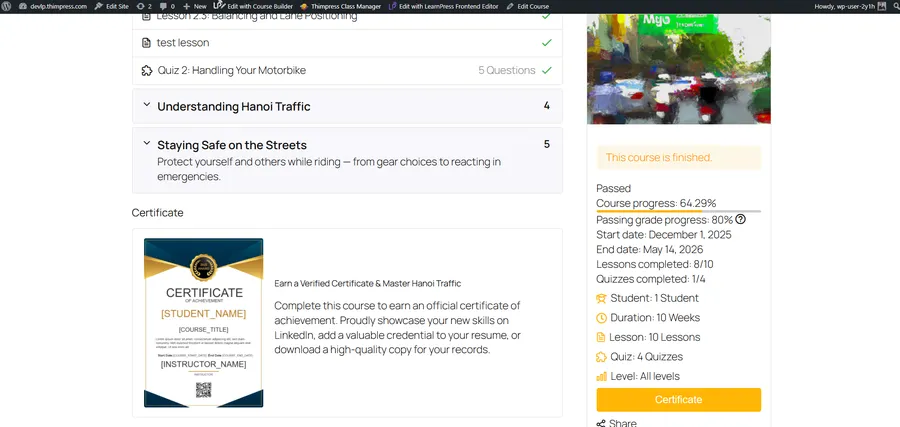
Now, follow this simple, proven workflow to efficiently create online course certificates:
- Update Your Software: First, update your core software plugins to the latest stable version. You must ensure you properly install learnpress and activate the newest add-on versions to prevent technical errors.
- Access the Native Interface: Second, navigate directly to the native builder located within your standard course setup menu. This unified interface is the exact place where you will create online course certificates seamlessly.
- Establish the Visual Foundation: Third, upload a high-resolution, professionally designed background image. A solid visual foundation is absolutely crucial when you create online course certificates for serious adult learners.
- Inject Dynamic Data: Fourth, strategically drag and drop the necessary dynamic data elements. Use these new technical tools to enrich the document with specific course details and personalized student information.
- Assign and Automate: Fifth, save your completed template and explicitly assign it to your desired curriculum. You can now automatically create online course certificates whenever a student successfully passes their final assessment.
Best Practices for the LearnPress Certificate Builder
To get the absolute highest return on your technological investment, you must follow established industry best practices. The LearnPress certificate builder is incredibly powerful, but it requires strategic execution to yield the absolute best results.
Always ensure your chosen typography is highly legible. While the LearnPress certificate builder offers many distinct font options, clean serif or sans-serif fonts generally perform best for official, professional documents.
Keep your overall visual layout clean and intentionally uncluttered. The LearnPress certificate builder provides an expansive visual canvas, but strategic whitespace is crucial for maintaining an elegant, high-end aesthetic.
Rigorously test your final visual output on multiple mobile devices. The LearnPress certificate builder generates fully responsive static images, but you must ensure the text remains large enough to read easily on small smartphone screens. If you are struggling with site performance during this testing process, you may need to speed up WordPress to ensure the builder loads instantly for your students.
Finalizing your settings is a breeze, but always utilize the live preview function before officially publishing. The LearnPress certificate builder allows you to meticulously check for minor alignment errors before finalizing the official credential.
Maximizing the LearnPress Certificate Builder Output
Once your visual designs are finalized and approved, the true technical power of the platform activates. The LearnPress certificate builder utilizes advanced true image rendering technology behind the scenes to process the final output.
This means the LearnPress certificate builder generates crisp, high-definition static images instantly. There are absolutely no frustrating loading delays, broken CSS, or visual rendering glitches for the end-user. A seamless technical delivery is just as important as the visual design itself.
The LearnPress certificate builder fundamentally guarantees a flawless user experience across all modern operating systems, devices, and screen sizes. We strongly encourage you to continuously experiment with different visual layouts to see which specific designs your students choose to share the most.
Finally, you never have to worry about frustrating layout conflicts. This major update includes Universal Theme Compatibility. The core CSS styles have been heavily optimized to display beautifully and accurately across almost any modern SEO WordPress theme.
By fully utilizing the LearnPress certificate builder, you effortlessly elevate your entire online school, transforming your platform from a basic website into a highly authoritative, globally recognized educational institution.
FAQs About LearnPress Certificate Builder
1. Do I need coding or graphic design skills to use the LearnPress certificate builder?
Not at all! The newest update features a fully visual, drag-and-drop interface integrated directly into your native course dashboard. You can effortlessly upload background images, arrange text blocks, and place dynamic elements without touching a single line of code.
2. Can I automatically add specific student details to the final document?
Yes. With our expanded custom certificate fields, you can dynamically inject personalized data such as the Student Name, Course Title, Course Price, and Lesson Count directly into your custom certificate design. The system handles the automatic rendering the moment a student completes the curriculum.
3. How do students share their verified credentials on professional networks?
Once a student successfully finishes your course, the system generates a crisp, high-definition static image of their reward. They are also provided with a unique, privacy-controlled shareable link that they can easily post to LinkedIn, Facebook, or Twitter to proudly showcase their achievement.
4. Will this updated WordPress certificate plugin work with my current website theme?
Absolutely. The LearnPress v4.2.3 update includes universal theme compatibility. The core CSS styles have been heavily optimized from the ground up, ensuring your "Earn a Certificate" indicators and digital credentials display flawlessly across almost any modern WordPress theme.
Contact US | LearnPress:
Website: https://learnpresslms.com/
Fanpage: https://www.facebook.com/learnpresslms
Email: [email protected]
Read more: LearnPress Certificate Sharing: 5 Ways to Boost Sales