Every online instructor faces the same major challenge: standing out in a highly competitive and crowded e-learning market. Creating a meticulously planned curriculum is only the first step of the journey. The real hurdle is convincing potential students to choose your platform over thousands of other online course platforms available today.
One of the most effective and proven ways to achieve this is by offering tangible, verified rewards for their hard work. With the latest update to our system, LearnPress certificate sharing has become your ultimate marketing tool. This major release brings a massive workflow overhaul, deeper integration with the LearnPress ecosystem, and significant frontend performance upgrades.
More importantly, it transforms how your students interact with your brand. In this comprehensive guide, we will explore how you can leverage the new LearnPress certificate sharing features to turn your successful students into your best brand ambassadors. Whether your goal is to boost course enrollments or establish industry authority, these updates are designed for you.
LearnPress – WordPress LMS Plugin
We provide an amazing WordPress LMS plugin to create & sell online courses. Let’s find out!
Try NowTable of Contents
The Power of Shareable Course Certificates
Before diving into specific marketing strategies, we must understand the psychology behind adult learning. Modern students do not just want theoretical knowledge; they want career advancement and professional recognition. They invest significant time and money into online education to build their resumes, impress potential employers, and stand out in the job market.
When you offer shareable course certificates, you provide exactly what they need. A digital credential acts as undeniable proof of their competence and dedication. Historically, managing these digital credentials could be complex and frustrating for both the site administrator and the user.
However, the new LearnPress update changes the game entirely. By introducing privacy-controlled student sharing links, we have made it easier than ever for your learners to display their achievements to the world. If you want to successfully increase online course sales, providing high-quality, shareable course certificates is no longer optional; it is an absolute necessity.
Let us look at five actionable strategies to utilize LearnPress certificate sharing to grow your online academy.
1. Leverage Privacy-Controlled Links for Social Proof
The most significant and highly anticipated addition in this update is the new privacy configuration designed specifically for students.
When a learner finishes your training program, they now receive a dedicated, unique URL for their earned credential. They can easily navigate to their student profile and use a simple, intuitive toggle to switch their document link between “Public” and “Private.”
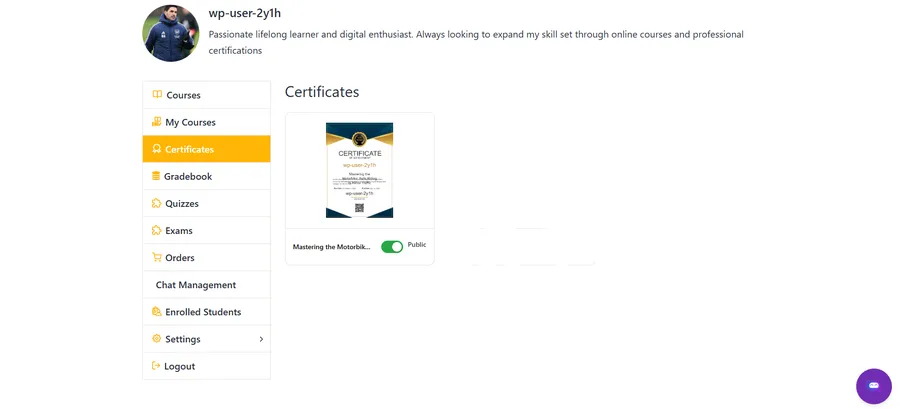
Why is this level of privacy important? It gives students complete control over their digital footprint. When they feel secure about their personal data, they are much more likely to share their achievements on professional networking sites like LinkedIn, Facebook, or Twitter.
Every time a student posts their public link, your website receives high-quality, targeted referral traffic. Their friends, family, and industry colleagues see the professional credential bearing your academy’s logo. This authentic social proof is highly effective and will naturally boost course enrollments without any additional advertising spend on your part. Finding organic ways to promote online courses and increase online course sales has never been this straightforward.
2. Display the “Earn a Certificate” Course Indicator
Marketing happens long before the student even clicks on your sales page. You need to grab their attention immediately when they are simply browsing.
If you want to quickly increase online course sales, you must highlight the return on investment right away. To facilitate this, we have introduced the “Earn a Certificate” course indicator.
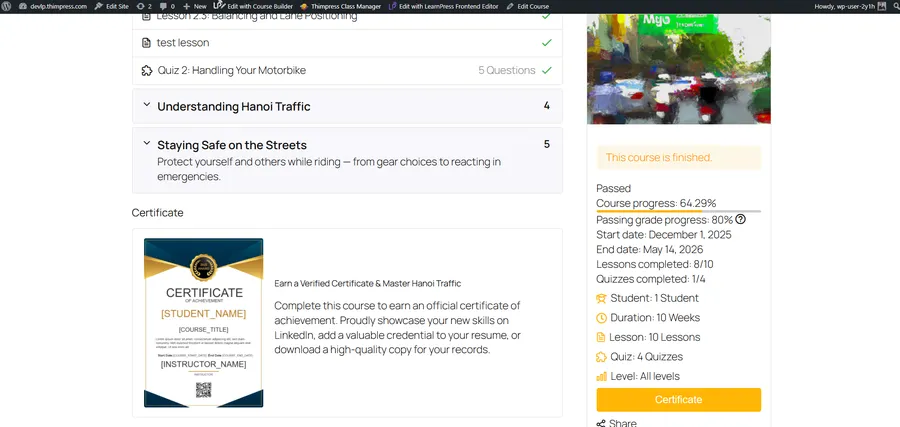
You now have the option to display a visual indicator directly on the external Course Item display. This works similarly to massive open online courses (MOOCs) like Coursera or Udemy. When potential students browse your course archive, they will immediately know that your curriculum offers a verified reward.
This simple visual cue dramatically reduces hesitation. A student comparing two similar educational programs will almost always choose the one that explicitly promises a digital credential upon completion. It is a subtle yet incredibly powerful tactic to boost course enrollments consistently over time.
3. Build Premium Credentials with Dynamic Elements
A digital document must look premium and professional if you expect students to share it proudly. A basic, plain-text layout will not inspire anyone to use the LearnPress certificate sharing feature, defeating the purpose of the marketing strategy.
To solve this design challenge, we have massively expanded the dynamic elements available in the system. You can now drag and drop course-specific details directly onto your design canvas. These beautifully designed WordPress LMS certificates instantly elevate the perceived value of your entire platform. If you haven’t set up your templates yet, you can easily learn how to create LearnPress certificates in just a few minutes.
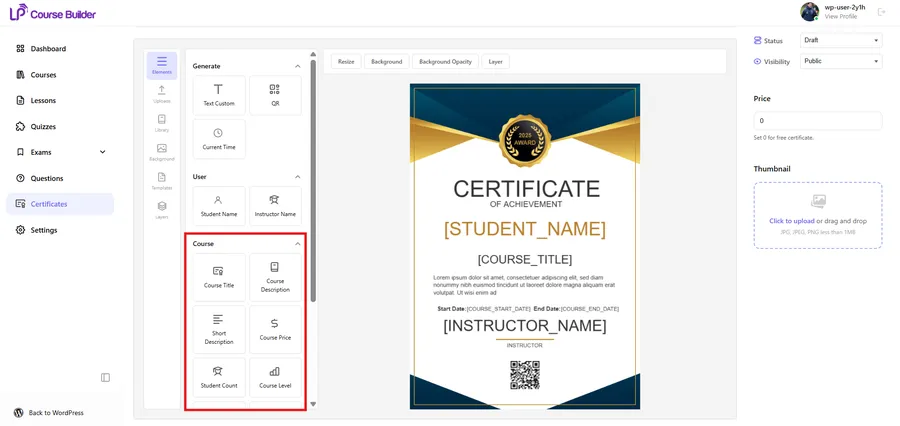
These new dynamic elements include:
- Course Description & Course Image
- Course Level & Lesson Count
- Total Enrolled Students
- Course Price
By including data like the “Course Level” or “Total Enrolled Students,” you add immense weight to the credential. It demonstrates that the student passed a rigorous, popular, and highly valued program.
Furthermore, you can now easily insert specific format tags into the middle of text blocks. The system will seamlessly replace these placeholders with the correct user data. The more professional the output looks, the more valuable your academy appears, allowing you to confidently increase online course sales. Creating high-end shareable course certificates is the key to premium branding.
4. Utilize the Native Course Builder Integration
Creating these beautiful credentials should not slow down your daily administrative workflow. Time is money for any course creator, and complex interfaces often lead to frustration.
To ensure maximum efficiency, we have completely overhauled the backend workflow to feature a Native Course Builder Integration. You can now build and manage WordPress LMS certificates directly inside the primary LearnPress Course Builder.
You no longer have to navigate away to a separate, clunky settings page. We have added a dedicated menu where you can view your complete list of credentials, add new designs, select pre-made templates, and use the visual builder.
You can do all of this without ever leaving the course setup screen. The entire UI has been redesigned to perfectly match the LearnPress core design system. This smooth, unified experience ensures you can launch new training programs—and their corresponding WordPress LMS certificates—much faster.
5. Improve User Experience with True Image Rendering
No matter how brilliant your marketing strategy is, technical flaws will ruin it. If a student tries to use the LearnPress certificate sharing link and the page takes ten seconds to load, they will close the tab in frustration. Site speed is a critical ranking factor for SEO, and it dictates the overall user experience. If you want to speed up WordPress, optimizing image and asset rendering is a crucial step.
Previously, displaying these documents relied on loading them via HTML5 Canvas. This technology could sometimes cause slight delays or rendering inconsistencies, especially on older mobile devices.
To fix this issue permanently, we have completely rebuilt the frontend rendering logic. We now use True Image Rendering. When a student finishes a course, the system automatically generates and saves the document as a high-quality, static image.
Whether the credential is viewed in a pop-up, on the course detail page, or via a profile link, it will load instantly. This drastic improvement in page speed ensures that when your students utilize LearnPress certificate sharing, their peers see the impressive result immediately. A fast, seamless experience is mandatory if you want to boost course enrollments through referral traffic.
Bonus: Universal Theme Compatibility
A common frustration among WordPress educators is plugin software conflicts. You might spend hours designing the perfect layout for your shareable course certificates, only to find that your specific WordPress theme breaks the CSS formatting.
We want to ensure that your WordPress LMS certificates always look completely perfect. Therefore, the core CSS styles for this massive update have been heavily optimized from the ground up.
Our development team has rigorously tested the output to ensure the credentials display beautifully and accurately across almost any modern SEO WordPress theme. Your brand image will remain consistent, authoritative, and professional, no matter what framework or page builder you use for your website.
UI & Library Updates for a Smoother Admin Experience
We did not just focus on the student-facing features; we also modernized the backend experience for site administrators, managers, and instructors.
Alongside the native builder integration, we have updated the color library and modernized the settings UI located inside the traditional Edit Course page.
Everything feels incredibly faster, cleaner, and much more intuitive. Managing WordPress LMS certificates is no longer a tedious, time-consuming chore. It is now a streamlined, enjoyable part of your course creation process. By saving valuable time on administrative tasks, you can focus on what truly matters: delivering engaging course content and discovering new ways to increase online course sales.
Final Thoughts on Growing Your E-Learning Business
The global e-learning industry is rapidly shifting. Modern students demand more value, more professional recognition, and better underlying technology. As an educator and business owner, you must adapt to these ever-changing expectations.
Relying solely on paid advertising campaigns is expensive and often yields diminishing returns over time. The most sustainable, long-term marketing strategy is to let the undeniable quality of your courses speak for itself.
By utilizing LearnPress certificate sharing, you empower your students to celebrate their hard work publicly. You provide them with shareable course certificates that look premium, load instantly, and respect their privacy preferences.
In return, they provide you with the most authentic form of marketing available. They showcase your brand to their vast professional networks, driving highly targeted, warm traffic right back to your sales pages.
Do not miss out on this incredible opportunity to boost course enrollments organically. Upgrade your system today, refine your designs, and let your students’ success become your greatest asset.
Contact US | LearnPress:
Website: https://learnpresslms.com/
Fanpage: https://www.facebook.com/learnpresslms
Email: [email protected]
Read more: LearnPress MCP integration: 7 Best Steps to Automate