Employee training is one of the highest-return investments an organization can make. When staff understand their roles, tools, and responsibilities clearly, they perform better, make fewer costly mistakes, and are significantly more likely to stay with the company long term.
Today, organizations use structured systems, including an employee learning management system, employee training tracking software, and purpose-built online training modules for employees, to deliver learning at scale without depending on in-person instruction. Whether your workforce is office-based, remote, or distributed across multiple locations, these tools make consistent, measurable development possible for every team member.
This guide covers the essential components of a modern program: the types of training your organization likely needs, how to choose the right platform, what to measure, and how to design digital content that people actually engage with. By the end, you will have a practical framework to build or strengthen your approach to staff development.
LearnPress – WordPress LMS Plugin
We provide an amazing WordPress LMS plugin to create & sell online courses. Let’s find out!
Try NowTable of Contents
Why employee training matters for business growth
Investing in structured learning is not optional for organizations that want to stay competitive. Staff who receive regular development opportunities tend to be more productive, more confident in their roles, and more committed to their employer over the long term.
The cost of skipping structured training
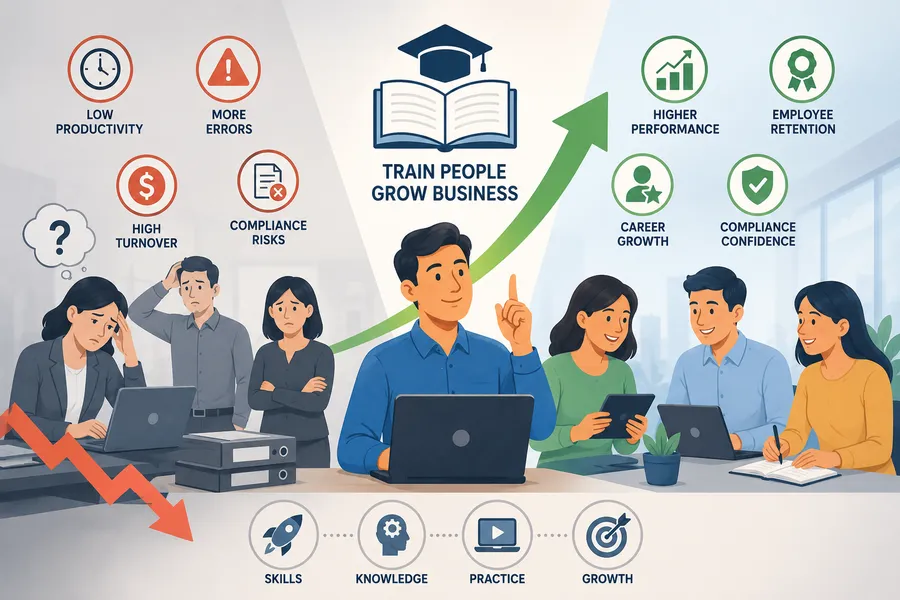
Without a consistent approach to employee training, the consequences are predictable. New hires take longer to become productive. Compliance violations increase when staff lack current knowledge of regulations. Customer-facing errors rise when product knowledge is inconsistent, and high turnover compounds the cost of bringing in new people who face the same poorly defined onboarding process all over again.
The business case for structured development is well-established. LinkedIn Learning’s 2023 Workplace Learning Report found that 94 percent of employees said they would stay at a company longer if it invested in their growth. Reducing turnover alone, which costs organizations an estimated six to nine months of a departing employee’s salary to replace them according to SHRM data, makes a strong financial argument for building proper training infrastructure rather than leaving development to chance.
Benefits of a structured development program
When employee training is consistent and well-designed, the returns are visible across the whole organization. Staff gain competence faster. Managers spend less time correcting avoidable errors. Teams in regulated industries maintain compliance without last-minute scrambles before an audit.
There is also a compounding benefit over time. Employees who progress through clearly defined skill pathways are stronger candidates for internal promotion, which reduces the cost and disruption of external hiring. A program that connects directly to career growth is also one of the most effective retention tools available, particularly for younger professionals who rank learning opportunities among their top reasons for staying with an employer.
Types of employee training programs
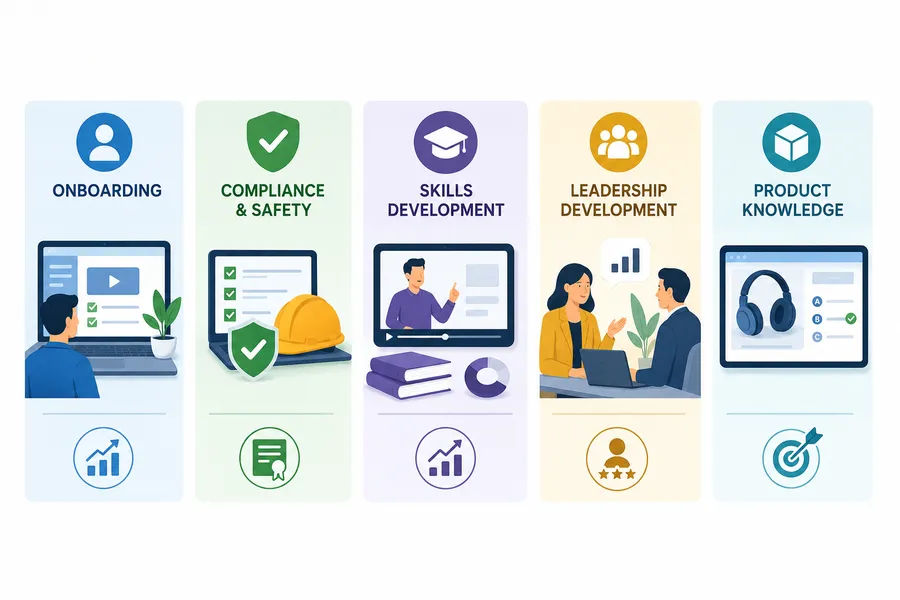
Not all training serves the same purpose. Understanding the main categories helps organizations allocate budget wisely, choose the right delivery format, and set realistic expectations for outcomes. Below is an overview of the most common types, along with notes on how organizations typically deliver and measure each one.
Onboarding and orientation training
Onboarding is the first formal learning experience a new hire receives. It covers company values, systems access, role-specific processes, and the basics of day-to-day operations. A well-structured onboarding program delivered through a web based employee training platform lets new staff progress through modules at their own pace, revisit content when needed, and complete required acknowledgements without placing the full burden on a manager’s schedule.
Effective onboarding shortens the time to productive contribution. When new hires have structured access to the information they need from day one, they typically reach full productivity several weeks faster than those who rely on informal knowledge transfer from senior colleagues.
Compliance and safety training
Compliance training is mandatory in most industries. It covers workplace health and safety, data protection under laws like GDPR, anti-harassment policies, and sector-specific regulations in fields such as finance, healthcare, and construction. Because proof of completion is often required for regulatory reporting, organizations need employee training and tracking software that records exactly who completed which course, on what date, and with what assessment result, all in one retrievable system.
Skills-based and professional development training
Beyond compliance, skills-based programs focus on closing specific knowledge gaps. This includes technical proficiency, communication, leadership, software skills, and role-specific competencies. E-learning for employees has made this category far more accessible: short video lessons, branching scenarios, and interactive assessments replace lengthy workshop days that pull entire teams away from productive work.
| Training type | Best delivery format | Primary tracking metric |
|---|---|---|
| Onboarding | LMS modules, video walkthroughs | Completion rate, time to productivity |
| Compliance | Online quiz, certification | Pass rate, certificate expiry dates |
| Skills development | Video lessons, interactive exercises | Assessment scores, skill progression |
| Leadership programs | Blended: online content and coaching | Competency rating over time |
| Product knowledge | Simulations, branching scenarios | Accuracy on product assessments |
Choosing the right employee learning management system
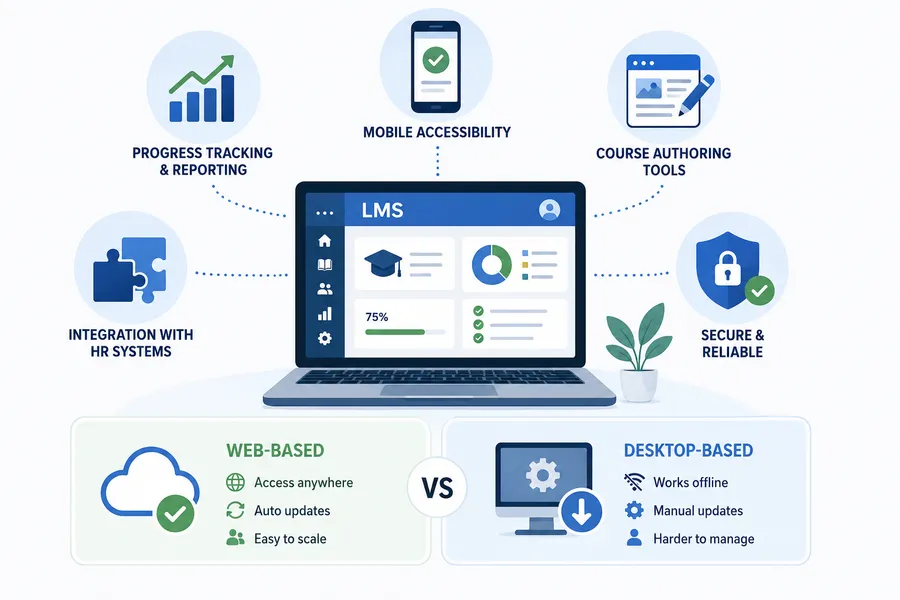
An employee learning management system is the platform that hosts, delivers, and tracks all of your training content in one place. The choice of LMS has a direct effect on how quickly you can create and publish courses, how learners experience the material, and how much visibility managers have into progress and completion.
The market ranges from simple cloud-hosted tools to fully configurable enterprise platforms. Before evaluating specific products, define your core requirements: how many learners will use the system, whether you need content available in multiple languages, what integration with your HR software looks like, and whether custom branding is a priority.
Key features to look for in an LMS
The features below are the most important to evaluate when selecting a platform for your organization’s learning program.
- Progress tracking and reporting. Completion rates, quiz scores, time spent per module, and certification records should all be accessible from a single dashboard. Without this visibility, data ends up scattered across spreadsheets that no one consistently maintains, making compliance reporting unnecessarily difficult.
- Mobile accessibility. A quality web based employee training platform works on smartphones and tablets without requiring a separate application download. This matters especially for organizations with field teams, retail staff, or employees on flexible schedules who cannot always access content at a fixed desktop.
- Course authoring tools. Some platforms include a built-in editor for creating courses directly inside the system. Others require content built externally in SCORM or xAPI format and then uploaded. For teams without a dedicated instructional designer, built-in authoring tools reduce time-to-publish significantly and lower the cost of content creation.
- Integration with HR systems. When your LMS connects to your HRIS, employee records stay accurate and automated enrollment based on role, department, or location becomes possible without manual administration overhead.
For organizations already running a WordPress-based website, LearnPress is a powerful open-source LMS plugin that supports unlimited courses, quizzes, and learner management at no base cost, making it a practical starting point for teams building a fully branded digital learning environment without a large platform budget. LearnPress also offers premium add-ons for certificates, Zoom live session integration, content drip scheduling, and WooCommerce-powered course sales, giving organizations a scalable platform that grows alongside their development needs.
Web-based vs. desktop learning platforms
Browser-based platforms require no local installation, update automatically, and work across operating systems and devices without compatibility issues. They are also easier to scale: adding new learners typically requires no additional software licensing or IT involvement, making them the default choice for most growing teams.
Desktop-installed solutions may offer stronger offline functionality, which is useful for learners in locations with unreliable internet access. However, the maintenance overhead is higher and keeping version consistency across a distributed team is harder to enforce. For the majority of small to mid-size organizations, a cloud-hosted system is the practical and cost-effective choice.
How employee training tracking software works
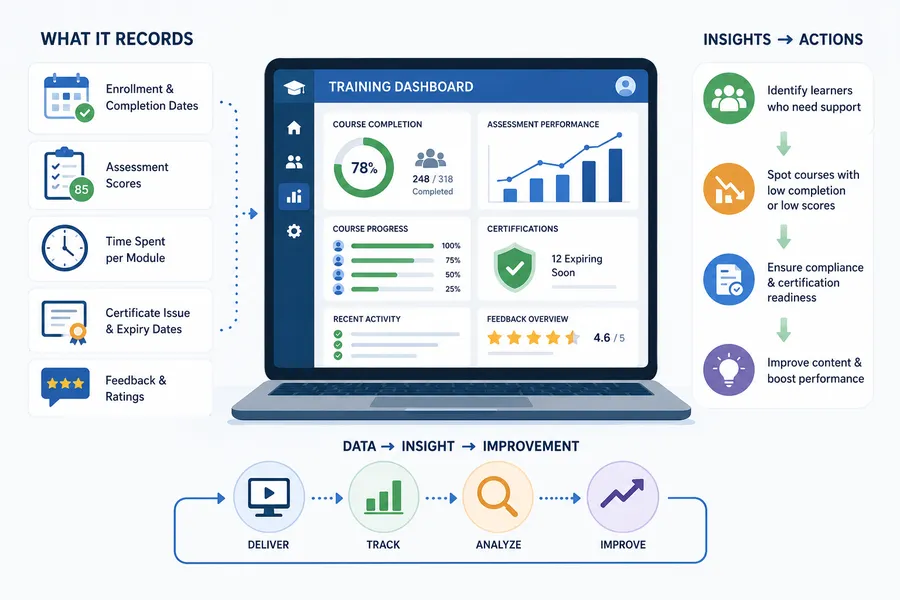
Delivering content is only half of the job. Understanding whether learning is actually producing results requires reliable data, and that is what separates organizations with a genuine development culture from those simply marking completion boxes.
Modern tools do far more than register that someone clicked a completion button. They capture granular behavioral data: how long a learner spent on each section, how many attempts they needed to pass an assessment, whether they engaged with interactive content or moved through it quickly, and when certifications are scheduled to expire.
What a tracking platform records
A well-configured system should capture the following data points automatically for every learner in the organization.
- Enrollment date and course completion date
- Assessment scores broken down by individual question
- Time spent per module and per course
- Certificate issue dates and expiry deadlines
- Learner-submitted feedback and satisfaction ratings
When this information is available in a central reporting dashboard, HR managers and team leads can identify who needs additional support, spot courses with high drop-off or failure rates, and produce compliance documentation on demand without searching through email threads or paper files.
Using tracking data to improve digital learning
Course-level data reveals where content is working and where it is not. If a large share of learners consistently exit a module at the same point, that section needs redesign. If pass rates on a compliance assessment are persistently low across the whole team, the issue may lie in how the content explains the material rather than in learner effort or motivation.
Scheduling a quarterly review of completion rates, scores, and satisfaction feedback turns e-learning for employees from a static catalog into a continuously improving resource. Outdated modules get refreshed. Poorly performing content gets redesigned. High-demand topics that are not yet in your catalog get added before knowledge gaps begin to affect performance or compliance standing.
Building effective online training modules for employees
A platform is only as useful as the content it delivers. Modules that are long, text-heavy, or disconnected from actual job tasks produce low completion rates and minimal retention. The goal is to build learning experiences that hold attention, teach something practical, and give staff a clear reason to engage with the material from start to finish.
Content formats that work in digital learning
Different formats serve different learning objectives. Mixing them within a single course keeps learners engaged and accommodates different working styles and preferences across your team.
- Short videos (5 to 10 minutes each). Highly effective for demonstrating processes, walking through software features, or presenting workplace scenario examples. Keep each video focused on a single objective. Longer presentations should be broken into a series of short episodes rather than delivered as one continuous file.
- Interactive quizzes. Place comprehension checks between content sections rather than only at the end. Questions that connect directly to the section just completed encourage careful reading rather than automatic clicking through material.
- Downloadable job aids. Checklists, quick-reference cards, and decision trees that staff can use during actual work extend the value of learning well beyond the module itself. A new customer service representative who can reference a one-page resolution guide during a live call benefits more than one who can only recall a general framework from a video watched three weeks earlier.
- Branching scenario exercises. Present a realistic workplace situation and ask the learner to select a course of action. This format works particularly well for customer service, compliance, and leadership development because it mirrors real decision-making. It also produces more useful performance data than a standard multiple-choice quiz, showing how learners actually think under pressure.
How to keep learners engaged throughout a program
Low completion rates are the most common challenge in any online staff training system, and most of the causes are predictable: modules that are too long, content that does not connect to daily work, or training scheduled at a fixed time that conflicts with the learner’s actual workload.
Microlearning units of 5 to 10 minutes are significantly easier to fit into a busy workday than a single 60-minute course. Self-paced scheduling removes the barrier of a mandatory training block that competes with other daily priorities. Automated reminders sent through your LMS help learners stay on track without requiring a manager to follow up manually with every individual.
Visible progress indicators, completion badges, and downloadable certificates give learners a sense of momentum that motivates continued engagement. Most importantly, make sure every module connects clearly to a real task or outcome. Employees who can see an immediate application for what they are learning complete courses at a higher rate and retain the information significantly longer, which is the goal of any serious development program.
FAQs
What is the best way to track employee training completion?
The most reliable method is a dedicated LMS or tracking platform that records completion, assessment scores, and certification status automatically for every learner. Manual tracking in shared spreadsheets introduces errors and does not scale as your workforce grows. A centralized system gives HR teams and managers an accurate, real-time view of where every staff member stands in their required learning at any point.
How long should individual training modules be?
Modules between 5 and 15 minutes consistently produce the highest completion rates in online learning environments. Anything longer than 20 minutes should be divided into separate units, each with a clearly distinct learning objective. Structured certification programs may include longer assessments, but the instructional content leading up to them should still be delivered in short, focused sections to maintain attention throughout.
What is the difference between an LMS and employee training and tracking software?
A full LMS hosts course content, manages learner enrollment, and records progress and assessments all in one place. Employee training and tracking software sometimes refers to standalone reporting tools that connect to existing content libraries, or to simpler platforms focused primarily on tracking completion and certification records rather than authoring or hosting full courses. Most modern LMS solutions combine both functions in a single interface, so organizations rarely need separate systems.
Can browser-based training platforms work effectively for small businesses?
Yes. Browser-based learning platforms are particularly well-suited to small businesses because they remove the need for a dedicated training room, a full-time trainer, or printed materials. Cloud-hosted options are available at pricing tiers designed for teams of 10 to 50 people. Because everything runs in a browser, staff in different locations or on different schedules can access the same content without additional coordination from managers.
Conclusion
Effective employee training does not happen by accident. It requires the right platform, content that connects directly to real job tasks, reliable tracking, and a consistent process for using data to improve over time. Choosing a capable LMS, building short and focused development modules, and using tracking data to refine what you deliver puts your organization in a strong position to grow talent consistently rather than reactively.
Whether you are setting up your first formal program or rebuilding an existing one, the principle stays the same: make learning accessible, make it measurable, and make sure every module connects directly to the work your team does every day. A well-run program turns staff development from an administrative obligation into a real and lasting competitive advantage.
Read more: LMS reviews: How to pick the right learning management software