Choosing the right elearning development services can decide whether your training program gets used or ignored. Many teams start by turning a slide deck into a video, then wonder why learners drop out after the first module. Professional providers avoid this by combining instructional design, media production, and technical setup in one planned workflow.
This guide explains what these services include, how a project runs from start to finish, what drives the cost, and how to compare agencies, freelancers, and in-house teams. It also shows how you can build your own learning site on WordPress with LearnPress or Eduma when a full agency project is more than you need.
LearnPress – WordPress LMS Plugin
We provide an amazing WordPress LMS plugin to create & sell online courses. Let’s find out!
Try NowTable of Contents
What are elearning development services?
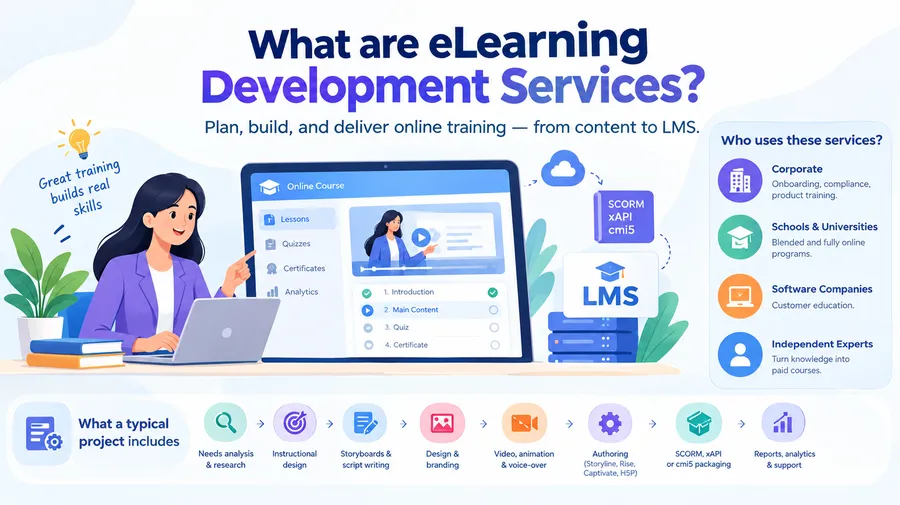
Elearning development services cover everything needed to plan, build, and deliver online training. The scope can be a single short course or a full learning ecosystem with its own platform, reporting, and ongoing support.
Definition
Elearning development services are professional services that design, produce, and launch digital learning content, along with the systems that deliver it. A provider usually works with your subject matter experts, turns their knowledge into structured lessons, and publishes the result in a learning management system (LMS). The goal is not only to share information. The goal is to change what learners know and do after the course ends.
What a typical project includes
Most providers split the work into the same core pieces, even if they name them differently:
- Needs analysis and learner research
- Instructional design and learning objectives
- Storyboards and script writing
- Visual design and branding
- Video, animation, and voice-over production
- Interactive authoring in tools such as Articulate Storyline, Rise, Adobe Captivate, or H5P
- Packaging in SCORM, xAPI, or cmi5 so the course talks to your LMS
- LMS setup, testing, and launch
- Reporting, analytics, and post-launch support
Who uses these services
Corporate training teams use them for onboarding, compliance, and product training. Schools and universities use them for blended and fully online programs. Software companies use them for customer education. Independent experts and coaches use them to turn their knowledge into paid courses. The needs differ, but the pattern is the same: a clear audience, a clear skill gap, and a need for training that people finish.
Types of elearning development services
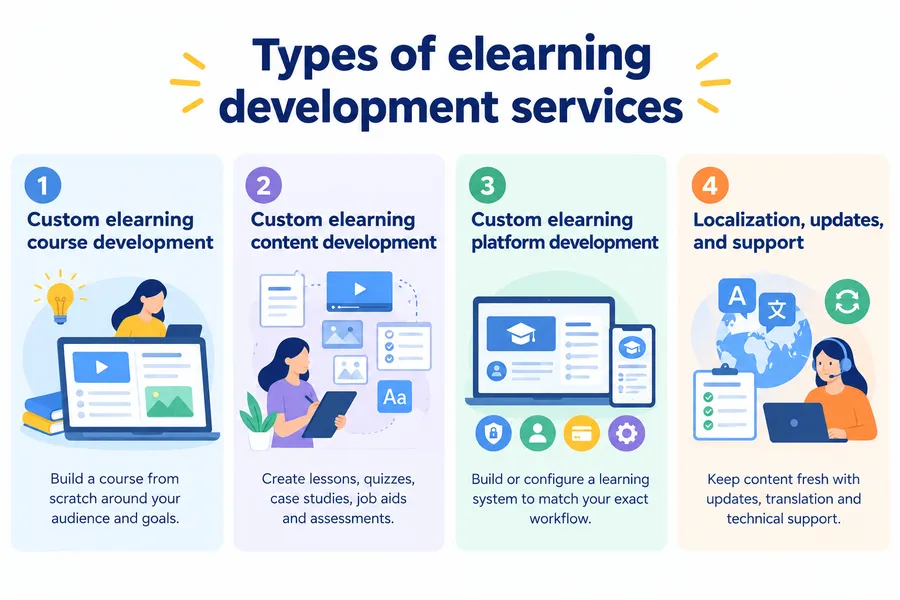
Providers usually offer a menu of services instead of one fixed package. Knowing the main types helps you ask for exactly what you need and avoid paying for extras.
Custom elearning course development
Custom elearning course development means building a course from scratch around your audience, your goals, and your brand. Nothing is copied from a library. The course uses your terminology, your scenarios, and your real workflows. This approach suits topics that are unique to your company, such as internal software, safety rules for a specific site, or a sales method you created. It takes longer than buying a ready-made course, but learners recognize their own work in the examples, and that raises engagement.
Custom elearning content development services
Custom elearning content development services focus on the material itself. A team of instructional designers, writers, illustrators, and video editors creates lessons, quizzes, case studies, job aids, and assessments. Some clients already have an LMS and only need content. Others have raw documents, such as manuals or recorded webinars, and want them reshaped into proper lessons. Content-only projects are common when you want to keep your platform but improve what learners see inside it.
Custom elearning platform development
A custom elearning platform is a learning system built or configured to match your exact workflow. That might mean a branded learner portal, a certificate engine, single sign-on with your company directory, or a payment system for selling courses. Some teams build a platform from code. Many others assemble one on WordPress using a learning plugin, a theme, and a few add-ons. The second path is faster and cheaper, and it is covered in detail later in this guide.
Localization, updates, and support
Courses age. Policies change, software interfaces change, and learners ask for new topics. Many providers offer retainer plans for updates, translation, and technical support. If your content has a short shelf life, ask about this before you sign anything.
Custom vs off-the-shelf elearning
Off-the-shelf courses are fast and low cost, while custom courses fit your needs more closely. The right choice depends on how unique your topic is and how long you will use the course. Many organizations use both.
| Factor | Off-the-shelf courses | Custom elearning | Hybrid approach |
|---|---|---|---|
| Setup time | Days | Weeks to months | Weeks |
| Upfront cost | Low | Medium to high | Medium |
| Fit to your content | General | Exact | Partial, with custom additions |
| Branding | Limited | Full | Partial |
| Best for | Common topics such as workplace safety basics | Unique processes, products, and culture | Mixed needs and tight budgets |
| Update control | Vendor decides | You decide | Shared |
| Ownership of assets | Usually licensed | Usually yours | Mixed |
A practical rule: buy generic training, build specific training. A course on basic data privacy rarely needs custom work. A course on how your support team handles a specific escalation path almost always does. This is where custom e learning services earn their cost, because no library can contain your internal knowledge.
The elearning custom development process step by step
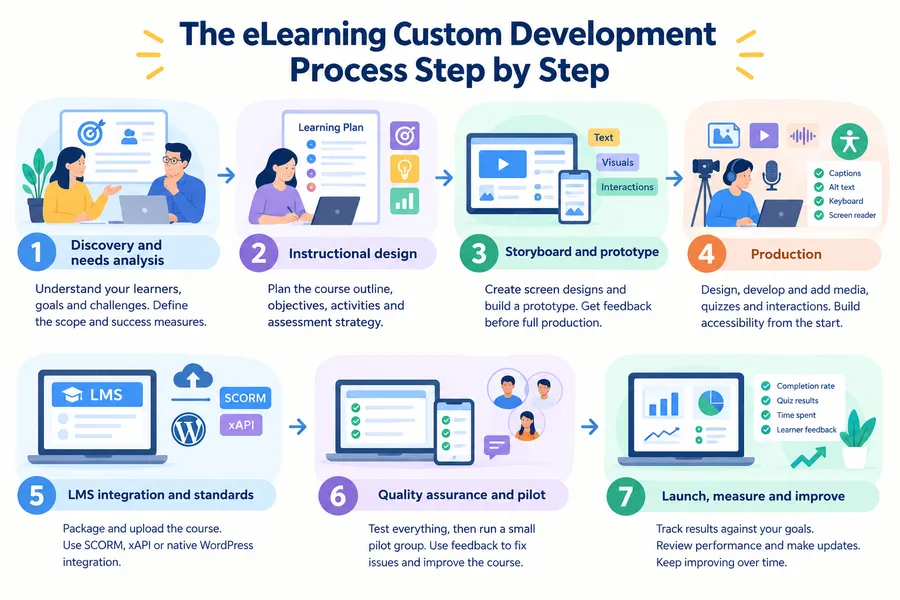
A good elearning custom development process is structured, with review points at every stage. Knowing the steps helps you judge whether a provider has a real method or is improvising.
1. Discovery and needs analysis
The project starts with questions. Who are the learners? What should they do differently after training? What is stopping them now? A strong provider interviews stakeholders, reviews existing material, and sometimes observes real work. The output is a short scope document with goals, audience, deliverables, and success measures. Skipping this step is the most common reason projects drift.
2. Instructional design
The instructional designer turns goals into a learning plan. This includes the course outline, learning objectives, activity types, and assessment strategy. Models such as ADDIE and SAM are common, and Bloom’s taxonomy often helps write measurable objectives. For example, “understand the refund policy” is vague, while “apply the refund policy to three customer scenarios” can be tested.
3. Storyboard and prototype
The storyboard shows each screen with text, visuals, narration, and interactions. A prototype of one or two modules lets stakeholders try the course before full production begins. Changes at this stage are cheap. The same change after video production can be expensive, so insist on a prototype review.
4. Production
Developers and designers build the real course. They create graphics, record audio and video, program interactions, and write quizzes. Accessibility should be built in at this stage, not added later. That includes captions, alt text, keyboard navigation, readable contrast, and screen reader support, in line with the Web Content Accessibility Guidelines (WCAG).
5. LMS integration and standards
The finished course is packaged and uploaded to the LMS. SCORM is still widely supported and tracks completion and scores. xAPI records more detailed learning activity, including actions outside the LMS. If you use WordPress, lessons and quizzes can be built natively inside the platform instead of uploading packages, which simplifies maintenance.
6. Quality assurance and pilot
Testers check links, quizzes, scoring, mobile display, browser support, and accessibility. Then a small pilot group takes the course and gives feedback. Pilot data often reveals confusing instructions, quiz questions that are too easy or too hard, and modules that take longer than planned.
7. Launch, measure, and improve
After launch, the work is not over. Track completion rates, quiz results, time spent, and learner feedback. Compare these numbers against the goals set in discovery. If a quiz question is missed by most learners, the lesson before it probably needs a rewrite. A provider that offers post-launch review shows real confidence in its work.
What affects cost and timeline
Cost and timeline depend on scope, interactivity, media, and the number of review cycles. Providers rarely publish fixed prices because two courses with the same length can need very different effort. Instead of looking for a universal price, learn what moves the number.
Level of interactivity
A basic course with text, images, and a quiz is the lowest effort. A scenario-based course with branching decisions, simulations, or software walkthroughs takes much more design and testing time. Ask your provider to classify the course as basic, moderate, or advanced interactivity, and request a price for each level so you can compare.
Media production
Video is the largest cost driver in most projects. Live-action filming needs planning, crew, editing, and often multiple takes. Animated explainers need scripts and design. Screen recordings are cheaper but still need clean audio and clear scripts. Stock footage and templated animations can reduce cost when the topic allows it.
Volume of content and expert availability
More modules mean more review. The hidden delay in many projects is not production. It is waiting for subject matter experts to answer questions or approve drafts. Name one decision maker, set review deadlines in the contract, and respond quickly. This one habit can shorten a project by weeks.
Platform and integrations
Hosting your course on an existing LMS costs less than building a custom elearning platform. Integrations with HR systems, payment gateways, or single sign-on add development time. On WordPress, many of these needs can be met with existing plugins, which keeps the budget lower than a fully coded system.
Review cycles and change requests
Each round of feedback adds time. Agree on the number of review rounds in advance, and combine feedback from all stakeholders into one document. Unstructured feedback from five people in five emails is a reliable way to slow any project.
In-house, freelancer, agency, or WordPress: a comparison
There are four common ways to get training built, and each has real trade-offs. This table compares them on the points that matter most to buyers.
| Option | Typical cost | Speed | Quality control | Scalability | Best for |
|---|---|---|---|---|---|
| In-house team | High fixed cost (salaries) | Medium | High, if team is skilled | Limited by headcount | Large organizations with constant training needs |
| Freelancer | Low to medium | Fast for small jobs | Varies by person | Low | Single courses and small updates |
| Agency providing elearning development services | Medium to high | Steady, with project management | Consistent, with review stages | High | Large or complex programs, tight deadlines |
| WordPress with LearnPress or Eduma | Low to medium | Fast to launch | You control it | High, with hosting upgrades | Course creators, schools, training companies selling or hosting their own courses |
No option wins in every case. An in-house team is hard to beat when training never stops. An agency is better when you have a large one-time project and no spare capacity. A WordPress build gives you ownership and low running costs, but you or your developer must handle maintenance, security updates, and hosting. Be honest about your internal skills before you choose.
How to choose the right provider
The best provider is the one whose process, portfolio, and communication match your project. Do not choose on price alone, because the cheapest bid often leaves out discovery, accessibility, or testing.
Check the portfolio for relevance
Ask for samples in your industry or with a similar audience. A beautiful course for retail staff does not prove they can handle healthcare compliance. Open the samples on a phone and a laptop, and try the quizzes. If possible, speak to a past client.
Ask about their process and team
A reliable provider can explain who does what: project manager, instructional designer, developer, media producer, and quality tester. Ask how they handle changes, how many review rounds are included, and how they report progress. Vague answers are a warning sign.
Confirm technical standards
Ask which standards they support, such as SCORM 1.2, SCORM 2004, xAPI, and cmi5. Ask whether they test on your LMS before delivery. Confirm accessibility practices and request a statement about WCAG compliance. If they build a platform, ask about security, backups, and data privacy.
Clarify ownership and licensing
Confirm in writing that you own the final course files, source files, and media, or that you have the license you need. Some providers keep source files and charge extra to release them. This matters if you want to update the course later with another team.
Review pricing and contract terms
Ask for a line-by-line quote that separates discovery, design, production, and testing. Check what is included for revisions, post-launch fixes, and support. Compare at least three quotes using the same project brief so the numbers are comparable.
Questions worth asking in the first call
- How do you measure whether a course worked?
- Can you show a project that changed after pilot feedback?
- What do you need from us to finish on time?
- Who owns the source files at the end?
- What happens if we need updates six months after launch?
Building a custom elearning platform on WordPress
If you want control over your learning site without a large development budget, WordPress is a practical base. A custom elearning platform on WordPress can be built with a learning plugin for course logic and a theme for design.
Why WordPress works for elearning
WordPress gives you full ownership of your content and data. You can host it where you choose, extend it with plugins, and change the design without being locked into one vendor. It also works well for search visibility, since your course pages, blog, and landing pages all live on the same site. The trade-off is that you manage updates, backups, and performance yourself, or pay someone to do it. This guide reflects the current stable WordPress release at the time of writing, so check plugin documentation for version-specific steps.
LearnPress for course management
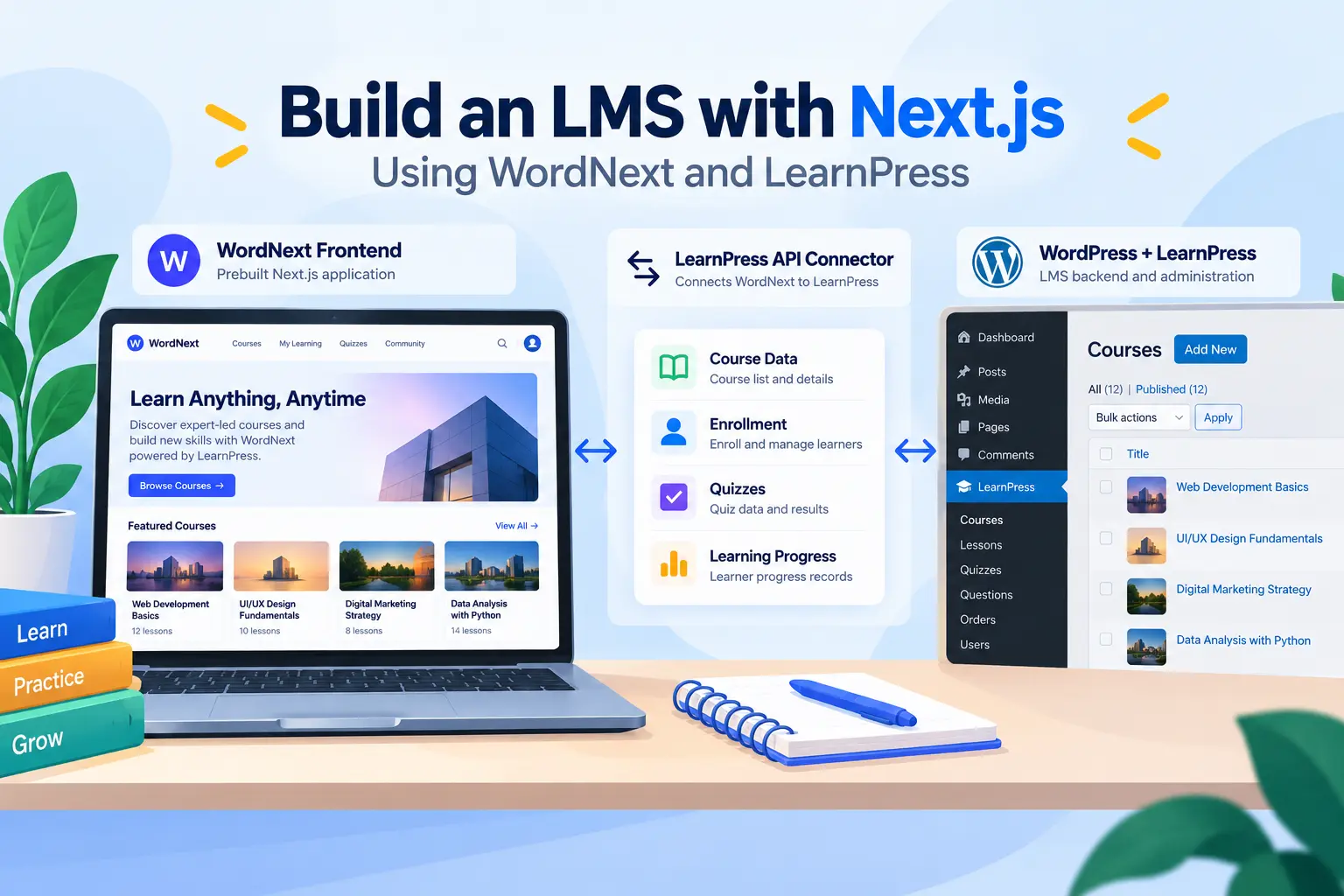
LearnPress is a free WordPress LMS plugin from ThimPress. It lets you create courses, lessons, quizzes, and questions from the WordPress dashboard, organize them into sections, and control access. Add-ons extend it with features such as certificates, course reviews, assignments, student lists, and payment options. For a trainer, school, or course business, this covers the core of what a learning site needs without writing code.
A typical setup looks like this: install LearnPress, create a course under the LearnPress menu, add sections and lessons, build quizzes with different question types, then set a price or make the course free. Learners enroll, track progress, and see results from their profile page. For simple custom elearning course development, this workflow is usually enough, and you can add paid add-ons only when you need them.
LearnPress is not a replacement for a heavy enterprise LMS in every case. If your compliance team requires deep SCORM tracking across thousands of employees, test your requirements first or use a dedicated LMS. For most course creators and training teams building their own site, it is a solid fit.
Eduma for design and layout
Eduma is an education WordPress theme from ThimPress, built to work with LearnPress. It provides ready-made demo sites for online schools, university-style layouts, and course marketplaces. Pairing it with LearnPress gives you a branded front end with course archives, instructor profiles, event listings, and a clean checkout path. You can import a demo, replace the content, adjust colors and fonts in the Customizer, and have a working course site much faster than designing from scratch.
Before importing a demo on a live site, test it on a staging copy. Demo imports can add many pages and plugins, so remove anything you do not need to keep the site fast. Then check your Core Web Vitals in PageSpeed Insights, especially Largest Contentful Paint on mobile, because course pages with large images can load slowly.
When to hire a developer
A WordPress build does not mean you must do everything alone. Hire a developer when you need single sign-on, custom reporting, integrations with a CRM, or special course logic. In that case, a small amount of paid elearning custom development on top of LearnPress and Eduma is often cheaper than starting a platform from zero. You keep the proven base and only pay for what is unique to your business.
Common mistakes to avoid
Most failed training projects share the same few problems, and almost all of them can be prevented before production starts.
Starting with content instead of outcomes
Teams often begin by asking, “What should we include?” A better question is, “What should learners be able to do?” When every lesson ties to a clear task, the course becomes shorter and more useful.
Overloading learners
Long courses with dense screens lead to drop-off. Break content into short lessons, use examples, and cut anything that does not support the objective. Microlearning works well for reference topics, while longer modules suit complex skills.
Ignoring mobile and accessibility
Many learners take courses on phones, often between tasks. Test every lesson on a small screen. Add captions to videos, write descriptive alt text, and make sure the course works with a keyboard. These steps help everyone, not only learners with disabilities.
Skipping the pilot
A pilot with five to ten real learners catches problems that internal reviewers miss. It is a small time investment that prevents embarrassing errors in the full launch.
Forgetting about maintenance
A course is a living asset. Assign an owner, set a review schedule, and budget for updates. Outdated training can be worse than no training because learners stop trusting it.
Choosing technology before strategy
It is easy to fall for a platform demo and buy before you know what you need. Define your learners, content, and reporting needs first. Then pick the tools that fit. Whether you choose an agency, a freelancer, or a WordPress build, the plan should lead the technology.
Elearning trends to plan for in 2026
Several trends are shaping how providers build courses this year, and it helps to ask about them during vendor calls. Do not chase every trend, but understand which ones fit your goals.
- AI-assisted production: Providers increasingly use AI tools for drafting scripts, generating quiz questions, and producing voice-over. Human review is still essential for accuracy and tone, so ask how the provider checks AI output.
- Microlearning: Short lessons that take a few minutes fit busy schedules and support just-in-time learning.
- Personalized paths: Learners skip what they already know and get extra practice where they struggle, often through pre-assessments and branching.
- Mobile-first design: Courses are planned for small screens first and expanded for desktop.
- Better analytics: xAPI and learning record stores make it possible to track more than completion, such as which questions cause errors and which resources are used on the job.
- Community and cohort learning: Discussion boards, live sessions, and peer review help completion rates. On WordPress, forums and live-class integrations can be added next to course content.
FAQs
How long does it take to build a custom course?
A short, basic course can take a few weeks, while a complex course with video and simulations can take several months. The timeline depends mostly on content volume, interactivity, and how quickly your experts review drafts. Ask your provider for a schedule with review dates, and keep your team’s feedback within the agreed deadlines.
What is the difference between SCORM and xAPI?
SCORM is a standard that lets a course report completion and scores to an LMS, but it works only inside the LMS. xAPI is newer and records detailed learning activity from many sources, including mobile apps, simulations, and real-world tasks. Choose SCORM if your LMS needs a simple, widely supported format, and choose xAPI if you need detailed analytics.
Can I build an online course platform myself with WordPress?
Yes, if you are comfortable managing a WordPress site. Install a learning plugin such as LearnPress, choose an education theme such as Eduma, add your courses, and connect a payment method if you plan to sell them. For advanced needs such as integrations or custom reports, bring in a developer for specific tasks.
How do I measure the return on elearning?
Compare results against the goals you set before the project. Useful measures include completion rate, assessment scores, time to competence, support ticket volume, error rates, and sales results for training tied to revenue. Collect a baseline before launch so you can show real change afterward.
Conclusion
The best elearning development services start with a clear learning goal, follow a structured process, and keep improving after launch. Whether you hire an agency, work with a freelancer, build an in-house team, or create your own site, the same rules apply: know your learners, design for outcomes, test before launch, and plan for updates. Custom work costs more than buying a library course, but it pays off when your content is unique to your business.
If you want a flexible platform without a heavy budget, start with WordPress. LearnPress handles courses, lessons, and quizzes, and Eduma gives you a ready-made design for your learning site. Add a developer only when your project needs something special. Whatever route you choose, write down your goals first, run a small pilot, and measure results. That approach will serve you better than any tool or trend.
Read more: Interactive quiz: How to Build One that Improves Learning