If you have been putting off starting a blog because you think it costs money or requires coding skills, that is not the reality in 2026. You can learn how to start a blog website for free using nothing but an email address and about twenty minutes. This guide walks through every step, from picking the right platform to publishing your first post and getting real readers.
LearnPress – WordPress LMS Plugin
We provide an amazing WordPress LMS plugin to create & sell online courses. Let’s find out!
Try NowTable of Contents
Why start a blog right now
There has never been an easier or more affordable time to start a blog. Whether you want to share your expertise, build a personal brand, or grow a business, blogging remains one of the best long-term investments you can make.
- Build your online presence without spending much. A blog helps you grow an audience, showcase your skills, document your work, or test a business idea. Many successful newsletters, YouTube channels, and online businesses started with a single blog post on a free platform.
- You don’t need technical skills. Modern blogging platforms let you publish posts, customize your site, and add images with simple drag-and-drop editors. Most also include mobile-friendly designs and basic SEO tools to help your content get found.
- Starting early gives you an advantage. Search engines reward websites that publish consistently over time. The sooner you publish your first post, the sooner your content can be indexed and begin building authority. Waiting for the “perfect” time usually means losing valuable months of growth.
- You own your content. Unlike social media, where algorithms constantly change, a blog is your own online space. You control your content, branding, and how readers experience your website.
- It creates future opportunities. A blog can eventually support affiliate marketing, digital products, online courses, freelance work, consulting, or an email newsletter. Even if monetization isn’t your goal today, you’re building a valuable asset for the future.
- Success takes consistency, not luck. A blog won’t generate traffic or income overnight, but publishing helpful content regularly builds trust, authority, and a loyal audience over time.
What you need before you start a blog for free
You do not need much to get going, but a little preparation saves you from restarting halfway through.
- A working email address. Every free blogging platform asks for one to create your account and verify it.
- A rough idea of your topic. You do not need a fully polished niche, but knowing whether you are writing about cooking, personal finance, travel, or a hobby helps you pick the right platform and name.
- A blog name. Keep it short, easy to spell out loud, and available as a subdomain (like yourname.wordpress.com) if you are not ready to buy a custom domain yet.
- Thirty minutes of uninterrupted time. Most of the setup, from account creation to your first published post, takes less time than a lunch break.
- Optional: a few photos or graphics. Free stock photo sites like Unsplash and Pexels work fine for a first post if you do not have your own images yet.
Where can you create a blog: comparing the top free platforms
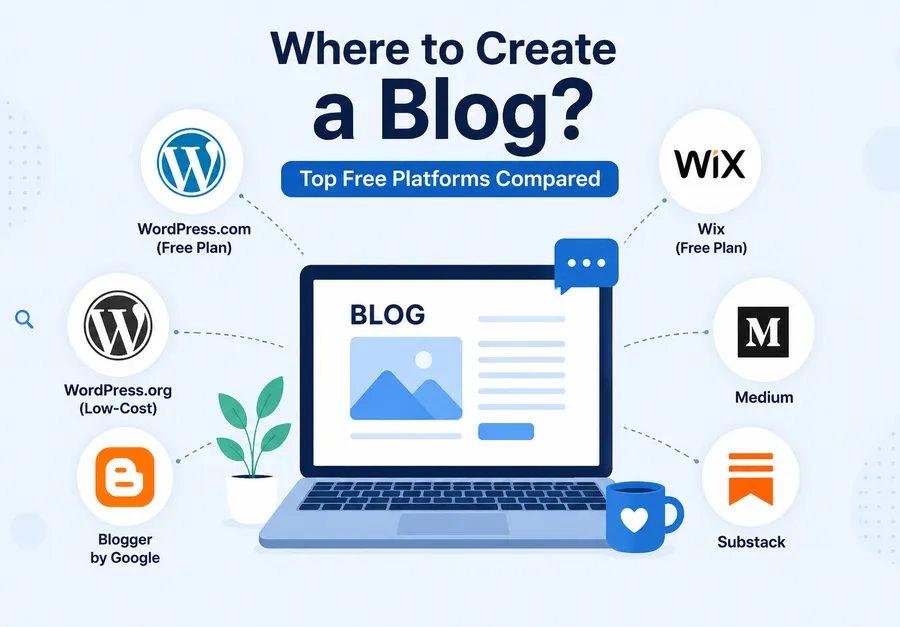
Before you commit to one tool, it helps to know where you can create a blog without paying anything up front. Each platform trades off differently between ease of use, design flexibility, and how much control you have over your own content.
WordPress.com free plan
WordPress.com gives you a free subdomain (yourblog.wordpress.com), a selection of free themes, and enough storage to publish a personal blog without paying upfront. Because hosting, security, and updates are managed for you, it is one of the easiest ways to start blogging.
One common point of confusion is that WordPress.com and WordPress.org are different products. WordPress.com is a hosted service, while WordPress.org is the free open-source software that anyone can install on their own hosting. The WordPress software remains the world’s most widely used content management system, powering more than 40% of all websites, which is one reason there’s such a large ecosystem of tutorials, themes, and plugins if you eventually decide to move to a self-hosted site.
Self-hosted WordPress.org (the low-cost middle ground)
WordPress.org is free, open-source software, but you’ll need web hosting and a domain name to use it. While this means there is a small ongoing cost, it gives you complete ownership of your website and far more flexibility than most free blogging platforms.
With self-hosted WordPress, you can install any theme or plugin, customize every aspect of your site, monetize without platform restrictions, and move your website between hosting providers whenever you want. Many successful blogs begin on WordPress.com or another free platform before migrating to WordPress.org as their audience grows.
Blogger by Google
Blogger has been around since 1999 and remains one of the simplest free blogging platforms available. It integrates with your Google account and includes free hosting on a blogspot.com subdomain. There are no practical limits for text-based blogging, although images count against your Google account storage quota.
Customization options are fairly limited compared to WordPress, and the platform has seen relatively few major feature updates in recent years, but it remains a reliable choice for hobby bloggers who want a straightforward publishing experience.
Wix free plan
Wix offers an intuitive drag-and-drop website builder with professionally designed templates that are easy for beginners to customize. The free plan includes a Wix-branded subdomain and displays Wix advertisements on your site. Storage is limited to 500 MB, making it suitable for personal blogs but less ideal for media-heavy websites.
Wix works well if visual design is your top priority, although migrating away from the platform later can be more difficult than moving a WordPress site.
Medium
Medium is less of a traditional blogging platform and more of a publishing community. Instead of building your own website, you publish articles alongside millions of other writers.
The biggest advantage is discoverability—quality articles can reach readers through Medium’s recommendation system without requiring much marketing. The downside is limited branding, virtually no design customization, and less control over your audience compared to owning your own website.
Substack
Substack is designed primarily for newsletter publishers rather than traditional bloggers. Every post can be delivered directly to subscribers by email, making it popular with independent writers, journalists, and creators.
The free plan includes unlimited subscribers, blog hosting, and email delivery. If you later offer paid subscriptions, Substack takes a percentage of subscription revenue. Design customization remains intentionally minimal so writers can focus on publishing instead of website management.
| Platform | Custom domain on free plan | Design control | Storage | Best for |
|---|---|---|---|---|
| WordPress.com | No (paid upgrade required) | High, with free themes | 1 GB | Long-term blogs planning to grow |
| Self-hosted WordPress.org | Depends on host | Full control | Depends on host | Owners who want complete flexibility |
| Blogger | No | Low | Unlimited text | Simple, no-frills blogging |
| Wix | No | High, visual editor | 500 MB | Design-focused personal blogs |
| Medium | No | None | Unlimited | Writers who want built-in readers |
How to create a blog for free, step by step
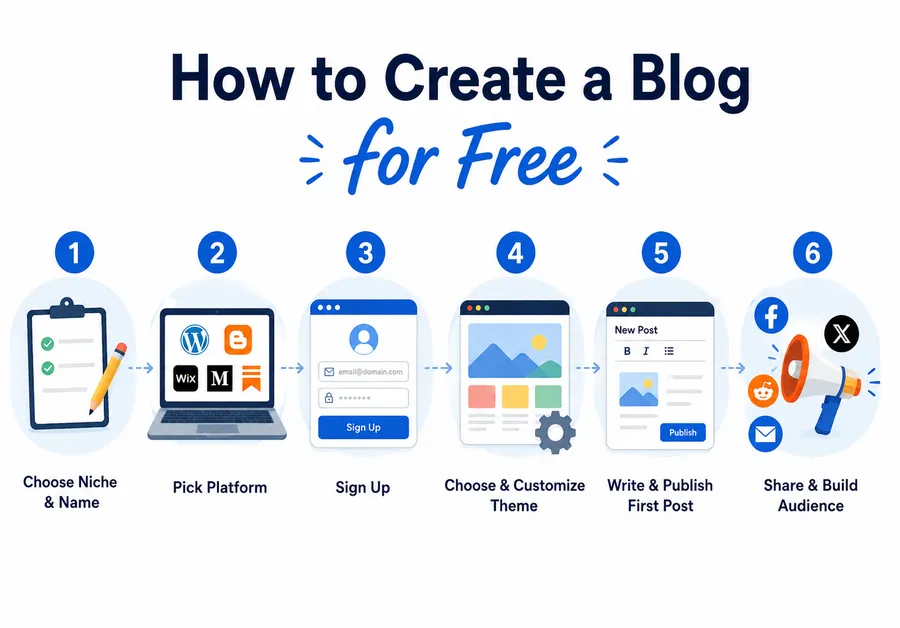
Once you know where to start a blog for free, the actual setup follows the same general pattern no matter which platform you pick. Here is how to create a blog for free from a blank screen to a published first post.
Step 1: Choose your blog’s niche and name
Pick a topic specific enough that you are not competing with every blog on the internet, but broad enough that you will not run out of things to write about in a month. “Budget travel for solo women in their 30s” works better than just “travel.” Once you have a topic, brainstorm three or four name options and check whether they are available as a subdomain on your chosen platform.
Step 2: Pick where to start a blog for free
Use the comparison table above to match a platform to your goals. If you want the largest long-term growth potential, WordPress.com is usually the strongest starting point because it is the same underlying software used by millions of larger sites, so upgrading later does not mean starting from scratch.
Step 3: Sign up and set up your account
Head to your chosen platform’s signup page, enter your email, and verify your account. Most platforms walk you through a short onboarding flow that asks about your blog’s purpose, which helps them suggest a starting theme. On WordPress.com, this is also where you choose your free subdomain address.
Step 4: Choose a free theme and customize your design
Every platform in this guide includes free themes or templates. Pick one that matches your topic and swap in your own colors, fonts, and a header image. Keep the homepage simple at launch: a clear title, a short bio, and a link to your first post are enough. You can always redesign once you have a better sense of how readers move through your site.
Step 5: Write and publish your first post
Your first post does not need to be perfect. A good starting move is an introduction post that explains who you are and what readers can expect from your blog going forward. Write it in the platform’s editor, add one image, proofread it once, and hit publish. The goal is momentum, not perfection.
Step 6: Share your blog and build an audience
Publishing is only half the job. Share your first post on any social accounts you already use, and if your niche has active online communities such as subreddits or Facebook groups, share it there too as long as self-promotion is allowed. Add your blog link to your email signature and social bios so people find it even when you are not actively promoting a specific post.
How to start your own blog for free without hidden costs
Free plans are genuinely free, but it helps to know exactly what you are trading for that price tag before you commit hours to a platform.
Free vs paid: what you actually get
On a free plan, you typically get a subdomain instead of a custom domain, platform branding somewhere on your site, and a storage cap that limits how many images and files you can upload. None of that stops you from writing consistently, building an audience, or testing whether blogging is something you want to stick with.
When it makes sense to upgrade
If your blog starts getting steady traffic, or if you want a domain name that matches your brand exactly, upgrading to a paid plan or self-hosting becomes worth the cost. Many bloggers spend their first three to six months entirely on a free plan and only upgrade once they know the topic has staying power. That approach avoids paying for hosting and a domain before you have proven to yourself that you will keep posting.
Turning your blog into something bigger
A blog rarely stays just a blog once it starts working. Writers add an email newsletter, small business owners add a shop, and educators add lessons or downloadable guides. If your content naturally moves toward teaching something, whether that is a skill, a recipe series, or a full course, you can add LearnPress, a free WordPress LMS plugin, directly to a WordPress site to turn blog posts into structured lessons and sell course access without switching platforms.
This matters because moving your content between tools later is a lot more work than planning for growth from the start. WordPress-based blogs have an advantage here since the same install that runs your blog can run a course, a membership area, or a small store as your goals change.
Common mistakes beginners make with a free blog
No matter which free blogging platform you choose, avoiding these common beginner mistakes will help you attract more readers and set your blog up for long-term success.
- Picking a platform based on looks alone. A beautiful theme does not matter if the platform limits your growth later. Think about where you want your blog to be in a year, not just how the signup page looks today.
- Publishing once and disappearing. Blogs build momentum through consistency. A posting schedule you can actually keep, even if it is only twice a month, beats an ambitious plan you abandon after two weeks.
- Skipping basic search engine optimization from day one. Simple habits like writing a clear post title, adding a short meta description, and using one main heading per post make a real difference in whether search engines can understand and rank your content later.
- Ignoring mobile design. Most readers will find your blog on a phone. Preview every new post on a mobile screen before you publish it, not just on your laptop.
- Ignoring backups. If you move to self-hosted WordPress later, set up automatic backups immediately. Losing months of posts to a technical issue is one of the most common regrets bloggers mention after the fact.
- Overthinking the first post. Many beginners spend weeks rewriting an introduction post instead of publishing something reasonable and moving on to post two. Readers rarely judge a blog by its very first entry. They judge it by whether new posts keep showing up.
- Writing only for search engines. Keyword-stuffed posts that ignore the actual reader tend to perform worse over time, not better. Search engines have gotten much better at recognizing content written for a real audience versus content written purely to rank, and that gap is only going to widen.
What starting a blog for free actually costs you
“Free” is not entirely free once you factor in what you are trading for it. Understanding this upfront prevents frustration later.
On a free plan, the platform usually keeps its branding somewhere on your site, whether that is a small badge in the footer or “wordpress.com” tacked onto your web address. You also give up some design control, since free themes come with fewer customization options than paid ones. Storage caps mean you cannot upload unlimited high-resolution photos or video, which matters more for photography or food blogs than for text-heavy writing.
None of these trade-offs stop you from building a real audience. Plenty of successful blogs spent their first year entirely on a free plan before their traffic or income justified paying for hosting, a custom domain, or a premium theme. Treat the free plan as a genuine starting point, not a lesser version of “real” blogging.
Tips to grow your blog after launch
Growth rarely comes from one big move. It comes from a handful of habits repeated consistently over months. These simple practices can help your blog gain readers and build long-term momentum.
- Publish on a consistent schedule. Choose a posting frequency you can realistically maintain, whether that’s once a week or twice a month. Let readers know your schedule so they have a reason to return regularly.
- Engage with your early audience. Reply to every comment during your first few months. Those first readers are often the ones who become loyal subscribers, share your content, and recommend your blog to others.
- Use internal links whenever possible. Link to your older articles from new posts when the topics are related. This keeps visitors exploring your site longer, improves navigation, and helps search engines understand the relationships between your content.
- Promote your blog naturally. Join a small number of online communities related to your niche and participate genuinely. Focus on answering questions and contributing useful insights instead of only posting links to your own articles.
- Pay attention to what performs well. After a few months, review which posts attract the most traffic and engagement. Those topics are strong indicators of what your audience wants, making them excellent candidates for follow-up articles or more in-depth guides.
- Set up analytics from the beginning. Even a free analytics tool is enough when you’re starting out. Most blogging platforms also include basic visitor statistics. Rather than looking only at page views, pay attention to which articles readers spend the most time on or read to completion. Those insights are often more valuable than click counts alone.
- Create a content idea list before you launch. Write down at least 10 to 15 article ideas before publishing your first post. Many new bloggers lose momentum around their fourth or fifth article simply because they run out of ideas. Keep adding to this list whenever readers ask questions in the comments, through email, or in online communities. Real questions from real people often become your best-performing content.
- Be patient and stay consistent. Blogging is a long-term investment. Search engines usually take several months to discover, index, and rank new content, and audiences grow through repeated exposure rather than overnight success. Many bloggers feel discouraged after a few months, but those who continue publishing consistently for a year are typically surprised by how much progress they’ve made.
FAQs
Is it really possible to start a blog with no money at all?
Yes. Platforms like WordPress.com, Blogger, and Medium let you sign up, publish posts, and share your work without paying anything. The trade-off is a subdomain instead of your own custom domain and some limits on storage or design control until you decide to upgrade.
How long does it take to start a blog for free?
Most people can go from signing up to publishing their first post in under an hour. The account setup itself usually takes about ten minutes, with the rest of the time spent choosing a theme and writing your introductory post.
Do free blogs show up in Google search results?
Yes, free blogs can absolutely be indexed and ranked by search engines. Ranking well still depends on writing useful content, using clear headings, and building some links over time, regardless of whether you are on a free or paid plan.
Can I move my free blog to a paid platform later without losing my content?
In most cases, yes. WordPress.com, for example, lets you export your posts and import them into a self-hosted WordPress.org site if you decide to upgrade. It is worth checking your specific platform’s export options before you start, so you know exactly what will and will not transfer.
Conclusion
Starting a blog no longer requires money, coding knowledge, or technical support. Pick a platform that matches your goals, spend a little time choosing a name and theme, and publish your first post today rather than waiting for the perfect plan. The bloggers who see real results are usually the ones who started with an imperfect first post and kept showing up, not the ones who waited until everything felt ready.
Read more: 17+ Best WordPress Plugins for Every Type of Site