Most teams don’t think hard about selecting a learning management system until something breaks: a course that stops tracking completions, a quiz that loses scores overnight, or a vendor that raises prices the month before renewal.
By then you’re stuck mid contract, with thousands of dollars in course content sitting on a platform nobody on the team actually likes using.
The fix is doing the homework before you sign anything.
An LMS is infrastructure, not a feature you bolt onto a website, and it deserves the same level of scrutiny you’d give a CRM or a payment processor, since switching later usually means re-uploading every video, rebuilding every quiz, and re-training every instructor on a new editor.
This guide covers what to look for in a learning management system, from course tools and instructor roles to day to day usability, integrations, migration, cost, support, and security: the pieces that actually predict whether a platform holds up once real students, real payments, and real support tickets show up.
LearnPress – WordPress LMS Plugin
We provide an amazing WordPress LMS plugin to create & sell online courses. Let’s find out!
Try NowWhat To Look for in a Learning Management System?
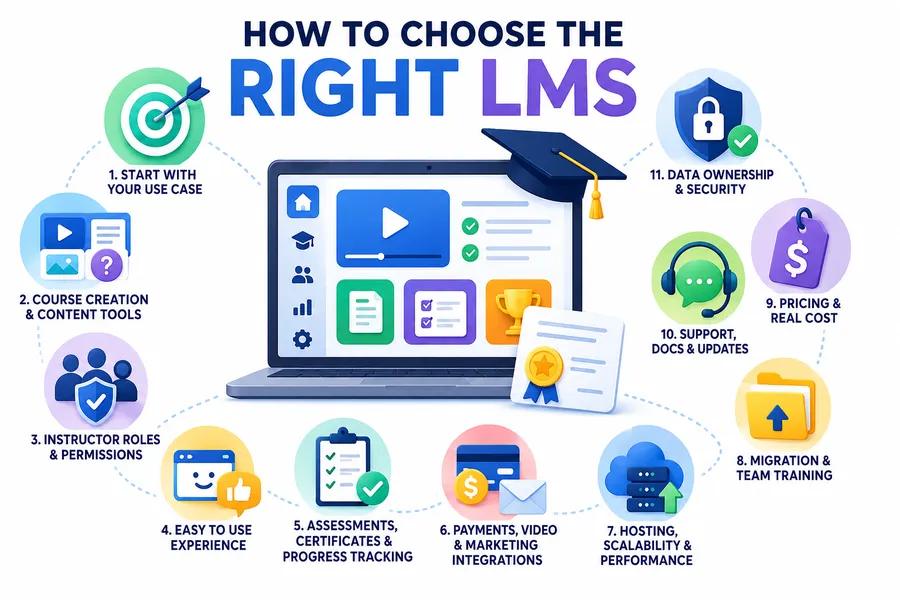
Start with Your Use Case
Before comparing pricing pages, write down who is actually going to sit inside this thing every week and what they’re trying to get out of it.
A platform built for university degree programs solves a different problem than one built for a 12 person team running onboarding, and a tool aimed at course creators selling to the public solves a different one again. Treat the search as a project with a few stakeholders in the room, not a decision made by whoever happened to sit through the first demo.
Write down three things before you look at a single vendor:
- who is learning (employees, customers, students, members),
- what success looks like (a certificate, a passed exam, a completed onboarding checklist, a sale)
- how often new content needs to go live
Those three answers rule out more platforms than any feature comparison chart will, because plenty of well-built tools are simply built for a different kind of buyer than you.
A platform optimized for selling courses to thousands of strangers, for instance, usually handles internal compliance training poorly, and the reverse is just as true.
Course Creation and Content Tools
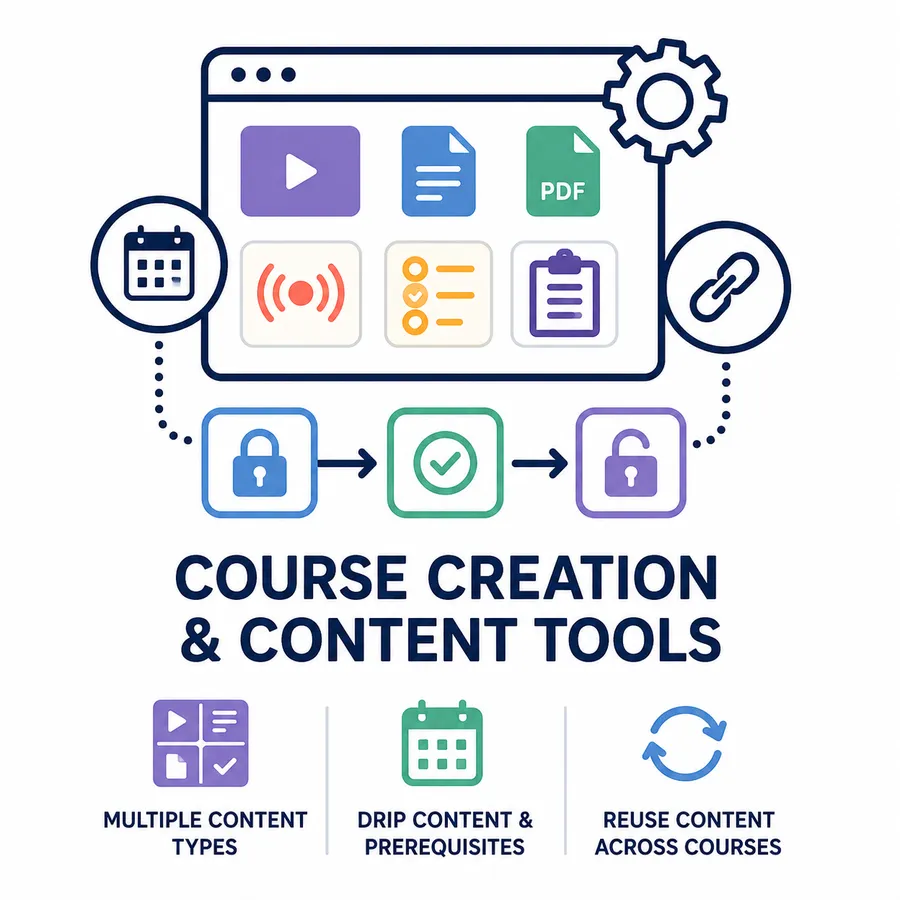
Once you know who you’re building for, the next question is whether the editor actually lets you build the kind of course you have in mind.
Content types the builder supports
Look closely at what a course can actually contain: video lessons, downloadable files, text lessons, live sessions, quizzes, and assignments that require manual grading. Some platforms handle video and text well but treat assignments and live sessions as an afterthought bolted on through a separate add-on, which becomes obvious the first time you try to set up something more complex than a quiz.
Drip content, prerequisites, and reuse
Check whether you can drip lessons on a schedule, require a learner to finish one course before unlocking the next, and reuse the same lesson across multiple courses without duplicating it. These sound like nice to haves until you’re three courses deep and rebuilding the same onboarding lesson for the fourth time because the platform has no way to share content between courses.
Instructor Roles and Permissions
If more than one person will ever create or manage a course, the platform’s role system matters more than it looks like it would in a demo.
Check whether instructors get their own restricted view, where they can manage their own courses and students without touching anyone else’s.
If you’re running a multi-instructor setup, like a marketplace or a training company with outside contractors, look at how revenue sharing works, whether an instructor can see another instructor’s enrollment numbers, and whether admins can step in to edit or reassign a course without locking the original instructor out. Smaller teams often skip this question entirely, then run into it the day a second person needs access.
How It Actually Feels to Use
Feature checklists rarely capture the thing that determines whether a platform sticks: how it feels to use on a normal Tuesday.
According to a 2026 Research.com survey, 88% of organizations point to poor user experience as the main reason they end up switching learning tools, which says more about how LMS buying usually goes than any spec sheet does.
Sit through a real demo and actually create a lesson yourself, don’t just watch the sales rep click through one.
Pay attention to how many clicks it takes to publish a quiz, whether the course dashboard makes sense to someone who has never used an LMS before, and how the experience holds up on a phone screen, since a meaningful share of learners will start a lesson on mobile and finish it on a laptop.
Assessments, Certificates, and Progress Tracking
For most buyers, this is the section that actually decides the deal, because tracking is the entire point of using an LMS instead of a folder of videos.
Confirm the platform supports the quiz types you need (multiple choice is rarely enough on its own), automatic and manual grading, retake limits, and timed exams if compliance requires them.
Check how certificates are generated, whether they’re customizable with your own branding, and whether completion data exports cleanly into a spreadsheet or syncs to an external system.
If you’re running anything compliance related, ask specifically how the platform proves a learner finished a course, since “marked complete” and “verified complete with a timestamp and passing score” are not the same thing during an audit.
Payment, Video, and Marketing Integrations
An LMS rarely runs alone. It needs to talk to the tools that already handle your money, your video, and your email list.
At minimum, check support for the payment gateways you actually use (Stripe, PayPal, and WooCommerce cover most cases), video hosting options for larger libraries (self-hosted video can get expensive fast, so look at YouTube or Vimeo support), and whether the platform connects to your email or CRM tool, either natively or through Zapier.
A platform that forces you to manually export a CSV of new students every week isn’t saving you time, it’s just moving the busywork somewhere less visible.
Hosting, Scalability, and performance
A demo with three test users tells you nothing about what happens on launch day with three hundred real ones.
On a shared hosting plan, a course launch with a few hundred concurrent learners can slow down a server that handles ordinary blog traffic just fine, and that’s one of the most common support tickets new course creators end up writing.
Ask how the platform handles video delivery at scale, whether it works with a CDN, and what happens to page load times once a course library grows past a few hundred lessons. Self-hosted platforms put performance in your hands, and your hosting budget, while SaaS platforms shift that responsibility to the vendor, for a price.
Migrating Existing Content and Training Your Team
If you already have training material sitting somewhere else, find out how much of it actually survives the move before you commit to anything.
Ask specifically whether the platform can import SCORM packages, bulk-import users from a CSV, and accept your existing video library without forcing a re-upload through a slow web form.
Then ask what onboarding actually looks like in the first 30 days: is there a real person walking your team through setup, or just a help center article.
Migration is where most rollouts stall, not because the new platform is bad, but because nobody budgeted the time it takes to move years of content and re-train instructors on a new editor.
Pricing and the real cost of ownership
The number on the pricing page is rarely the number you actually pay.
Look past the headline price for hosting costs, transaction fees on course sales, per-user or per-active-learner charges, and the cost of add-ons you’ll likely need later, like certificates, drip content, or advanced quizzes.
A platform that’s $29 a month but takes a 10% cut of every sale can end up costing more than a one-time plugin license once you’re doing real volume. Ask for the total cost at the scale you expect to reach in a year, not just the scale you’re at today, since pricing pages are built around the smallest plan, not the one you’ll likely outgrow.
Support, documentation, and update history
Support quality is hard to judge from a sales call, but it’s easy to check before you ever talk to a vendor.
Pull up the support forum or ticket history and read a handful of real threads, not just the marketing page that says “world class support.”
Check how often the plugin or platform ships updates, whether the changelog shows active maintenance, and how clear the documentation is for the specific tasks you’ll do most: building a course, issuing a refund, or troubleshooting a learner who can’t log in.
A platform that hasn’t shipped a meaningful update in over a year is worth a second look, even if the feature list still reads fine today.
Data Ownership and Security
Once learner data lives inside a platform, getting it back out should never be the hard part.
Confirm you can export learner records, course content, and progress data in a usable format, and ask what happens to that data if you ever cancel. For self-hosted WordPress plugins, the data sits in your own database, which gives you direct control but also means backups and security updates are on you.
For hosted platforms, ask directly about data residency and how they handle privacy regulations like GDPR, since the answer affects what you’re allowed to promise your own learners.
A Quick LMS Selection Criteria Checklist
With all of that in mind, here’s a condensed version you can run through with whoever else is part of the decision.
| Criteria | Question to ask |
| Use case fit | Does it match who’s learning and why? |
| Content tools | Can it handle video, quizzes, and live sessions? |
| Roles | Can multiple instructors work without stepping on each other? |
| Usability | Can a beginner publish a course without help? |
| Tracking | Are completions, scores, and certificates reliable? |
| Integrations | Does it connect to your payment and email tools? |
| Performance | Will it hold up at your expected enrollment scale? |
| Migration | Can you import existing content without losing it? |
| Cost | What’s the real total, including add-ons and fees? |
| Support | Is the documentation and update history solid? |
| Data control | Can you export everything if you leave? |
Where a WordPress LMS Plugin Fits in
If you’re still working out how to choose the right LMS for a team that already runs on WordPress, a plugin built specifically for that ecosystem is worth a serious look before you add another separate platform to manage.
LearnPress is a free, open source LMS plugin for WordPress built by ThimPress, with a drag and drop course builder, quizzes, certificates, content drip, and built in support for payment through WooCommerce, Stripe, and PayPal. It’s a reasonable starting point for anyone who wants course features living inside the same WordPress site they already manage, rather than syncing content between two separate systems.
Once you know what to look for in an LMS, the rest of the search moves a lot faster. Most of the time spent evaluating platforms goes toward narrowing down options that were never a real fit in the first place, so a clear set of requirements up front saves more time than any feature comparison spreadsheet.
FAQs About What to Look for in a Learning Management System
How to choose an LMS?
Start by writing down who’s learning, what counts as success, and how often you’ll publish new content, then test the actual course builder yourself instead of relying on a sales demo. Narrow your list to platforms that handle your specific content types, like video, quizzes, and live sessions, connect to the payment and email tools you already use, and let you export your data if you ever switch.
What’s the difference between an LMS and an LXP?
An LMS focuses on structured courses, tracking, and compliance, while a learning experience platform (LXP) leans toward self-directed, recommendation-driven content closer to a streaming service. Many modern tools blend both, so the more useful question is whether you need structured tracking, a discovery-style experience, or both.
How long should an LMS evaluation take?
Most teams can run a focused evaluation in two to four weeks: about a week to define requirements, one to two weeks testing two or three shortlisted platforms hands-on, and a few days to compare total cost before deciding. Rushing past the hands-on testing step is the most common reason teams end up switching platforms within the first year.
Can you switch LMS platforms later without losing your courses?
In most cases yes, as long as your original platform supports exporting course content, video files, and learner progress data in a standard format. Confirm export options before you commit, since platforms that lock content into a proprietary format make switching far more expensive later, even if the upfront price looked cheaper.
Read more: How to Use WordPress to Build a Website (Guide)
What to Look for in a Learning Management System