The landscape of online education and corporate training is evolving at a breakneck pace. We are rapidly moving away from static, one-size-fits-all courses and entering the era of hyper-personalized learning. At the center of this revolution is Artificial Intelligence.
However, until today, educators and developers have faced a massive technological roadblock. AI agents like Claude, ChatGPT, and Cursor are incredibly intelligent, but they suffer from one critical flaw: they are completely blind to your live LMS data. If you ask an AI, “Which of my students are failing the advanced React course?” it cannot answer. To make an AI understand your specific syllabus or course enrollments, developers historically had to build complex, brittle, and highly expensive custom API pipelines.
That changes today. We are incredibly proud to announce that LearnPress officially supports native WordPress MCP integration. This monumental update bridges the gap between your best WordPress LMS and the world’s most advanced AI models. By exposing our core functionalities as discoverable tools, LearnPress is officially stepping into the future, paving the way for powerful WordPress LMS AI agents.
In this comprehensive guide, we will explore what this technology is, why it matters, how we secured student records, and how developers can start building an agentic AI LMS today using our new WordPress MCP integration.
LearnPress – WordPress LMS Plugin
We provide an amazing WordPress LMS plugin to create & sell online courses. Let’s find out!
Try NowTable of Contents
Chapter 1: What is a Model Context Protocol LMS?
To understand the magnitude of this WordPress MCP integration, we must first understand the underlying technology.
The Model Context Protocol (MCP) is an open-standard communication protocol designed specifically for AI. Think of it as a “Universal Translator” between AI models and external data sources.
In traditional development, if you wanted an AI to interact with your database, you had to write custom scripts to pull data via a REST API, format it into text, feed it to the AI, and then parse the AI’s response back into code. This is inefficient and incredibly hard to scale.
A Model Context Protocol LMS eliminates this friction entirely. It standardizes how AI applications discover and interact with your e-learning tools. When an MCP-compatible client connects to your server via the WordPress MCP integration, it instantly “understands” what actions it can perform. It can read your courses, analyze quiz results, and check student statuses natively, without requiring you to build custom integration pipelines for every single AI model on the market.
Chapter 2: The Shift to an agentic AI LMS
Why did our development team prioritize LearnPress MCP? Because the pain points for both LMS owners and developers were growing too large to ignore, and a proper WordPress MCP integration was the only logical solution.
Solving the Developer Pain Point:
Tech agencies and developers are constantly asked by clients to build “AI Tutors” or a chatbot for education. Previously, saying “Yes” meant writing hundreds of hours of custom REST API bridge codes. With LearnPress MCP, developers can skip the manual WordPress LMS AI infrastructure entirely. The bridge is already built. You can focus purely on crafting the AI prompt and user experience.
Solving the LMS Owner Pain Point:
Academy owners sit on mountains of valuable data—thousands of quiz scores, completion rates, and lesson engagements. Yet, this data is hard to manually analyze. By stepping into an agentic AI LMS framework, owners can simply “talk” to their database in natural language to extract business-critical insights instantly.
Chapter 3: Real-World Use Cases for WordPress LMS AI agents
Because the WordPress MCP integration exposes your system as structured tools, you can interact with your academy using conversational English. Here are a few real-world scenarios and prompts our engineering team has successfully tested using WordPress LMS AI agents:
1. The AI Student Success Manager
Tracking student drop-offs is vital for revenue retention. Instead of exporting CSV files from your gradebook, you can connect your AI and ask:
“Retrieve the progress for user ID 123 in the ‘Python Masterclass’ (Course ID: 456). Focus on their student progress tracking. What is their current completion percentage, how many items have they finished, and what was their exact score on the last quiz?”
The AI will seamlessly invoke the correct system tools and return a beautifully formatted summary, allowing you to quickly email the student and offer help.
2. The AI Content Auditor
Keeping course materials updated is a tedious task. You can use an AI agent to audit your curriculum:
“List all published courses in the ‘Digital Marketing’ category. Then, retrieve the detailed curriculum for the ‘SEO Basics’ course. Summarize the lessons and tell me if any quizzes are missing from the winning syllabus.”
The AI will chain multiple abilities together, analyzing the entire structure of your academy in seconds through the WordPress MCP integration.
3. The Enrollment Analyst
“Show me the list of active enrollments for the ‘Leadership Training’ course. Filter the results to only show users who are currently active.”
This turns your AI assistant into a powerful administrative dashboard, streamlining your daily management workflow.
Chapter 4: Built for Scale—How LearnPress MCP Handles Data
A common concern among enterprise LMS owners (academies with tens of thousands of active learners) is server load. Will allowing an AI to query data continuously crash my website?
The short answer is No.
We engineered the WordPress MCP integration specifically to protect your server’s performance. Unlike traditional setups that route data through bloated, memory-heavy WordPress endpoints, our architecture utilizes the core WordPress Abilities API.
This means that when an AI requests a list of 100 students, the system bypasses standard REST proxying and uses the Abilities API to execute direct database queries. This approach guarantees optimized performance, lightning-fast response times, and consistent permission checking without overloading your server resources. Becoming a Model Context Protocol LMS does not mean sacrificing speed.
Chapter 5: Enterprise-Grade Security and API keys authentication
When dealing with student records, grades, and enrollment history, protecting Personally Identifiable Information (PII) is our absolute top priority. We designed the WordPress MCP integration with a strict, multi-layered security architecture.
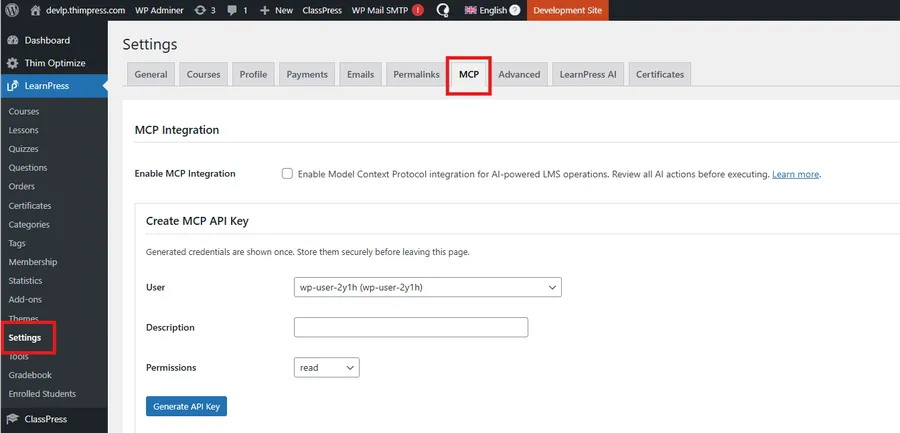
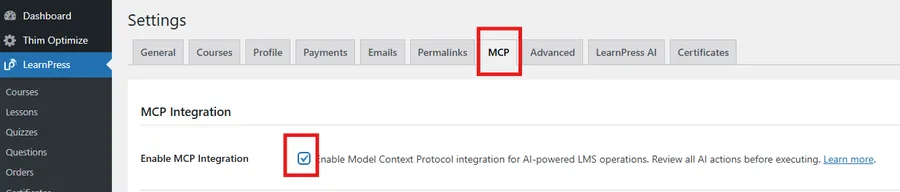
1. The Feature Flag (Disabled by Default): The system is not active out-of-the-box. It must be explicitly enabled by a top-level Administrator navigating to LearnPress > Settings > MCP.
2. Strict Read-Only Operations (For Now): To ensure maximum data safety during this initial rollout, the system currently only supports Read-Only operations. AI agents can analyze data, but they cannot accidentally delete a course or alter a student’s grade.
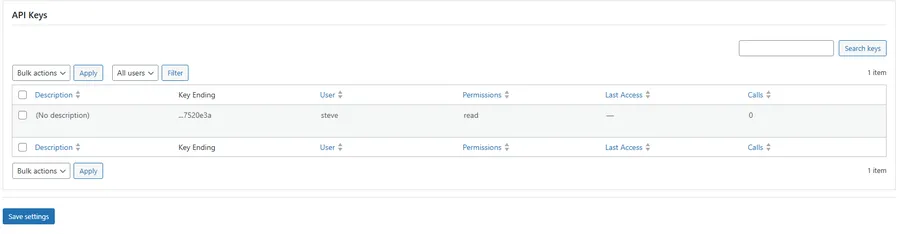
3. API keys authentication & Scopes: AI clients do not use your standard WordPress admin passwords. Instead, we built a dedicated API keys authentication system. These keys are hashed securely in the database and come with specific permission scopes (e.g., read).
4. Custom WordPress Capabilities: We introduced dedicated capabilities to govern AI access. The system enforces strict capability checks, meaning the user account attached to the API key must hold the correct permissions before the AI can retrieve any information.
Security Best Practice: We highly recommend creating a separate WordPress User specifically for your AI integrations, granting them Application Passwords, and strictly monitoring their key usage statistics (last access, call counts) provided in the new LearnPress admin panel. For teams extending this architecture beyond LMS data, for example, pulling search visibility metrics into AI-driven dashboards by connecting to an SEO API can enrich the data available to AI agents with keyword, ranking, and competitive intelligence at scale.
Chapter 6: Deep Dive into the 8 Core Abilities
Once authenticated through the WordPress MCP integration, your AI client can discover and utilize 8 core capabilities registered within the system:
- learnpress/get-courses: List courses with advanced filters (status, category, instructor, price range, search keyword).
- learnpress/get-course-details: Retrieve a deep dive into specific courses, including the full curriculum summary and prerequisites.
- learnpress/list-lessons: View lessons categorized by specific sections.
- learnpress/get-lesson-details: Extract lesson content, video embeds, and attached downloadable materials.
- learnpress/list-quizzes: Discover all quizzes attached to a specific course.
- learnpress/get-quiz-details: View crucial assessment data like time limits, passing grades, and question counts.
- learnpress/get-student-progress: Handle comprehensive student progress tracking, including completion percentages and exam results.
- learnpress/get-enrollments: Generate lists of active, completed, or expired course enrollments.
Chapter 7: Getting Started with Claude Desktop integration
Note: This feature requires WordPress 6.9 or later.
For developers eager to test this architecture, the current implementation utilizes a local proxy approach to connect clients with your remote server via our WordPress MCP integration. Here is a quick guide on setting up your Claude Desktop integration:
Step 1: Enable the Feature: Navigate to LearnPress > Settings > MCP and check “Enable MCP Integration”.
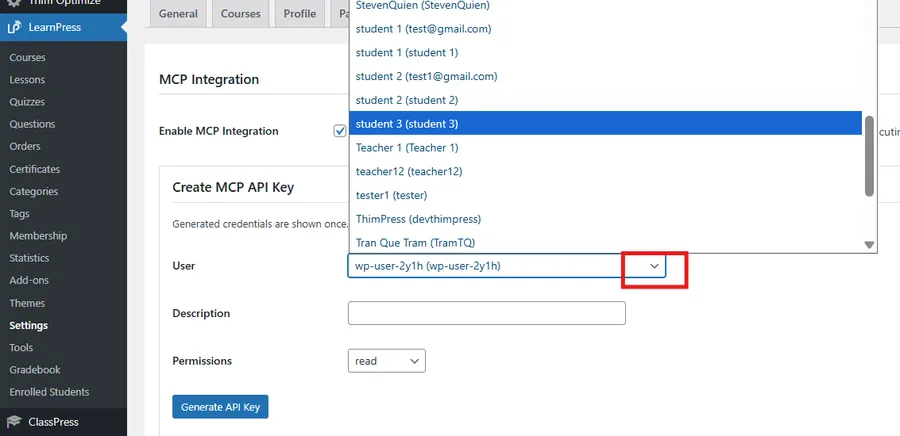
Step 2: Generate CredentialsGo to the MCP API Keys section to create your credentials. First, select the User from the dropdown menu who will own this API key (ensure this user has the necessary administrative permissions). While the Description field is technically optional, we highly recommend filling it out with a clear, identifiable name (such as “Claude Desktop Integration”). This ensures you can easily track and manage multiple keys.
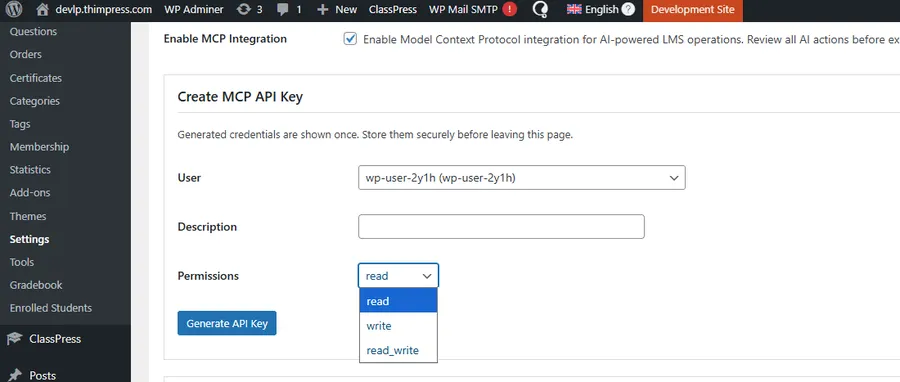
Next, set the permissions to Read. (Note: You will see options for write and read_write in the dropdown. As mentioned in our roadmap, these are placeholders for upcoming features. For the current secure rollout, please stick to Read). > Finally, click Generate API Key, and securely copy the provided Consumer Key and Consumer Secret.
Step 3: Base64 Encode Your Credentials
You must encode your credentials for HTTP Basic Authentication. Open your terminal and run:
echo -n “ck_your_key:cs_your_secret” | base64
Step 4: Connect Your AI Client
Use the following configuration snippet in your terminal to finalize the Claude Desktop integration using the Automattic remote proxy:
Bash
claude mcp add learnpress_mcp \
–env WP_API_URL=https://yoursite.com/wp-json/lp/v1/mcp \
–env CUSTOM_HEADERS='{“Authorization”: “Basic BASE64_ENCODED_CREDENTIALS”}’ \
— npx -y @automattic/mcp-wordpress-remote@latest
Once connected, open your AI interface and ask it to list your courses. You are now communicating directly with your database!
Chapter 8: The Roadmap—What’s Next?
This Read-Only phase is just the beginning. Our engineering team is already hard at work developing the next monumental leap: Write Capabilities.
In the near future, you will be able to grant read_write permissions to your AI agents. This will unlock the true power of a fully automated agentic AI LMS.
Imagine typing into an AI chat: “Create online course focusing on ‘Beginner SEO’, generate 10 multiple-choice quiz questions, set the price to $49, and publish it.” TheAI course creator will seamlessly execute these write commands, building out your entire curriculum directly in the backend while you watch. The WordPress MCP integration will turn these prompts into reality.
Conclusion
The native WordPress MCP integration marks a historic milestone for digital education. By embracing open standards and prioritizing developer flexibility, we are ensuring that your educational platform is not just ready for today’s market, but primed for tomorrow’s AI-driven economy.
Whether you want to build custom WordPress LMS AI agents for your students or automate your administrative data analysis, the tools are now in your hands.
Upgrade to the latest version today, generate your first API key, and transform your website into the ultimate Model Context Protocol LMS. By doing so, you will proudly launch the next generation of an agentic AI LMS.
Read more: How to Create LearnPress Certificates: 5 Easy Steps (V2.0 Update)
Contact US | LearnPress:
Website: https://learnpresslms.com/
Fanpage: https://www.facebook.com/learnpresslms
Email: [email protected]