Picking a learning management system is straightforward until you start looking at the price tags.
Some platforms hide their costs behind per-user fees, transaction cuts, and mandatory add-ons. Others look expensive upfront but save you thousands over time.
This guide breaks down every LMS pricing model, compares the most popular platforms side by side, and shows you exactly where the hidden costs live — so you can make a confident decision before spending a dollar.
LearnPress – WordPress LMS Plugin
We provide an amazing WordPress LMS plugin to create & sell online courses. Let’s find out!
Try NowTable of Contents
What Drives LMS Software Cost?
LMS pricing is not one-size-fits-all. A solo course creator, a mid-size corporate training team, and a university with 50,000 students all have radically different cost profiles.
Before comparing any numbers, it helps to understand the four variables that move the price up or down the most.
Number of users and access model
Most cloud-based LMS platforms price based on how many people access the system, either as registered users (everyone who signs up) or active users (only those who log in during a billing cycle).
The active-user model tends to be cheaper for organizations where many learners sit dormant between training cycles.
A platform charging $5 per active user per month sounds affordable with 100 learners but gets expensive fast when you scale to 2,000. Knowing your projected learner count before you evaluate pricing is non-negotiable.
Deployment model: cloud versus self-hosted
Cloud-based (SaaS) LMS platforms host everything for you. You pay a subscription, and the vendor handles servers, security patches, and uptime.
Self-hosted platforms, including most WordPress LMS plugins, run on infrastructure you control. You pay for your own hosting, but you own the system completely.
For a business running LearnPress on a solid managed WordPress host, total costs often land well below what a SaaS platform charges annually, with far fewer restrictions on courses, users, and revenue.
Feature depth and add-ons
A basic LMS covers course hosting, user management, and quiz delivery. Advanced features like certificates, content drip, co-instructors, live sessions, SCORM compliance, gamification, and payment gateway integrations typically cost extra on most platforms.
Some bundle everything into one plan. Others sell each feature as a separate add-on, which lets you pay only for what you need but can make budgeting unpredictable.
Always map your must-have features against each platform’s pricing tier before committing.
Support, updates, and long-term maintenance
This cost is easy to overlook. SaaS subscriptions generally include support as part of the monthly fee. WordPress plugin licenses typically include 12 months of updates and support, after which you renew at a reduced rate.
If you stop paying on a WordPress plugin, you keep your existing features — they just stop receiving updates. Stop paying a SaaS subscription, and your courses go offline. That distinction matters a lot when calculating long-term LMS software cost.
Common LMS Pricing Models Explained
The learning management system market runs on five distinct pricing models, and understanding them is the fastest way to filter out the platforms that do not suit your situation.
Per-user pricing
You pay a fixed amount for each registered or active learner, typically billed monthly. This model scales predictably for corporate training teams with stable headcounts.
For consumer course platforms with spiky enrolments, it can be harder to forecast. Rates range from under $2 per user per month for entry-level tools to $25 or more for feature-rich enterprise systems.
Flat monthly subscription (SaaS)
You pay a fixed monthly or annual fee for a set of features, usually with user limits tied to each pricing tier. TalentLMS, for example, structures its plans this way — you pick a tier and get everything that tier includes, up to a defined number of users.
This model works well when your learner count is stable and predictable, but upgrading plans as you grow means your LMS cost can jump significantly between tiers.
Open-source with hosting costs
Platforms like Moodle are free to download and run, but “free” covers only the software. You still need to pay for a server, domain, SSL certificate, and someone to configure and maintain the system.
For small organizations without technical staff, managed Moodle hosting can cost anywhere from $120 per year for a starter plan to several thousand dollars annually for a larger deployment.
Open-source pricing works best when you have in-house developers or a tight feature checklist that vanilla Moodle satisfies out of the box.
One-time or annual plugin license (WordPress)
WordPress LMS plugins such as LearnPress and LearnDash operate on a license model. You pay once or annually for the plugin and its premium add-ons, then run everything on your own WordPress hosting. When the license renews, you pay a reduced rate, not the full price.
This model delivers the best long-term LMS software price for anyone already running a WordPress site, because the base infrastructure cost is shared with the rest of your website.
Custom or enterprise pricing
Large organizations with complex workflows, HRIS integrations, SSO requirements, or compliance mandates often need a custom-built or enterprise-tier LMS.
Custom development costs range from $25,000 to $150,000 or more depending on scope, plus around 15 percent of development cost annually for ongoing maintenance. SaaS platforms with enterprise tiers typically price on a per-contract basis and require a sales conversation to get a number.
These solutions are designed for companies deploying training at scale across thousands of employees with tight IT governance requirements.
Learning Management System Price Comparison: 5 Popular Platforms
Before making any decision, putting the main platforms side by side is the fastest way to see where your LMS software cost lands. The table below reflects 2026 pricing for the most commonly compared platforms.
| Platform | Starting price | Pricing model | Transaction fees | User limits | Ownership |
| LearnPress | $0 (Free plan) | Plugin license / one-time | None | Unlimited | You own it (WordPress) |
| LearnPress Pro Bundle | $299/year | Annual license | None | Unlimited | You own it (WordPress) |
| LearnDash | $259/year | Annual license | None | Unlimited | You own it (WordPress) |
| TalentLMS | $119/month | Flat SaaS subscription | None | Per-tier limit | Vendor-hosted |
| Teachable | $39/month + 7.5% fees | Flat SaaS subscription | 7.5% on Starter plan | 100 students (Starter) | Vendor-hosted |
| Moodle | Free (self-hosted) | Open-source + hosting | None | Unlimited | You own it (self-hosted) |
A few things stand out from this comparison.
First, the monthly fees on SaaS platforms add up fast.
TalentLMS at $119 per month works out to $1,428 per year just for the Core plan, before you add any custom domains, advanced reporting, or integrations that may require a higher tier.
Teachable’s Starter plan looks cheap at $39 per month, but the 7.5% transaction fee on every course sale turns a $200 course into a $15 fee per enrollment — those fees compound quickly for any course with meaningful sales volume.
By contrast, LearnPress Pro at $299 per year gives you all 25 premium add-ons, unlimited courses, unlimited students, and zero transaction fees, running on hosting you already control.
The renewal rate drops to $209.30, making the second year meaningfully cheaper. For course creators and schools already on WordPress, that cost structure is very hard to beat.
Hidden LMS Costs Buyers Usually Miss
The published subscription price is only part of the story. These are the costs that catch buyers off guard six months into using a platform.
Transaction fees and revenue cuts
Teachable charges a 7.5% transaction fee on every sale made through its Starter plan. On a $500 course with 50 enrolments per month, that is $1,875 per year going straight to the platform on top of your subscription fee.
You only avoid transaction fees by upgrading to the Builder plan at $89 per month, which adds another $1,068 per year.
WordPress LMS plugins like LearnPress charge zero transaction fees on any plan, including the free version, because payments go directly through your chosen gateway (Stripe, PayPal, WooCommerce, or Razorpay).
Integrations and payment gateways
Most SaaS platforms include only one or two payment gateways natively and charge for additional integrations or lock them behind higher tiers.
LearnPress includes integrations for Stripe, WooCommerce, Razorpay, 2Checkout, Authorize.Net, and Paid Memberships Pro — many of them available as individual add-ons or included in the Pro Bundle.
If your business operates internationally or needs a specific regional payment method, confirm which gateway integrations are included in the plan you’re evaluating and which cost extra.
Content creation and authoring tools
Some platforms include built-in video hosting, SCORM authoring, or AI-powered course builders.
Others require you to bring your own tools. If you need to host video directly on the platform, check whether there are bandwidth or storage caps. Hosting video on Vimeo or YouTube and embedding it into LearnPress lessons is a straightforward workaround that keeps costs low without sacrificing quality.
User cap overages and plan upgrades
SaaS platforms with user caps can force unexpected plan upgrades. If you launch a successful course and enrolments push you past your tier limit, you either pay for the next tier immediately or lock new students out.
Moodle and WordPress plugins like LearnPress have no such limits — you can enrol as many students as your hosting can support. For a business scaling quickly, the absence of user caps is a meaningful financial safety net.
Annual renewal and price increases
SaaS platforms reserve the right to increase pricing at renewal. Teachable restructured its pricing in June 2025, eliminating the free plan and introducing student caps and product limits that affected existing customers on legacy plans.
Some users reported costs doubling or tripling after that change. LearnPress renewal pricing is set at the time of purchase ($209.30 for the Pro Bundle), and if you stop renewing, you keep your existing install and features — they just stop receiving new updates.
LearnPress Pricing: The Most Cost-effective WordPress LMS
LearnPress is the most installed LMS plugin for WordPress, with over 90,000 active installations and 5 million downloads.
It is built by ThimPress and designed to give you a complete e-learning platform on your existing WordPress site without locking your courses, data, or revenue behind a vendor’s servers. Here is what each plan includes and who it is best suited for.
Free plan
The LearnPress free plan is genuinely usable — not a stripped-down teaser designed to push you into a purchase.
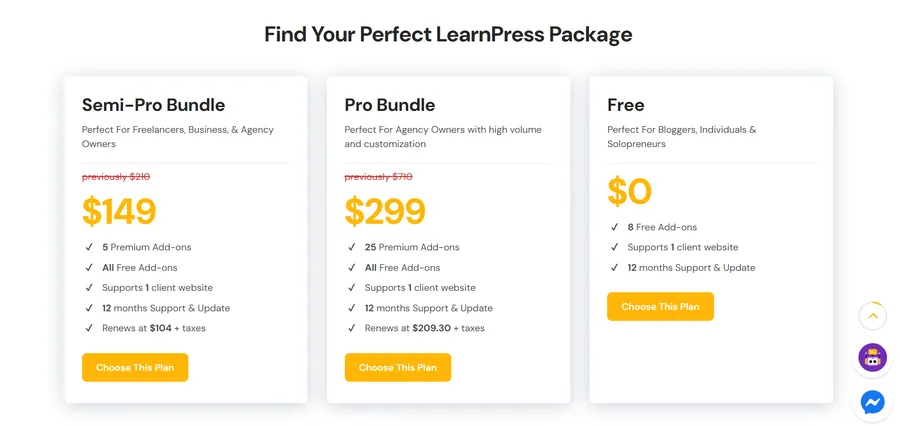
You get unlimited courses, unlimited lessons, unlimited students, and the core quiz engine out of the box, along with 8 free add-ons including Course Wishlist, Course Review, Student List, Prerequisites Courses, bbPress Integration, BuddyPress Integration, a Coming Soon add-on, and the LearnPress Mobile App add-on.
You can sell courses immediately using built-in basic payment methods. For a blogger, a solo coach, or an individual educator just getting started, the free plan covers everything you need to launch and start earning.
Semi-Pro Bundle ($149)
The Semi-Pro Bundle layers the most commonly requested premium features on top of the free plan at a cost that undercuts most SaaS platforms by a wide margin.
It includes the WooCommerce add-on (which opens up the full WooCommerce payment ecosystem), Certificates, Assignments, Gradebook, and Stripe — five add-ons that together cover the core requirements for a professional online school. At $149 for a 12-month license on one site, it costs less than two months of TalentLMS’s entry-level plan.
Pro Bundle ($299)
The Pro Bundle is the complete LearnPress package. It includes all 25 premium add-ons plus all free add-ons, covering every capability the platform offers: Content Drip, Co-Instructors, Memberships and Subscriptions, Frontend Editor, Live Course, Collections (learning paths), WPML for multilingual sites, Commission management for multi-instructor marketplaces, myCRED gamification, Random Quiz, Announcement, and more.
It supports one client website and comes with 12 months of support and updates. Renewal pricing is $209.30.
For agencies building e-learning sites for clients, or for any school that needs the full feature set, the Pro Bundle delivers agency-level capability at a fraction of what SaaS platforms charge annually.
Build your own plan
If you only need one or two specific premium features, LearnPress lets you purchase individual add-ons starting at $19 each. You pay only for what you need, and you can upgrade to the Pro Bundle at any time.
This flexibility is unusual in the LMS market — most platforms force you into a tier whether or not you use everything in it. Individual add-on pricing runs from $19 for features like Collections, Live Course, and Sorting Choice, up to $49 for the WooCommerce integration and the Frontend Editor.
When you compare the full picture, the LearnPress value proposition is hard to argue with: a free plan that is actually functional, a Pro Bundle that renews at under $210 per year, no transaction fees, no user caps, and full ownership of your courses and data on WordPress infrastructure you control.
Which LMS is the right fit for your budget?
The right LMS depends on three things: where you publish your content, how many learners you plan to serve, and whether you want to own the platform or rent access to it.
If you are already on WordPress or plan to build there, a WordPress LMS plugin is almost always the most cost-effective path. LearnPress in particular gives you a fully functional free option to start, a clear upgrade path with transparent pricing, and no per-user fees regardless of how fast your audience grows. You keep your data, your courses, and your revenue stream on infrastructure you own. If LearnPress Pro at $299 per year still sounds like too large an upfront commitment, you can start with the free plan, add one or two individual add-ons as your needs grow, and move to the Pro Bundle when the math makes sense.
If you are a corporate L&D team that needs HR system integrations, SSO, compliance tracking across a large workforce, and a vendor-managed environment with guaranteed uptime SLAs, a SaaS platform or enterprise LMS is the more appropriate tool. The higher cost reflects the managed infrastructure and enterprise-grade integrations your IT team would otherwise need to configure and maintain.
If you are a solo creator focused on selling courses to consumers and you want a hosted platform with built-in marketing pages, Teachable or a comparable SaaS tool can work for an early-stage launch. Just go in with clear eyes about the transaction fee structure. A 7.5% fee on $10,000 in monthly course revenue is $9,000 per year — enough to pay for a premium WordPress LMS setup with substantial room to spare.
The most common mistake in LMS buying is anchoring to the monthly subscription price without calculating total cost of ownership over two or three years, including transaction fees, plan upgrades, and the hidden cost of being locked out of your own content if you stop paying.
FAQs About LMS Pricing
How much does an LMS cost per user?
LMS cost per user varies dramatically by platform type. SaaS platforms with per-user pricing typically charge between $2 and $25 per user per month, while flat-subscription platforms like TalentLMS cap users at each pricing tier without charging per head. WordPress LMS plugins like LearnPress have no per-user cost at all — you pay one annual license fee regardless of how many students enrol, which makes them significantly cheaper per user as your audience scales.
What is the cheapest LMS for small businesses and course creators?
LearnPress is the most cost-effective option for small businesses and individual course creators, because its free plan is genuinely functional — you can create unlimited courses, enrol unlimited students, and sell course access without paying anything upfront. For creators who need features like certificates, assignments, or Stripe payments, the Semi-Pro Bundle at $149 per year costs less than two months of most SaaS platforms. Moodle is also free as software, but factor in server setup and maintenance costs before treating it as the cheaper option.
Is open-source LMS really free?
The software itself is free, but running an open-source LMS has real costs. You need a server (typically $20 to $100 per month for managed hosting depending on your learner volume), a domain name, an SSL certificate, and either technical expertise or paid support to configure and maintain the system. For small organizations, a managed Moodle plan or a WordPress plugin like LearnPress often works out cheaper than self-hosting Moodle once you account for all the infrastructure and maintenance costs involved.
What is the difference between a SaaS LMS and a WordPress LMS plugin?
A SaaS LMS is hosted entirely on the vendor’s servers. You pay a monthly or annual subscription and access the platform through a browser, but you do not own the underlying system. If you stop paying, your courses and student data are locked behind the vendor’s login. A WordPress LMS plugin installs on your own WordPress site and runs on hosting you control. You own your content, your student database, and your revenue stream outright. LearnPress is a WordPress LMS plugin: your courses live on your server, your payments go directly to your gateway, and your data stays yours regardless of whether you renew your license.
Read more: Powerful LearnPress AI Assistant: Boost Your LMS
Need more help? We’re here for you
Can’t find the answer in the docs? Reach out to our support team—we’re happy to assist you directly.

AVAILABLE 24/7
Chat with Our AI Assistant