Online learning offers incredible convenience, but it often comes with a significant challenge: isolation. Have your students ever read a complex definition in your online courses, felt completely confused, and eventually given up because no instructor was there to answer their questions immediately? This lack of immediate feedback is exactly why many students abandon their digital studies before completing the final modules.
This is a common struggle across the entire e-learning industry. However, today, we are officially introducing a groundbreaking solution that will completely change how we approach digital education and student retention.
We are incredibly proud to announce the launch of the LearnPress AI Assistant—a revolutionary feature that transforms your static course website into a highly engaging, two-way interactive online learning environment. If you have been searching for a way to modernize your digital academy without needing custom LMS development, this is the exact answer you have been waiting for. Let us explore what makes this feature so special and how it will benefit both learners and website administrators.
LearnPress – WordPress LMS Plugin
We provide an amazing WordPress LMS plugin to create & sell online courses. Let’s find out!
Try NowTable of Contents
What is the LearnPress AI Assistant?
Simply put, the LearnPress AI Assistant is an intelligent virtual tutor built directly into each student’s learning screen.
In the past, if a student did not understand a concept, they had to open a new browser tab, search Google, or log into an external artificial intelligence website to find answers. This constant switching of tabs completely destroys their concentration. This powerful LMS AI assistant solves that problem by being deeply embedded within the actual lesson interface.
It actively reads and understands the entire context of your lesson content, standing by twenty-four hours a day, seven days a week to help learners. It can answer questions, summarize long paragraphs of information, and create instant practice exercises based strictly on your syllabus.
For website administrators and educators, having a reliable LMS AI assistant means you can provide personalized, real-time support to thousands of students simultaneously without hiring a massive human support team. It is a major leap forward for AI powered LMS technology. The system knows exactly what the student is reading at any given moment, making its responses highly accurate, deeply contextual, and incredibly relevant to your specific teaching materials.
Where Can Students Find the LearnPress AI Assistant?
We carefully designed the user interface so the technology does not distract the learner but remains instantly accessible whenever they need a helping hand. To use the LearnPress AI Assistant, a student simply needs to follow these clear and easy steps on your website:
Step 1: Log in to the educational website using their registered account credentials.
Step 2: Navigate to their personal dashboard and open any enrolled course they are currently studying.
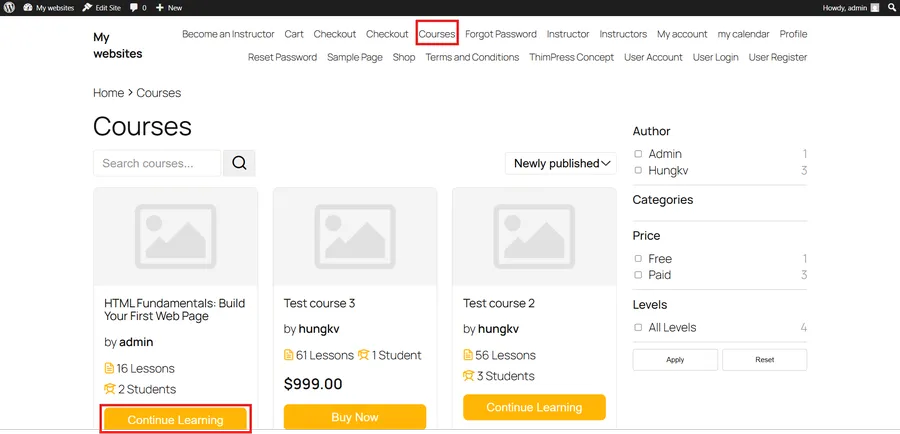
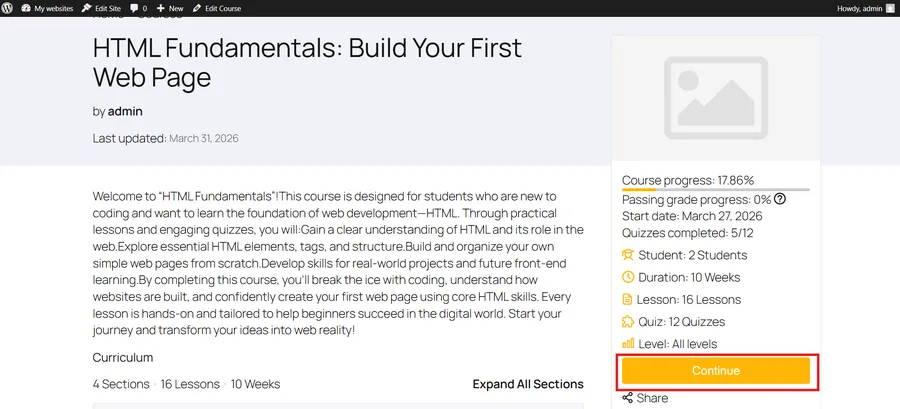
Step 3: Click the Start Now or Continue button to start/ resume studying exactly where they left off previously.
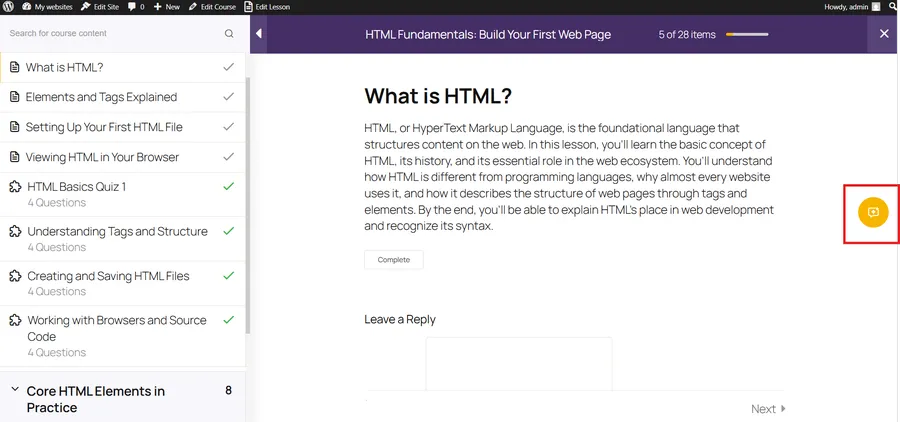
Step 4: Once inside a specific lesson, look to the right side of the screen. You will see a prominent, user-friendly icon.
Step 5: Click that button, and a smart chat window will smoothly slide out, ready to help immediately!
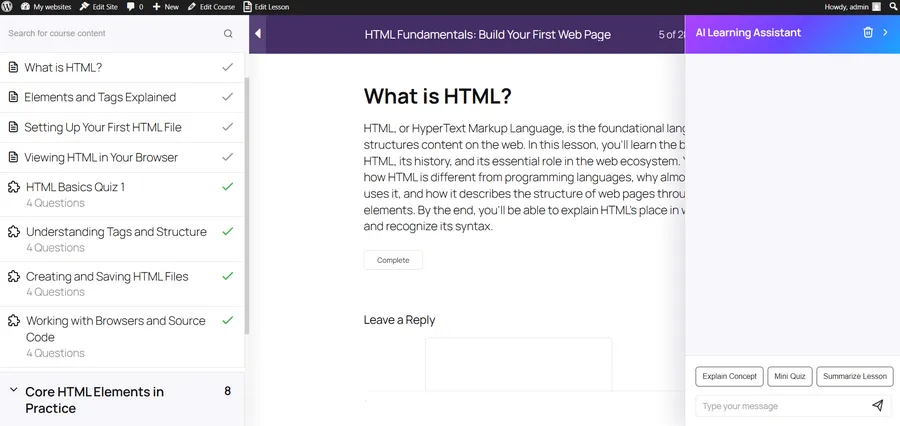
This seamless integration ensures that your interactive AI tutor is always just one simple click away. Students never have to leave your educational platform to find the answers they desperately need, which keeps them engaged and focused on completing their educational journey.
Four Magical Features for Learners
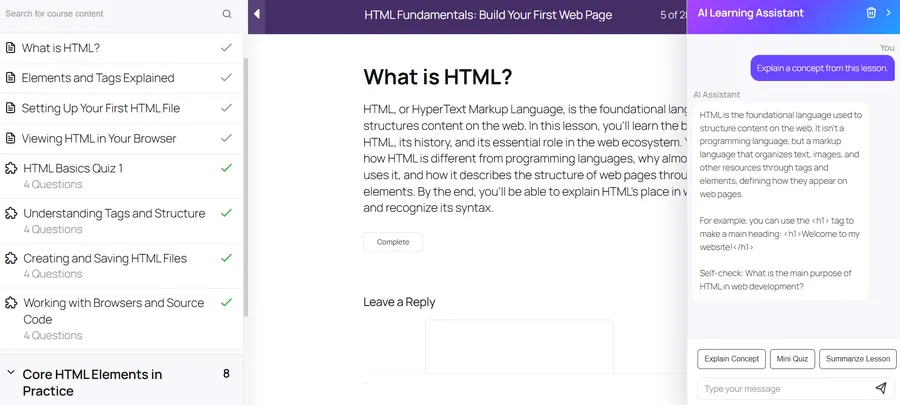
When the chat window opens, students are equipped with four core tools to conquer even the most difficult subjects. These features are designed to handle every aspect of the comprehension process.
1. Summarize Lesson
Are your students reading a massive, text-heavy article and need the main points quickly? With just one click, the AI lesson summary feature will scan the entire page and generate clear bullet points of the key concepts and critical takeaways in seconds. Using an AI lesson summary is absolutely perfect for quick revisions before a student moves on to the next module. If they are in a rush, a reliable AI lesson summary ensures they do not miss any vital information.
2. Explain Concept
If a learner encounters a confusing technical term or a complex theory, they no longer need to rely on generic external search engines. The interactive AI tutor will explain the concept based specifically on the context of the current lesson you provided. This contextual understanding makes complex knowledge much easier to grasp and apply in real-world situations. Having an interactive AI tutor is like having a subject matter expert sitting right next to the student at all times.
3. Quick Quiz
Theory must always be paired with active practice to ensure true comprehension. The AI quick quiz feature allows the system to automatically generate short multiple-choice questions based directly on the lesson the student just read. They can test their knowledge instantly to prevent forgetting material. It is a brilliant quiz design upgrade that requires zero manual effort from the instructor. Every time a student clicks the AI quick quiz button, they actively reinforce their memory. A simple AI quick quiz can dramatically change how students interact with passive text.
4. Smart Review
This feature activates automatically after a student finishes taking a test. Instead of just displaying a final passing or failing score, the interactive AI tutor deeply analyzes the incorrect answers. It explains exactly why the student made a mistake and guides them toward the correct way of thinking without just giving away the answer. This turns every single mistake into a valuable, constructive learning opportunity.
Real Benefits: Learn Faster, Understand Deeper
Acting as a dedicated LMS AI assistant, this tool accompanies students through every single stage of their educational journey. When you create a course, you want your students to succeed, and this tool guarantees better outcomes. Let us break down exactly how this impacts the learning process at different stages:
- Before deep study: Students can use the AI lesson summary to get a bird’s-eye view of what they are about to learn. Knowing the destination helps the brain absorb information much better. A quick AI lesson summary sets the perfect foundation for absorbing heavy academic materials.
- During the lesson: Whenever a student feels confused or stuck, they can use the Explain Concept tool. It is exactly like raising a hand in a physical classroom and getting an immediate, tailored answer from your interactive AI tutor, keeping the learning flow entirely uninterrupted.
- After the lesson: Students should not rush to the next topic immediately. They can click the AI quick quiz button. Immediate self-testing is a scientifically proven method to move knowledge from short-term memory to long-term memory. A timely AI quick quiz dramatically improves retention rates. If they make a mistake, the Smart Review function will patch that specific knowledge gap instantly.
By utilizing the LearnPress AI Assistant, you are providing a premium, highly personalized educational experience that rivals and often exceeds traditional physical classrooms.
Essential Configurations for Administrators
This feature is incredibly powerful, but we fully understand that website owners need absolute control over their operational costs and data security. Just like managing your enrolled students list, you have full administrative authority over how this tool operates on your specific website.
Here are the ways you can configure the LearnPress AI Assistant to perfectly suit your business model:
1. Basic Requirements and Security:
First and foremost, the artificial intelligence system only appears when a student is actively logged into their account. Guests cannot access it. Furthermore, the website administrator must explicitly enable this feature in the backend settings and successfully configure the OpenAI API connection. Nothing happens without your direct permission.
2. Managing the Free Chat Feature:
By default, students can click the predefined Quick Action buttons (like Summarize and Quiz). However, administrators have the exclusive power to turn the Free Chat feature on or off.
- If OFF: Students can only use the predefined quick action buttons. This keeps the interaction strictly focused on the provided tools.
- If ON: Students can type natural language questions directly into the chat box. For example, they can ask the system to provide three real-world examples of a theory, and the LMS AI assistant will generate a custom response instantly.
3. Controlling Operational Costs (Token Limits):
To prevent potential abuse and manage your API usage costs effectively, the system allows administrators to set a daily token limit for each individual student. You can establish a specific number of tokens allowed per day, or you can choose to leave it “Unlimited” for high-paying premium learners. This granular control ensures your LMS AI assistant remains a highly cost-effective and profitable solution for your educational business.
Why You Need the LearnPress AI Assistant Today
The digital education market is becoming increasingly competitive every single day. Students now expect more than just static videos and long pages of text; they expect interactive, engaging, and supportive environments.
If you want your academy to stand out from the crowd, integrating the LearnPress AI Assistant is no longer just a luxury; it is a necessity. It reduces your administrative burden, lowers the number of support tickets you receive regarding confusing course materials, and drastically increases overall student satisfaction.
When students feel supported, they finish their courses. When they finish their courses, they leave positive reviews and purchase your advanced programs. The LearnPress AI Assistant is the key to unlocking higher completion rates and building a loyal community of successful learners.
Conclusion: Embrace the Future of Education
The official launch of the LearnPress AI Assistant marks a massive step forward in modernizing the e-learning experience on the WordPress platform. It completely redefines what an online course can be.
It not only saves your students precious time and deepens their academic understanding, but it also helps course creators and digital entrepreneurs significantly improve their business metrics. By bringing an intelligent helper directly to the student’s screen, you remove the traditional barriers to learning.
Upgrade your educational platform today. Configure your OpenAI settings, introduce these groundbreaking features to your audience, and deliver the absolute future of education directly to your students’ screens. The LearnPress AI Assistant is ready to transform your website right now. Do not wait to modernize your academy; let the LearnPress AI Assistant take your courses to the next level today.
FAQs About LearnPress AI Assistant
1. Does the LearnPress AI Assistant work automatically on all courses?
Yes, once enabled by the website administrator, the AI Assistant is automatically accessible across all your published courses. It dynamically reads and understands the specific content of whatever lesson the student is currently viewing to provide accurate, context-aware answers and summaries.
2. Can students cheat on quizzes using the AI Assistant?
No, they cannot. The AI quick quiz feature is designed for practice and self-assessment, not for finding answers to existing graded tests. The AI generates completely new, unrecorded questions based on the lesson text, ensuring students focus on actual learning rather than searching for shortcuts.
3. Is there a risk of high API costs if students use the AI too much?
Not at all. We have built-in robust cost-control features. Administrators can easily set a specific daily token limit for each individual user. Once a student reaches their limit, the AI Assistant will pause until the next day, ensuring you have total predictability over your operational expenses.
Read morre: WordPress MCP integration: 8 Powerful Steps to an Agentic AI LMS