Tuition management systems are software platforms that handle fee collection, student enrollment, class schedules, attendance, and progress reports from one dashboard. If you run a school, a coaching center, or a small tutoring business, you have probably spent evenings matching bank transfers to a spreadsheet and chasing parents on a group chat just to learn who has paid.
This guide explains how tuition management systems work, which features matter most, and how they compare with other types of school software. It also shows how WordPress site owners can build a tuition-focused learning platform with LearnPress and Eduma, and where that approach does not fit.
LearnPress – WordPress LMS Plugin
We provide an amazing WordPress LMS plugin to create & sell online courses. Let’s find out!
Try NowTable of Contents
What are tuition management systems?
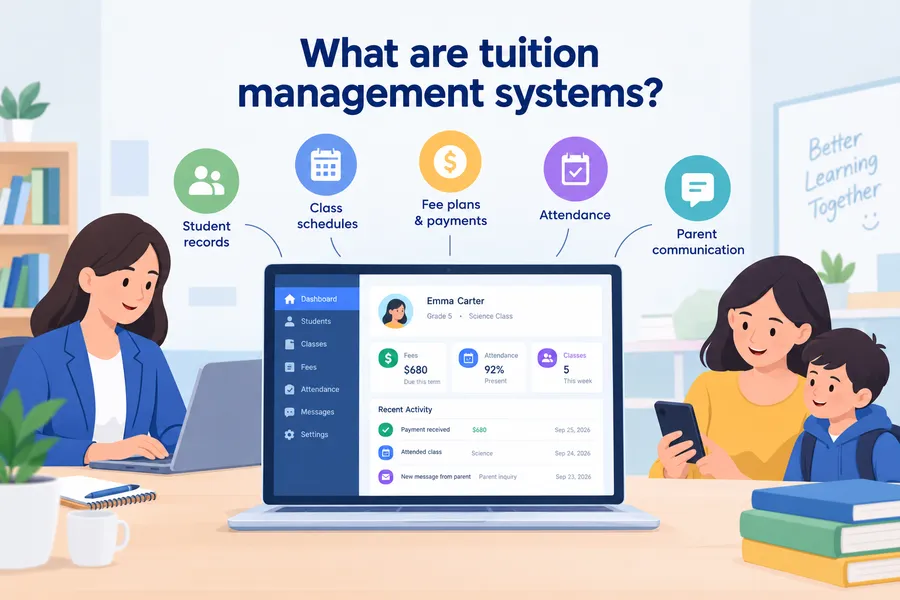
A tuition management system is software built around the money and the people side of teaching. It keeps student records, class groups, fee plans, invoices, and attendance in one place so that office staff and teachers stop working from separate files.
A simple definition
A tuition management system is a web-based tool that tracks student enrollment, tuition fees, payments, attendance, and communication with parents. Most tuition management systems run in the browser, and many add a mobile app for teachers and parents. The core idea is simple: every student has one profile, and every fee, class, and note links back to that profile.
The word “tuition” matters here. These tools are designed for recurring or term-based payments, such as monthly fees, per-session fees, or installment plans. A general accounting tool can record income, but it does not know that a student missed three sessions and is owed a make-up class.
Who uses them
Three groups use these tools most often.
- Private tutoring centers and coaching institutes. They need batch scheduling, monthly billing, and quick attendance marking.
- Small and mid-size schools. They want a lighter alternative to heavy school management suites, with a focus on fees and student records.
- Independent tutors and academies. They need reminders, receipts, and a simple parent portal without hiring an administrator.
Larger districts usually need full school administration software. We cover the difference later in this guide.
Why schools and tutoring centers need one
Manual tracking works when you have 15 students. It starts to fail around 50, and by 150 it creates real money problems. A proper system fixes the daily friction that staff often accept as normal.
Problems with spreadsheets and paper
Spreadsheets are flexible, but they have no memory of rules. Nothing stops two people from editing the same cell, and nothing sends a reminder when a payment is late.
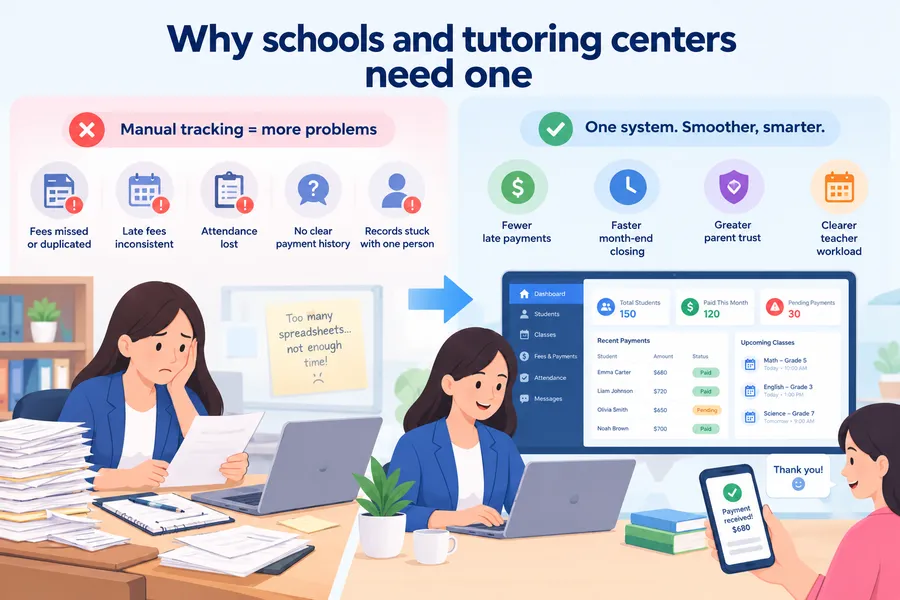
Common problems we see in centers that rely on paper and spreadsheets include:
- Fees recorded twice or not recorded at all
- Late fees applied inconsistently, which leads to disputes
- Attendance sheets that never reach the main file
- No clear history when a parent asks, “Which months have I paid for?”
- Staff turnover that leaves the records only one person understands
Weak student management also hurts teaching. When a teacher cannot see a learner’s attendance and payment status in one view, small issues stay hidden until the student drops out.
What changes after you switch
Once data lives in one system, the work shifts from chasing information to using it. Staff can see unpaid invoices in a single filtered list. Teachers mark attendance on a phone in under a minute. Parents get automatic receipts and reminders instead of phone calls.
The practical benefits are easy to measure:
- Fewer late payments, because reminders go out automatically
- Faster month-end closing, since reports come directly from the system
- Better parent trust, because receipts and balances are always visible
- Clearer teacher workload, because schedules are tied to rooms and batches
Core features to look for
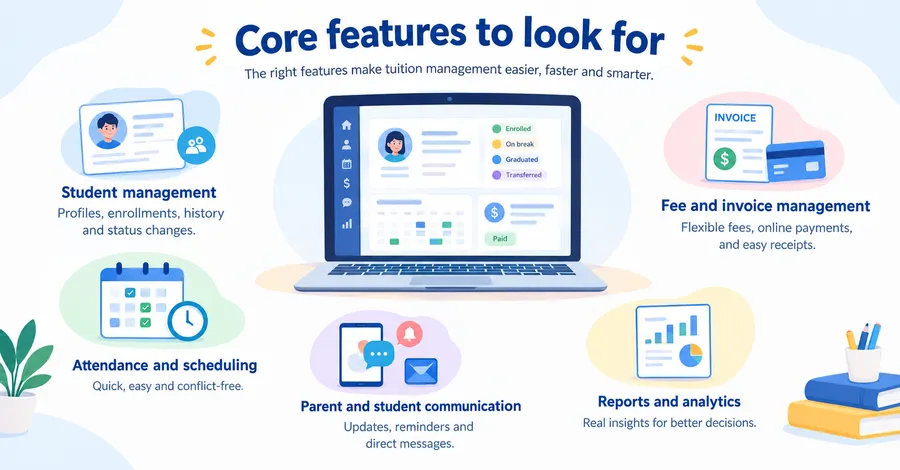
Every vendor claims to do everything, so it helps to judge features against daily tasks. The sections below cover the five areas where tuition management systems earn their keep.
Student management
Good student management starts with a clean profile. Look for guardian contacts, enrollment date, class or batch, previous results, and notes from teachers. The system should let you import records from a CSV file, because typing 300 students by hand is a bad way to start.
Also check how the system handles status changes. Students pause, transfer, graduate, or return after a break. If the software cannot show these states clearly, your reports will mix active and inactive students.
Fee and invoice management
This is the heart of the product. You should be able to create fee structures by class, subject, or term, and apply discounts, sibling rates, or scholarships without manual edits.
Check these items before you commit:
- Support for installments and partial payments
- Automatic invoice numbering and tax fields if you need them
- Online payment gateways that work in your country
- Late fee rules that you can adjust
- Receipt generation as PDF or email
Attendance and scheduling
Attendance should take seconds, not minutes. The best tools let a teacher open a class list on a phone and tap present, absent, or late. Scheduling features should flag clashes in rooms and teachers, and allow make-up sessions.
Some centers link attendance to billing for per-session pricing. If that is your model, confirm that the system can do it before you sign up.
Parent and student communication
Parents want two things: clear balances and timely news. A parent portal, SMS, or email alerts cover both. Look for templates for reminders, holiday notices, and exam schedules, and check whether messages can be sent to a single batch instead of everyone.
Reports and analytics
Reports should answer real questions. Which classes have the highest dropout rate? How much revenue is overdue this month? Which teacher has the best attendance rate? If the system only offers fixed reports, ask whether you can export raw data to a spreadsheet.
How tuition tools relate to school administration software
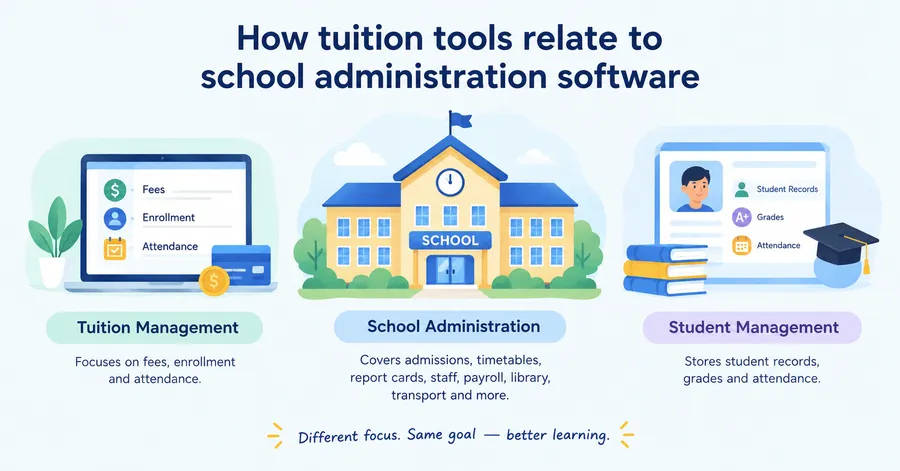
Many buyers get confused because vendors use similar names for different products. A short comparison clears this up before you spend money.
Tuition management vs school administration software
School administration software covers the full operation of a school. That includes admissions, timetables, report cards, staff payroll, library, transport, and government reporting. Tuition management systems focus on a narrower area, mainly fees, enrollment, and attendance.
If you run a licensed school with a formal curriculum, grading rules, and official records, you probably need school administration software. If you run after-school classes, language training, or exam prep, a tuition-focused tool is usually faster to set up and cheaper to run.
Where school management and student management system software overlap
The labels overlap because the data overlaps. Student management system software stores records, grades, and attendance. School management tools add staff, finance, and operations on top. A tuition system uses part of both.
Here is a simple way to remember it:
- Student management system software answers “Who is the student and how are they doing?”
- School management answers “How does the whole institution run?”
- Tuition management answers “Who owes what, and who attended which class?”
Some products bundle all three, and some focus on one. Read the feature list, not just the product name.
Do you need classroom monitoring software?
Classroom monitoring software lets teachers see what students are doing on their screens during a lesson. It is common in schools that use laptops or tablets, and in online classes where the teacher wants to confirm that students stay on task.
This kind of tool is separate from tuition billing. Most tutoring centers do not need it. A school with a one-to-one device program might, but only after the basics of records and fees are working. If you do consider classroom monitoring software, check the privacy rules in your region, tell parents and students what is being monitored, and avoid tools that capture more data than the lesson requires.
Comparison of the main software types
The table below compares the options most buyers consider. It uses general categories, so individual products will vary.
| Option | Best for | Main strengths | Main limits | Typical pricing model |
|---|---|---|---|---|
| Tuition management system | Tutoring centers, coaching institutes, small schools | Fee tracking, reminders, attendance, parent portal | Light on timetables, grading, and staff payroll | Monthly subscription per student or per center |
| School administration software | Full schools and districts | Admissions, timetables, report cards, finance, staff records | Longer setup, higher cost, more training needed | Annual license or per-student yearly fee |
| Student management system software | Schools that need strong records and results | Profiles, grades, attendance, transcripts | Billing features may be basic | Subscription or one-time license |
| WordPress LMS plugin (for example, LearnPress) | Online or hybrid tuition with video, quizzes, and paid courses | Course delivery, quizzes, certificates, WooCommerce and payment add-ons | Not a full fee ledger or timetable tool | Free core plugin plus paid add-ons |
| Classroom monitoring software | Schools with student devices or live online classes | Screen visibility, focus control during lessons | No billing, no enrollment management | Per-device or per-teacher subscription |
| Spreadsheets | Very small tutors under about 20 students | Free, flexible, familiar | Manual work, errors, no reminders | Free |
Use the table as a starting point. The right answer often combines two tools, such as a tuition system for fees and a WordPress site for online lessons.
How to choose the right system
A good choice starts with your workflow, not the vendor demo. The steps below keep the process practical.
Start with your workflow
Write down how a student moves through your center, from first inquiry to final payment. Mark every point where staff currently use paper or a spreadsheet. These are the points where software should save time.
Then rank your needs. For a tutoring center, the top three are often fee tracking, attendance, and parent reminders. For a school, they may be student management, report cards, and timetable control.
Check payments and data protection
Payment support differs by country. Confirm that the system supports your local gateway, currency, and tax format. Test one real payment before rolling out to all parents.
Data protection matters because you hold information about minors. Ask where the data is stored, who can access it, and how backups work. Depending on your location, rules such as FERPA in the United States or GDPR in the European Union may apply. This article does not give legal advice, so check with a qualified professional about your obligations.
Test with real data
Do not judge a system from a sample school. Import a small batch of your own students, create two fee plans, mark attendance for one class, and generate a report. If any of these steps feels confusing in a trial, it will feel worse with 200 students.
Ask two teachers and one office staff member to try it as well. Software that only the administrator likes rarely survives the first term.
Compare the total cost
Look beyond the monthly price. Add setup fees, payment gateway charges, SMS credits, extra storage, and the cost of training. A cheap plan that charges for every SMS can end up more expensive than a flat plan.
Also ask about export. You should be able to take your data out in a standard format if you ever leave.
Watch for red flags
Be careful if a vendor:
- Cannot explain where student data is stored
- Refuses to offer a trial or demo with your own data
- Has no clear support channel or response time
- Locks your records behind a long contract with no export option
- Promises that one product will replace every tool you use
Building a tuition platform on WordPress with LearnPress and Eduma
If your tuition business includes online lessons, WordPress can be a practical base. It does not replace a full fee ledger, but it handles course delivery, enrollment, and payment well.
Where LearnPress fits
LearnPress is a free WordPress LMS plugin that lets you create courses, lessons, quizzes, and student profiles. It works well for tutoring centers that sell courses or class packages online, because enrollment and payment can run through the same site.
In a typical setup, you install the plugin from Plugins > Add New, create a course under LearnPress > Courses, and add lessons and quizzes in the curriculum tab. Paid courses can be connected to payment methods through the add-ons that LearnPress offers, and you can use certificates, assignments, and student lists to track learner progress. Check the add-on list on the LearnPress website for the current options, since available LearnPress add-ons change between releases.
For student management, LearnPress gives you learner profiles, enrollment status, and course progress. That is useful for online tuition, where you want to see who completed which lesson. It is not designed to record cash payments, print fee vouchers, or manage physical timetables.
Where Eduma fits
Eduma is an education WordPress theme from ThimPress that is built to work with LearnPress. It supplies the front-end design, including course archives, instructor pages, event listings, and a homepage layout suited to a school or training center.
For a tutoring brand, the benefit is speed. You can import a ready-made demo, replace the logo and colors, and publish a professional site without custom code. Eduma works with page builders such as Elementor and WPBakery, so non-developers can adjust layouts. If you plan to customize templates, create a child theme first so updates do not overwrite your changes.
What WordPress cannot replace
It is better to be clear about limits. A WordPress learning site is a strong choice when your main goals are:
- Selling and delivering online or hybrid courses
- Giving students a login to view lessons and results
- Building a brand site with a course catalog
It is a weaker choice when your main goals are:
- Daily paper-based attendance for physical classes
- Complex fee structures with sibling discounts and installment ledgers
- Government reporting and full school administration software features
Many centers solve this by using a dedicated tuition tool for fees and LearnPress with Eduma for online learning. If your needs are mostly online, WordPress alone may be enough.
Basic setup steps
This outline is based on current LearnPress and Eduma releases. Menu names may change in newer versions.
- Install WordPress on reliable hosting and set up HTTPS.
- Install and activate the Eduma theme, then import a demo from the theme’s demo importer.
- Install LearnPress and run its setup wizard to create the required pages.
- Create your first course and add lessons, quizzes, and a price.
- Connect a payment method and run a test purchase with a small amount.
- Set up email notifications for enrollment and course completion.
- Add a privacy policy page that explains what student data you collect.
- Test the whole flow on a phone, since most students will use one.
A 30-day rollout plan
A phased rollout reduces stress for staff and parents. The plan below works for most tutoring centers and small schools.
- Week 1: Prepare data. Clean your student list, remove duplicates, and confirm guardian contacts. Decide your fee plans and late fee rules in writing.
- Week 2: Configure and test. Set up classes, fee structures, and users. Import a small group of students and run a test billing cycle. Mark attendance for a sample class.
- Week 3: Train staff and pilot. Train teachers and office staff for one hour each. Run a pilot with one or two classes, and collect feedback on anything confusing.
- Week 4: Launch to parents. Send a short guide to parents that explains how to see balances, pay online, and contact the office. Keep your old method running in parallel for one billing cycle, then retire it.
After launch, review the reports every month for the first quarter. Look at overdue balances, attendance trends, and support requests, and adjust settings where needed.
Common mistakes to avoid
Most failed rollouts come from process problems, not software problems. Avoid these mistakes.
- Buying for features you will not use. A long feature list looks impressive, but staff only learn what they need daily.
- Skipping data cleanup. Importing messy records only moves the mess into a new system.
- Ignoring teachers. If teachers find attendance entry slow, they will skip it and your data will be incomplete.
- Forgetting parents. A system that is easy for staff but confusing for parents will create more calls, not fewer.
- No backup plan. Know how to export your data and how often backups run.
- Mixing up tool types. Do not expect classroom monitoring software to handle fees, or a fee tool to run a full timetable.
FAQs
Is cloud-based school software safe for student data?
Cloud-based school software can be safe if the vendor uses encryption, role-based access, and regular backups. Ask for a clear privacy policy and find out where servers are located. You should also limit staff access so that each person sees only the records they need.
Can small tutoring centers use school administration software?
Yes, but it is often more than they need. Full school administration software includes modules for admissions, payroll, and government reporting that a tutoring center will never open. A tuition-focused system is usually cheaper, quicker to learn, and easier for parents to use.
Do parents need to install an app to use these systems?
Not always. Many systems offer a web portal that works in any mobile browser, along with email or SMS alerts. An app can make payments and notifications faster, but a good system should not force parents to download one.
What is the difference between a tuition management system and an LMS?
A tuition management system handles fees, enrollment, and attendance, while an LMS delivers learning content such as lessons, quizzes, and certificates. Some centers use both. For example, a center might track payments in a tuition tool and run online classes on a WordPress site with LearnPress.
Can tuition management systems accept online payments?
Yes. Many tuition management systems support online payment gateways, allowing parents to pay fees digitally. Before choosing a system, confirm that it supports your local payment gateway, currency, tax requirements, and preferred payment methods.
How long does it take to implement a tuition management system?
Implementation depends on the size of the school or tutoring center and how clean the existing data is. A phased 30-day rollout can work well for many small schools and tutoring centers: prepare student data in week one, configure and test in week two, train staff and run a pilot in week three, then launch to parents in week four.
Conclusion
Tuition management systems turn scattered spreadsheets and paper receipts into one reliable record of students, fees, and attendance. The right choice depends on your size and model. A tutoring center usually needs a focused tuition tool, a full school may need school administration software, and an online academy may do well with a WordPress LMS.
Start by mapping your workflow, test any system with your own data, and roll it out in stages. If online teaching is part of your plan, LearnPress with the Eduma theme is a practical way to launch courses on WordPress, as long as you pair it with a proper fee tool for in-person billing. Choose software that your teachers will actually use, and the benefits in time and trust will follow.
Read more: Online Grading Calculator: How Teachers Grade Tests And Essays Faster