Artificial intelligence is rapidly changing the landscape of online education. In our previous guide, we explored how an automated system can build complete courses in minutes. However, advanced technology requires precise human instruction to function correctly.
If you want to maximize your digital academy, you must understand how to communicate with the machine. Crafting the perfect LearnPress AI prompts is the absolute key to generating high-quality educational materials.
If you input vague or confusing instructions, the software will return generic, unhelpful text. Conversely, providing clear, detailed instructions ensures you receive highly engaging course content. This technical communication skill is known as prompt engineering for educators.
In this comprehensive guide, we will explore five essential tips. By mastering these strategies, you will effectively use your AI course creator to produce exceptional results. You will learn how to structure your requests to consistently generate better course content for your students.
LearnPress – WordPress LMS Plugin
We provide an amazing WordPress LMS plugin to create & sell online courses. Let’s find out!
Try NowTable of Contents
Why Good Inputs Matter for Your LMS
The golden rule of computer science is “garbage in, garbage out.” This principle applies perfectly to modern educational software. A robust WordPress LMS AI is incredibly smart, but it cannot read your mind.
It relies entirely on the context and parameters you provide before it begins writing. According to official guidelines from tech leaders like OpenAI, defining clear personas and boundaries drastically improves output quality.
When you use highly specific LearnPress AI prompts, you save hours of manual editing. You stop acting merely as a writer and step into the role of an instructional director.
Embracing prompt engineering for educators allows you to scale your business rapidly. You can launch multiple classes while maintaining strict academic standards. Let us explore the exact methods to achieve this level of precision.
Tip 1: Assign a Specific Persona in LearnPress AI Prompts
The most common mistake new instructors make is providing generic requests. Asking the software to simply “write a lesson about digital marketing” will yield boring, encyclopedia-style text. To guarantee better course content, you must give the intelligence a specific role to play.
Always start your instructions by assigning a professional persona. Instead of a basic request, tell the AI course creator exactly who it is supposed to be.
- Bad Request: “Write a marketing module.”
- Good Request: “Act as a Senior Digital Marketing Strategist with ten years of agency experience. Write a comprehensive module on SEO.”
By setting this persona within your LearnPress AI prompts, you instantly elevate the vocabulary and authority of the text. The WordPress LMS AI adopts the appropriate industry jargon and shares practical, real-world insights rather than basic dictionary definitions.
Establishing a clear persona ensures the final output maintains a consistent, expert tone of voice throughout the entire winning syllabus.
Tip 2: Define Your Target Audience Clearly
Even the most brilliant lecture will fail if it does not match the students’ comprehension level. A crucial aspect of prompt engineering for educators involves clearly defining who is taking the class.
The software needs to know if it is explaining concepts to absolute beginners or seasoned professionals. If you omit this detail, the AI course creator might use overly complex terms or, alternatively, sound too simplistic.
To achieve better course content, always explicitly state your target audience and their specific learning objectives.
- Bad Request: “Explain HTML coding.”
- Good Request: “Explain HTML coding to absolute beginners who have never built a website before. Use simple analogies and avoid complex developer jargon.”
Including audience details in your LearnPress AI prompts completely changes the structural output. The software will automatically adjust its pacing, ensuring that learners are never overwhelmed or bored. This targeted approach significantly reduces student dropout rates.
Tip 3: Master Course Structure Settings Before You Generate Prompt
One of the unique advantages of using a dedicated educational tool is the built-in configuration interface. Before you even type a single word, you must establish the exact architecture of your program.
To start, navigate to your dashboard and locate the “Generate with AI” button. Clicking this initiates the smart creation process.
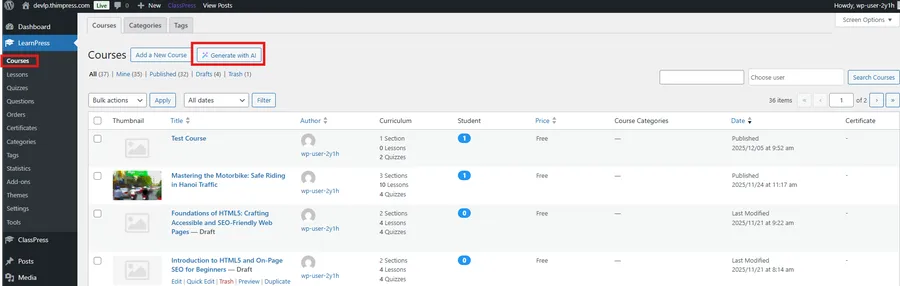
Unlike generic chatbots, a professional WordPress LMS AI forces you to define parameters logically. In Step 3 of the builder, you will encounter the Course Structure menu.
Here, you must precisely input the number of sections, the number of lessons per section, and the number of quizzes required.
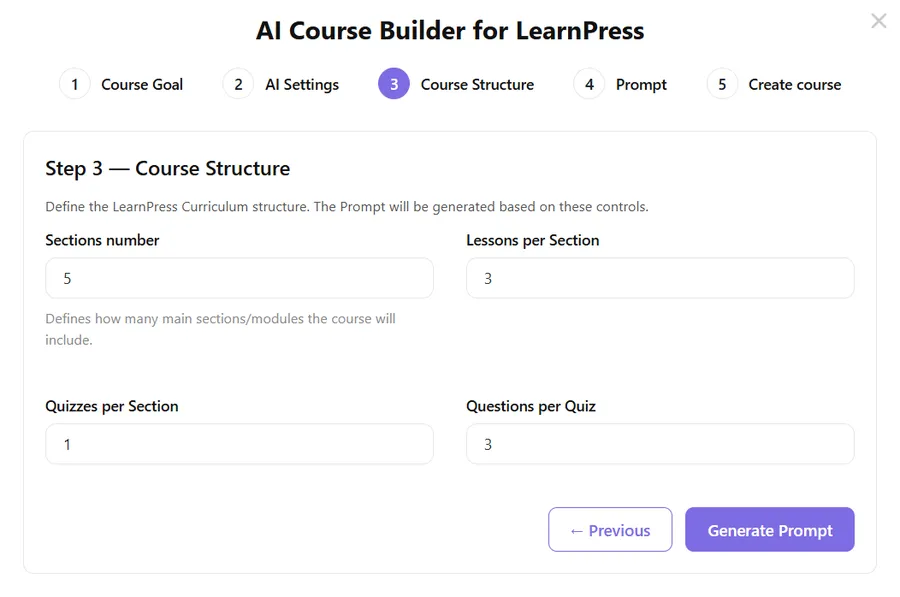
Defining these numbers is a mandatory part of prompt engineering for educators. By locking in the exact architecture first, you prevent the system from creating unnecessarily long or overly brief modules.
Once the structure is mathematically defined, you can click the “Generate Prompt” button. The system then blends your specific structural numbers with your custom text instructions. This seamless integration is why optimizing LearnPress AI prompts produces vastly superior, ready-to-publish material.
Tip 4: Specify the Formatting and Tone
Readability is vital for online education. Huge walls of unbroken text intimidate students and decrease engagement. To produce genuinely better course content, you must instruct the software on exactly how to format lesson content visually.
The AI course creator is highly capable of formatting, but it needs explicit permission to do so. You should always include formatting rules at the end of your instructions.
For example, you can add: “Please use short paragraphs, bulleted lists for key takeaways, and bold text for important vocabulary words.”
Furthermore, you must dictate the emotional tone. Do you want the lecture to be strictly academic, warmly encouraging, or highly persuasive?
Adding these styling rules to your LearnPress AI prompts ensures the final draft looks professional immediately. It minimizes the time you spend manually adding line breaks and formatting tags within the editor.
Tip 5: Embrace the Iterative Refinement Process
The final secret to mastering a WordPress LMS AI is understanding that the first draft is rarely perfect. Professional prompt engineering for educators is an iterative, ongoing process of refinement and adjustment.
If the generated lesson feels too brief, do not delete it entirely. Instead, issue a follow-up command. You can instruct the system to “expand on section two and provide three real-world examples.”
If the automatically generated quizzes are too easy, you can command the AI course creator to rewrite the assessment to improve your quiz design with advanced, scenario-based questions.
Your LearnPress AI prompts should evolve as you review the material. Think of the software as a highly capable teaching assistant. You review their work, provide constructive feedback, and ask them to revise it until it meets your strict standards.
This collaborative, iterative approach guarantees that you will consistently deliver better course content that genuinely educates and inspires your audience.
Conclusion: Transforming Ideas into Academies
Mastering modern WordPress AI tools requires a slight shift in how we work. The days of staring at a blank screen and typing every single word manually are fading away.
By utilizing these five expert strategies, you can harness the full power of your WordPress LMS AI. You transition from a tired writer into a strategic educational director, overseeing the rapid development and helping promote your course effectively.
Remember to always assign a specific expert persona and clearly define your target audience. Take advantage of the structural settings before generating text, and always dictate your preferred formatting.
Most importantly, treat your LearnPress AI prompts as a conversation that you can refine and improve over time. Proper prompt engineering for educators is the ultimate skill for scaling an eLearning business today.
When you communicate effectively with your AI course creator, the possibilities are limitless. Open your dashboard, apply these five professional tips, and start building your next bestselling curriculum today!
Read more: How to Create LearnPress Certificates: 5 Easy Steps (V2.0 Update)
Contact US | LearnPress:
Website: https://learnpresslms.com/
Fanpage: https://www.facebook.com/learnpresslms
Email: [email protected]