Building a training course that people actually finish is harder than it looks. Anyone who has sat through a slide-heavy online module knows the difference between content that was dumped online and eLearning development that was actually planned.
If you are starting a new training project, moving classroom material online, or scaling up a learning team, this guide walks through the full process: what to plan first, which roles you need, how to pick tools, and where most teams lose time.
LearnPress – WordPress LMS Plugin
We provide an amazing WordPress LMS plugin to create & sell online courses. Let’s find out!
Try NowWhat eLearning development actually covers
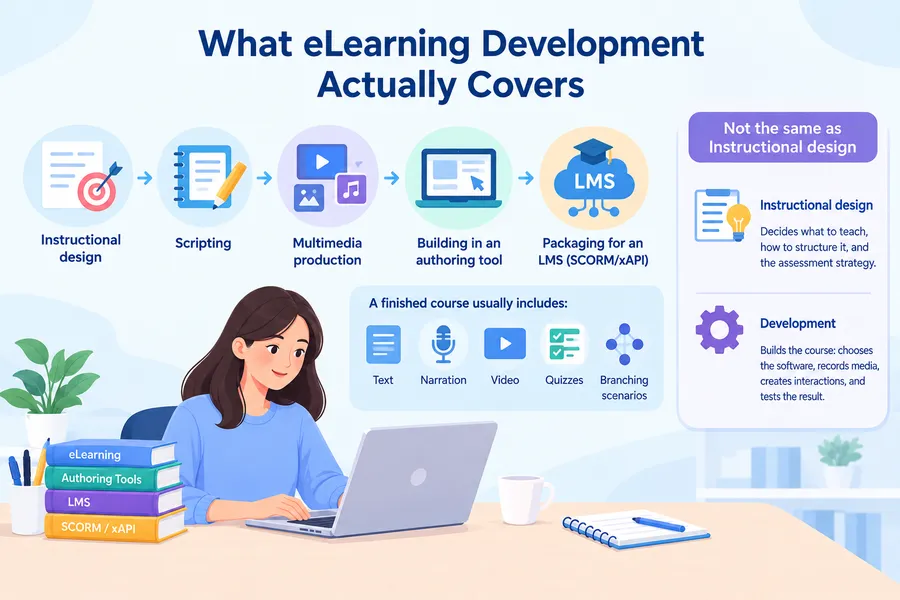
The term gets used loosely, so it helps to define it before going further. It is the process of turning a learning objective into a finished, interactive course that runs on a computer or phone. It covers instructional design, scripting, multimedia production, building the course in an authoring tool, and packaging it so a learning management system, or LMS, can track completion and scores. A finished course usually includes text, narration, video, quizzes, and sometimes branching scenarios, all wrapped into a SCORM or xAPI package that any modern LMS can read.
This is different from instructional design on its own. Instructional design decides what a course should teach and how it should be structured, including the sequence of topics and the assessment strategy. Development takes that plan and actually builds it: choosing the software, recording the media, building interactions, and testing the result across devices before anyone sees it.
Why teams invest in structured elearning programs
A course built without a process tends to look like a stack of slides with a narrator reading them out loud. Structured elearning programs solve a specific business problem: getting a group of people to a measurable skill or knowledge level, on a schedule, without pulling them into a classroom. Sales teams use them for product launches, HR teams use them for compliance training, and product companies use them to onboard new customers without scheduling a live call for every signup.
The return shows up in three places. Completion rates go up when a course is interactive rather than a click-through slide deck, because learners stay engaged past the first few screens. Support tickets go down when product training is clear before a feature launches, since fewer customers get stuck on basic setup steps. And audit results improve when compliance training tracks scores automatically inside an LMS instead of relying on a paper sign-off sheet that is easy to lose.
Who is on an elearning production team
Even a small course usually involves more than one role, and knowing who does what keeps a project from stalling.
- Stakeholder or training manager. Sets the business goal and signs off on the final course. Without a clear stakeholder, review cycles drag on because no one has the authority to say a draft is finished.
- Subject matter expert (SME). Supplies the raw content, checks technical accuracy, and answers questions the instructional designer cannot answer alone.
- Instructional designer. Converts raw content into a storyboard, decides where quizzes and scenarios go, and applies adult learning principles so the course does more than repeat facts.
- Developer. Builds the course in an authoring tool, records or edits media, and handles the technical packaging for the LMS.
- Project manager. Keeps the schedule on track and manages the back and forth between the SME, designer, and developer.
On smaller teams, one person often wears two or three of these hats, which is fine as long as everyone knows what review step comes next.
The eLearning development process, step by step
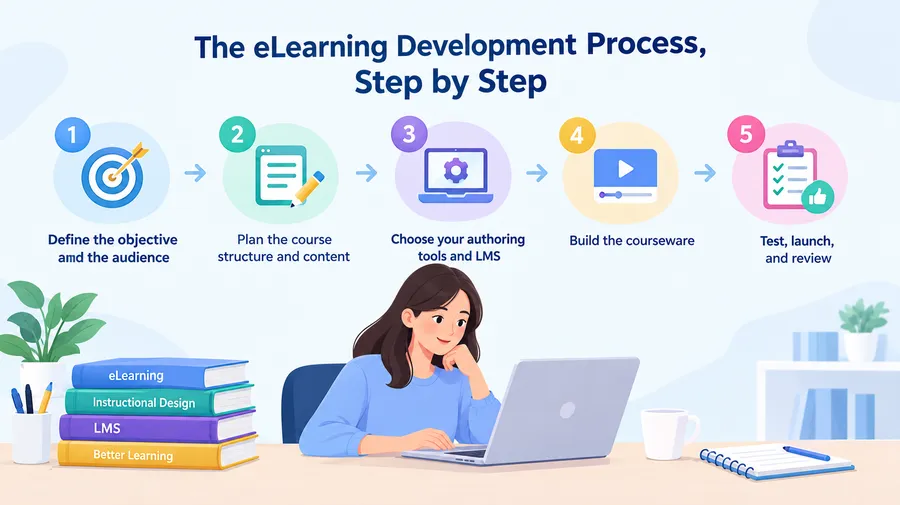
Every reliable process for building a ecourse follows a similar sequence, even if the specific tools change from one team to the next. Below is the order most instructional design teams use, from the first planning call to the final upload.
Step 1: Define the objective and the audience
Start by writing down exactly what a learner should be able to do after finishing the course, not just what they should “know.” A sales onboarding course might aim for “the learner can explain the three pricing tiers to a prospect without checking notes.” That single sentence shapes every design decision that follows, including how long the course should run and how much interactivity it needs.
At the same time, find out how learners will actually take the course. A warehouse team on shared tablets needs shorter modules and simpler navigation than a remote sales team working from laptops at their own desks. Skipping this step is one of the most common reasons a finished course ends up with low completion rates.
Step 2: Plan the course structure and content
With the objective set, break the topic into modules and lessons, and note where a quiz, scenario, or hands-on task belongs. This is also the stage to gather source material from subject matter experts, since waiting until the build phase to chase down content is a common cause of delayed launches.
A simple storyboard, even a spreadsheet with one row per screen, saves hours later. It gives stakeholders something concrete to review before anyone spends time inside an authoring tool, and it catches scope problems while they are still cheap to fix.
Step 3: Choose your authoring tools and LMS
This is where the actual build starts to take shape. Popular authoring tools include Articulate Storyline, Articulate Rise, iSpring Suite, and Adobe Captivate, each suited to a different level of interactivity and technical skill. Pair the authoring tool with a learning management system that can host the finished package, track scores through SCORM or xAPI, and report on completion for every learner.
If the course will live on a WordPress site, LearnPress is worth a look. It is a free LMS plugin that lets a course run natively inside WordPress, handling lessons, quizzes, certificates, and student progress without a separate platform to manage. For teams that also need a course-ready front end, pairing it with the Eduma theme adds a built-in course catalog, instructor profiles, and a layout designed around selling and delivering courses rather than a generic blog.
Step 4: Build the courseware
Now the actual build work begins: recording narration, building slides or screens, adding interactions, and assembling quizzes. Keep each screen focused on one idea. A screen with three unrelated points and a wall of text is the fastest way to lose a learner’s attention, especially on a phone screen.
Build in short knowledge checks every few screens rather than saving every question for a final exam. It keeps learners engaged and gives them a chance to notice a gap in understanding while the material is still fresh, instead of finding out at the end that something did not stick.
Step 5: Test, launch, and review
Before publishing, test the package on the actual devices learners will use, not just a desktop browser. Check that video loads on a mobile connection, that quiz scoring reports correctly to the LMS, and that navigation works for a screen reader if accessibility is a requirement for your organization.
After launch, pull completion and quiz data after the first two weeks. A drop-off point in the data usually points to a specific screen that needs a rewrite, not a full redo of the course. Treat this review as a normal part of the schedule rather than an optional extra step.
LMS content development: choosing the right platform
Picking a platform is really a question of who owns the site and how much control the team needs. Running everything on a dedicated corporate LMS, such as Docebo or Cornerstone, works well for large organizations that already have HR systems to integrate with. For a smaller organization, an agency, or a business that wants to sell courses directly to the public, building on WordPress is often the faster and cheaper route.
Why LearnPress fits a WordPress-based LMS
LearnPress installs like any other WordPress plugin and turns the site into a working LMS within an afternoon. Courses are built the same way you would write a blog post, with lessons and quizzes added as regular WordPress content. It supports certificates, course prerequisites, and paid enrollment through WooCommerce, which makes it a practical choice for a business that wants to launch a course catalog without hiring a separate development team.
Why Eduma suits course-focused sites
Eduma is a WordPress theme built specifically around online course businesses. It ships with course listing pages, instructor directories, and student dashboards already designed, and it works directly with LearnPress rather than needing custom template work. For a company whose main product is training content, that combination removes a lot of the front-end build time that a generic theme would otherwise require.
Best practices for elearning courseware development
A few habits separate courses that get finished from courses that get abandoned halfway through.
- Keep individual lessons under ten minutes. Long, unbroken video segments are a top reason learners drop off partway through a module.
- Write for the ear as well as the eye. Narration scripts should sound like a person talking, not a document being read aloud.
- Use real workplace scenarios in quizzes instead of abstract questions. A branching scenario based on an actual customer call teaches more than a multiple-choice question about a definition.
- Add closed captions to every video. It helps learners in quiet or noisy environments and supports accessibility requirements.
- Version your source files. When a policy changes six months later, you want to edit the original project file, not rebuild the course from scratch.
- Keep a style guide for tone, colors, and button labels. It keeps a multi-course catalog feeling like one product instead of several unrelated modules.
Common mistakes when developing e learning courses
Even experienced teams run into the same handful of problems.
- Treating the LMS as an afterthought. Building a full course before confirming it will publish correctly wastes hours reworking file formats and tracking settings that should have been checked on day one.
- Skipping the storyboard. Jumping straight into the authoring tool without a plan leads to scope creep, since stakeholders keep adding “just one more screen” once they see something on the page.
- Ignoring mobile learners. A course designed only for a desktop browser often breaks on a phone, with tiny click targets and video that will not play smoothly on a mobile network.
- No plan for updates. Content goes out of date. A course with no owner or review schedule keeps training people on an outdated process long after it should have been retired.
Measuring whether the course actually worked
Launching is not the finish line. Completion rate tells you whether people are getting through the material, but it does not tell you whether they learned anything, so pair it with quiz scores and, where possible, a short follow-up assessment a few weeks later. For compliance or sales training, watch a downstream metric too, such as audit findings or deal close rates, since that is the number stakeholders actually care about.
If completion drops sharply at one specific point, check that screen first. It is usually a length problem, a confusing instruction, or a technical glitch rather than a sign the whole course needs to be scrapped. Small, targeted fixes based on real data almost always beat a full rebuild.
How to choose a development partner or team
Some organizations handle eLearning development in-house; others bring in an outside team for a specific project or ongoing production. When evaluating a partner, ask to see finished courses, not just a portfolio of screenshots, since interactivity and pacing only show up when you actually click through a module. Ask how they handle source files and ownership after the project ends, and confirm which authoring tools and LMS platforms they are comfortable working with. A partner who has shipped courses on WordPress with LearnPress or Eduma can usually move faster if that is where your course catalog will live, since there is no platform learning curve on their side.
FAQs about elearning development
How is eLearning development different from instructional design?
Instructional design decides what a course should teach and how it should be structured, including learning objectives and assessment strategy. eLearning development takes that plan and builds it into a finished, interactive course inside an authoring tool, complete with media, quizzes, and LMS packaging.
How long does it take to build an eLearning course?
A simple, text-and-narration module can take one to two weeks from storyboard to launch. A course with custom video, branching scenarios, or animation typically takes four to eight weeks, depending on how much content review is needed from subject matter experts.
How much does it cost to produce a course?
Cost depends heavily on the level of interactivity and whether the work is done in-house or outsourced. A basic self-paced module built with an in-house team mainly costs staff time, while custom video and branching scenarios built by an outside studio commonly run from a few thousand dollars to tens of thousands per finished hour of content.
Do you need coding skills to build a course?
No. Modern authoring tools such as Articulate Rise, Articulate Storyline, and iSpring Suite are built for non-developers, and LMS plugins like LearnPress require no code to set up lessons, quizzes, or certificates. Coding skills help for custom interactions but are not required to publish a working course.
Conclusion
A finished course is the result of a process, not a single burst of content creation. Define the objective first, plan the structure before opening an authoring tool, and pick a platform that matches how your organization actually works, whether that is a dedicated corporate LMS or a WordPress site running LearnPress and Eduma. Test with real devices, watch the completion data after launch, and treat the course as something that gets maintained, not something that ships once and gets forgotten. Teams that follow this order consistently produce eLearning development that people actually finish, and that is the real measure of doing it well.
Read more: Online School Management System: A Complete Guide for School Leaders