If people search your site and land on a blank results page, that’s not a content problem. It’s a search problem. The default WordPress search only checks post titles and body text, so it skips custom fields, product data, PDFs, and anything stored outside the main content area. Picking the best WP search plugin for your site fixes that gap, and it usually takes less than ten minutes to set up.
This guide walks through six standout options, what each one actually does well, and how to choose between them based on your site type and budget.
LearnPress – WordPress LMS Plugin
We provide an amazing WordPress LMS plugin to create & sell online courses. Let’s find out!
Try NowTable of Contents
How we picked these plugins
Every plugin on this list replaces or extends the native WordPress search query, and each was checked against the same criteria: does it index custom fields and custom post types, how fast is setup on a fresh install, does it handle WooCommerce products if that matters to you, and is pricing clear. A few names that show up on older “best WordPress search plugin” roundups were left off because they’re no longer actively maintained.
What “better than default” actually means
Default WordPress search runs a basic database match against titles and content, then sorts by date. It has no concept of relevance, no fuzzy matching for typos, and no awareness of Advanced Custom Fields or WooCommerce attributes. Any search plugin WordPress site owners install should fix at least one of those gaps. The plugins below fix all of them, to varying degrees.
SearchWP
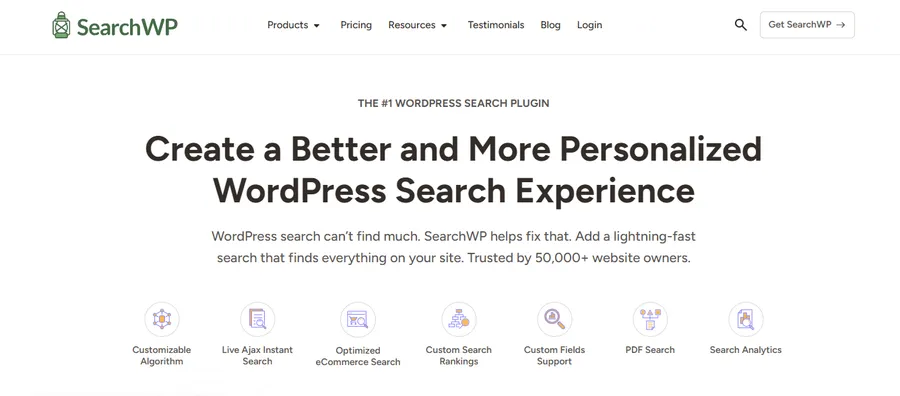
SearchWP is a premium-only plugin built around a custom index of your content, so it tends to search faster than a plain database query once a site has a lot of posts, pages, and products.
Key features
SearchWP indexes titles, content, custom fields, taxonomies, and PDF text, and gives you direct control over how much weight each of those fields carries when results are ranked. It also handles synonym mapping and fuzzy matching, so a typo like “runing shoez” still surfaces the right product.
Performance and setup
Installing SearchWP follows the usual upload-and-activate process, then configuration happens through a dedicated Engines screen where you assign weight to titles, content, or specific meta fields. Because it builds its own index instead of querying the live database on every search, larger sites generally see faster results than they would with a plugin that searches on the fly.
Pricing
SearchWP has no free core plugin, only two lightweight companion extensions on WordPress.org. As of this writing, plans start at $99 a year for a single site, move up to $199 a year for a plan that adds WooCommerce and product-attribute indexing, and top out around $399 a year for an agency-level license covering many sites. Check the current pricing page before buying, since premium plugin tiers shift over time.
Who it’s best for
Choose SearchWP if you run a content-heavy site or WooCommerce store with a lot of custom fields and don’t mind paying for a polished, low-maintenance setup.
Relevanssi

Relevanssi is the closest thing to a true best WordPress search plugin for budget-conscious site owners, since its free version already replaces the default date-based sorting with relevance ranking.
Key features
The free version handles basic attachment search by file name, while the premium upgrade adds full-text search inside PDF files and other documents, which matters a lot for documentation sites and knowledge bases. Premium also adds search across a WordPress Multisite network and detailed search logging that shows popular queries, failed searches, and trends over time.
Performance and setup
Relevanssi builds its own index table in the database and reorders results by an internal relevance score instead of publish date. The interface is more technical than SearchWP’s, with settings spread across several tabs, so expect a slightly longer learning curve on first setup.
Pricing
The free plugin on WordPress.org covers most of what a small blog or business site needs. The premium annual license runs somewhere around $100 to $130 depending on the current offer, with a one-time lifetime option priced higher, and both premium tiers include PDF indexing and custom field search.
Who it’s best for
Relevanssi fits site owners who want strong relevance-based search without paying anything upfront, and who don’t mind spending a little more time in the settings tabs.
Ivory Search

Ivory Search takes a different approach from most of this list: instead of one site-wide search engine, you build multiple custom search forms, each with its own rules.
Key features
You can place a search form in the header, footer, a widget area, the navigation menu, or inside page content using a shortcode, and each form can be scoped to specific post types, categories, custom fields, or WooCommerce products. That makes it a good search engine plugin for WordPress sites with several distinct content types, like a blog paired with a product catalog and a resource library.
Performance and setup
The free version is genuinely usable on its own, and setup mostly happens through the WordPress Customizer, so styling changes preview live as you make them. Advanced filtering, like SKU search, keyword stemming, and excluding out-of-stock products, sits behind the paid tiers.
Pricing
Ivory Search offers a full free version on WordPress.org, with the Pro tier starting under $20 a year for a single site, and a Pro Plus tier for stores that need SKU search and stock-based filtering.
Who it’s best for
Ivory Search suits sites that need more than one kind of search box, for example a support documentation search kept separate from a product search.
FiboSearch

FiboSearch, previously called Ajax Search for WooCommerce, is built specifically for WooCommerce stores rather than general content search.
Key features
The free version already covers search by product title, short or long description, and SKU, with an autocomplete dropdown showing product images, prices, and SKUs as customers type. The pro version adds search by custom fields, attributes, categories, tags, and brands, and is built to keep performing on stores with well over 10,000 products.
Performance and setup
Setup happens under WooCommerce > FiboSearch in the admin menu, and the plugin can replace your theme’s existing search bar with one click on many popular themes. The Pro version’s indexed search engine is built for speed at scale, which starts to matter once a catalog grows past a few thousand SKUs.
Pricing
Pro plans are sold as yearly licenses, with the cheapest single-site tier priced in the neighborhood of $50 to $60 for the first year, a mid-tier plan for a handful of sites, and an agency tier for larger site counts. All plans include a refund window, so check the terms before committing.
Who it’s best for
Skip this one unless you run WooCommerce. If you do, it’s one of the more purpose-built options on this list.
Ajax Search Lite and Ajax Search Pro

Ajax Search Lite is a free, no-limits live search plugin, and Ajax Search Pro is its premium sibling with more layout and filtering options.
Key features
The free version supports search across posts, pages, and custom post types, matching against titles, descriptions, excerpts, and custom fields, plus filter boxes for categories and post types. Ajax Search Pro adds more layout themes, taxonomy-based filters, and result grouping by content type.
Performance and setup
Both versions run entirely on your own server rather than a third-party service, so search data stays local and there are no per-query fees to worry about. Setup is largely shortcode or widget based, with a theme editor for matching the search box to your site’s design.
Pricing
Ajax Search Lite is free with no feature cap. Ajax Search Pro is a separate paid upgrade with tiered site licensing; check the current plans on the developer’s site before buying, since pricing for premium WordPress plugins tends to change from year to year.
Who it’s best for
A good fit for anyone who wants a live, as-you-type search box without spending more than a few minutes in the settings.
Better Search

Better Search is a lightweight, entirely free plugin for smaller sites that just need results ranked by relevance instead of publish date.
Key features
It indexes pages and custom post types, not just standard posts, and lets you fine-tune results by assigning more weight to titles than to content. There’s also a basic profanity filter for public-facing search boxes.
Performance and setup
Activation replaces the default search automatically, with no custom post type configuration required for basic use, which makes it one of the fastest plugins on this list to get running.
Pricing
Free, with no premium tier. It won’t handle WooCommerce filtering or PDF content, but for a blog or small business site, that’s rarely a dealbreaker.
Who it’s best for
Choose Better Search if you want the simplest possible upgrade over default WordPress search and don’t need ecommerce features.
Comparison table for the best WP search plugin
| Plugin | Best for | Free version | Starting price |
|---|---|---|---|
| SearchWP | Content-heavy sites and WooCommerce stores | No | ~$99/year |
| Relevanssi | Budget-friendly relevance search | Yes | ~$100-130/year (premium) |
| Ivory Search | Multiple custom search forms | Yes | Under $20/year |
| FiboSearch | WooCommerce product search | Yes | ~$50-60/year |
| Ajax Search Lite/Pro | Live, as-you-type search | Yes | Paid Pro tier available |
| Better Search | Simple relevance search, no ecommerce | Yes | Free only |
Pricing changes over time, so treat the table as a starting point and confirm current numbers on each plugin’s site before you buy.
How to choose the right search plugin for your site
Start with what your site actually contains. A blog with a handful of categories rarely needs the same search plugin WordPress a 5,000-product WooCommerce store does. If you’re running a store, FiboSearch or SearchWP’s higher tier will index product attributes that Better Search simply can’t see. If your content lives in custom fields, whether that’s Advanced Custom Fields data, course metadata, or event details, confirm the plugin indexes custom fields before you install it, since several free versions only search titles and body text.
Budget matters too. Relevanssi and Ivory Search both offer capable free tiers, so they’re worth trying before paying for SearchWP or FiboSearch’s premium plans. And if your main goal is a live, autocomplete-style search box rather than deep indexing, Ajax Search Lite covers that without a paid upgrade.
A note for course and membership sites
If you’re running an online course or membership site with LearnPress, search needs to cover lesson and course titles just as well as blog content, which is where a general-purpose search engine plugin for WordPress can miss the mark if it isn’t configured to include LearnPress’s custom post types. Most of the plugins above let you add course and lesson post types to their indexed content manually, which keeps course material searchable alongside everything else on the site.
FAQs About The Best WP Search Plugin
Does WordPress have a built-in search function?
Yes, every WordPress site ships with a native search widget, but it only matches post titles and body content and sorts results by date rather than relevance. That’s why so many site owners add a dedicated search plugin WordPress once their content library grows past a few dozen pages.
Can a search plugin slow down my site?
A poorly configured plugin can, especially one that queries the live database on every keystroke without caching. Plugins that build a separate search index, like SearchWP and Relevanssi, tend to perform better on larger sites because they’re not scanning the full database for each query.
Do I need a premium search plugin, or is free enough?
For a small blog or portfolio site, a free plugin like Better Search or Relevanssi’s free version is usually enough. Premium plans earn their price on WooCommerce stores, PDF-heavy resource sites, or anywhere search accuracy directly affects sales or support tickets.
Which is the best WP search plugin for WooCommerce?
FiboSearch and SearchWP’s higher-tier plan are the two strongest picks for WooCommerce, since both index product attributes, SKUs, and variations that the default WooCommerce search ignores. Ivory Search’s Pro Plus tier is a solid middle-ground option if you want SKU search without a full ecommerce-focused plugin.
Conclusion
The right search plugin depends less on which one ranks highest on a list and more on what your site actually needs indexed. Store owners should lean toward FiboSearch or SearchWP, budget-conscious blog owners will get real value from Relevanssi or Better Search, and anyone who needs several distinct search experiences on one site should look at Ivory Search. Whichever you choose, test it with a handful of real searches your visitors would actually type, not just the obvious keywords, before deciding it’s the right fit.
Read more: Top 10 LMS Website Builder Platforms to Launch Online Courses