If you have opened the WordPress theme directory lately, you have probably noticed that almost every new listing mentions AI somewhere in the description.
Choosing the right AI WordPress theme in 2026 is no longer about picking a pretty demo; it is about deciding how much of the design, copy, and layout work you want a model to do for you before a human touches it.
This guide walks through what these themes actually do, how the underlying AI website builder works, and which tools are worth your time if you are building a course site, a blog, or a client project.
LearnPress – WordPress LMS Plugin
We provide an amazing WordPress LMS plugin to create & sell online courses. Let’s find out!
Try NowTable of Contents
What is An AI WordPress Theme?
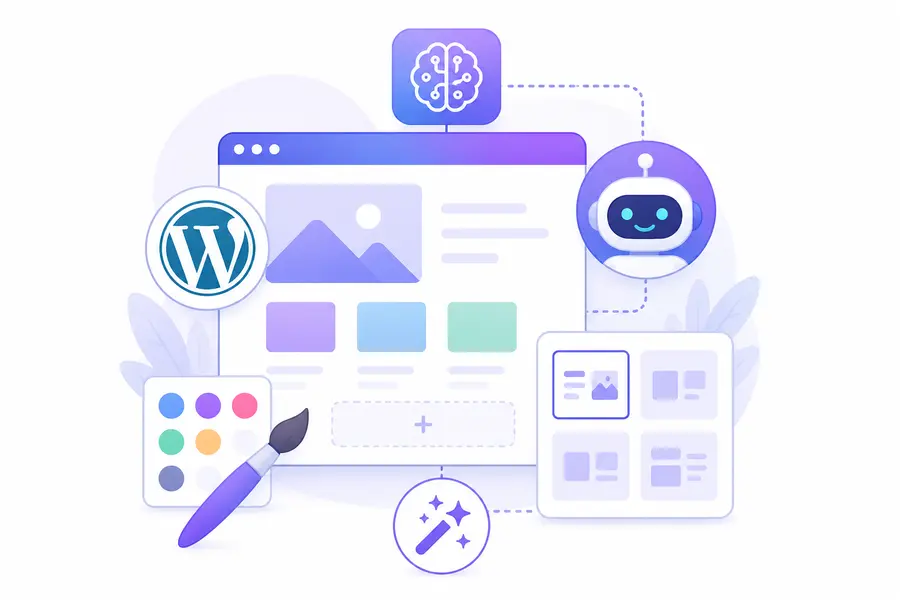
An AI WordPress theme is a theme that uses a connected language model, either built into the theme itself or through a companion plugin, to generate layouts, copy, and sometimes images directly inside the WordPress editor based on a short prompt or a business description. Instead of starting from a static demo and swapping out placeholder text, you type a sentence like “landing page for a local bakery” and the theme assembles sections, writes draft copy, and picks a color palette before you ever open the Customizer.
This is different from a theme that simply ships with a chatbot widget bolted onto the front end. A true AI WordPress theme changes the build process itself. The generation usually happens through the block editor, so the output is still standard Gutenberg blocks that you can edit by hand afterward, not a locked page-builder format you cannot touch without the vendor’s tools.
WordPress still runs a huge share of the web, which is exactly why so many AI tools target it first. According to W3Techs data reported in mid-2026, WordPress powered roughly 42 % of all websites and close to 59 % of the market among sites running a known CMS. That installed base is the reason nearly every AI website tool, from page builders to standalone theme frameworks, has shipped a WordPress integration rather than skipping the platform in favor of something newer.
AI theme vs. AI page builder plugin
It helps to separate two things that get lumped together under the same “AI WordPress” label.
An AI theme bundles the generation logic into the theme itself, so switching themes later usually means losing the AI onboarding flow, though the generated content stays intact as regular blocks.
An AI page builder plugin, like Elementor AI or Divi AI, sits on top of whatever theme you already have, which makes it easier to swap themes later without touching the generation tool.
If you expect to change your site’s design more than once a year, the plugin route is usually the safer bet, since you are not locked into one theme’s AI wizard.
How Does an AI Website Builder Work
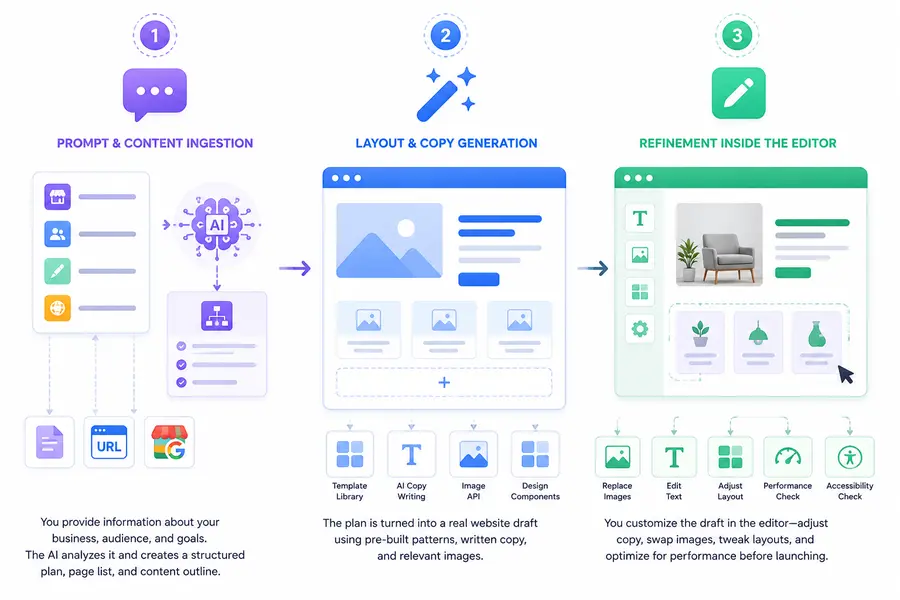
Before comparing tools, it helps to understand how does an AI website builder work under the hood, because the answer explains why some tools feel fast and flexible while others feel rigid. Most builders follow the same three-stage pipeline, even when the interface looks completely different from one product to the next.
Step 1: Prompt and content ingestion
You start by answering a short questionnaire or typing a prompt: business type, tone, target audience, and sometimes an existing brand document or a URL to a competitor site. The builder sends this to a language model, which returns a structured plan, page list, section order, and a rough content outline, rather than finished HTML right away. Some tools, including Elementor’s AI features and 10Web’s AI Builder, also scan an existing site or a Google Business Profile listing to skip the questionnaire entirely.
Step 2: Layout and copy generation
The plan gets mapped onto a library of pre-built patterns or blocks. This is the part people usually mean when they say “AI generated my whole site.” The model is not designing from a blank canvas; it is selecting and filling in components from a template library, then writing headline and body copy to match, and in some cases generating or sourcing stock images through an integrated image API. The output lands as real Gutenberg blocks or, in page-builder themes, as native widgets you can drag and resize.
Step 3: Refinement inside the editor
The generated draft is a starting point, not a finished site. You still need to check heading hierarchy, replace stock photography with real product shots, fix any copy that reads generically, and run a Core Web Vitals check before launch. In practice, the AI draft gets you to roughly 60 to 70 percent of a finished homepage. The remaining work, real copy, real images, accessibility checks, is still manual, and that is fine. Treat the generation step as a fast first draft, not a finished product.
5 Best AI WordPress Themes Worth Considering
Although AI builders and coding assistants receive most of the attention, the underlying theme still plays an important role in your site’s performance, flexibility, and compatibility. If you’re looking for an AI WordPress theme, these are some of the most practical options to consider:
| Theme | AI capability | Best for |
|---|---|---|
| Eduma | Purpose-built LMS theme with native LearnPress integration and AI-assisted course creation. | LMS and online course websites |
| Divi | Built-in Divi AI for generating layouts, copy, and images | Agencies and freelancers |
| Astra | Compatible with AI Starter Templates and popular AI page builders | Business websites and blogs |
| Kadence | Integrates well with AI-assisted design workflows and Gutenberg | Content-focused websites |
| Blocksy | Lightweight block theme with strong compatibility for AI-powered builders and plugins | Performance-focused WordPress sites |
The best choice depends on how you plan to use AI. If you want an end-to-end AI design experience, Divi is a strong option. For education websites, Eduma combined with LearnPress provides purpose-built course templates while still allowing AI tools to accelerate marketing page creation. If flexibility and long-term compatibility matter most, lightweight themes such as Astra, Kadence, and Blocksy work well alongside AI builders like Elementor AI or 10Web.
5+ Best AI for WordPress Right Now
If you already run WordPress and want to add AI capability without switching platforms, these are the tools worth testing first. This list focuses on active, actively maintained tools rather than abandoned plugins that still show up in search results.
| Tool | What it does | Works with | Free tier |
| Elementor AI | Generates layouts, copy, and CSS inside the Elementor editor | Elementor page builder | Limited credits, paid add-on |
| 10Web AI Builder | Builds a full site from a business description or existing URL | Any WordPress install, hosted or self-managed | Free trial, then subscription |
| Divi AI | Text, image, and layout generation inside the Divi builder | Divi theme and builder | Included with Divi license |
| Jetpack AI Assistant | Drafts and rewrites content directly in the block editor | Native Gutenberg, any theme | Free tier with usage limits |
| Block-based AI starter themes | Full-site editing themes with AI onboarding wizards | Full-site editing themes | Free, open source |
A bridge sentence worth repeating here: none of these tools replace a well-built theme foundation. They speed up the first draft of a page, but the underlying theme still needs to be lightweight, accessible, and compatible with your plugins, or the AI-generated content will sit on top of a slow, fragile base.
What to check before installing an AI WordPress plugin
Look at how recently the plugin was updated, whether it stores your API key locally or routes every request through the vendor’s server, and whether it degrades gracefully if the AI service goes down. A theme that breaks the entire editor when its AI API call fails is not production ready, no matter how good the demo video looks.
Where these tools fall short
Generated copy still needs a human edit pass for tone and accuracy, and generated images from built-in tools are often generic stock-style output rather than anything specific to your brand. If your site sells a physical product or teaches a specific skill, plan on replacing at least the hero image and the first paragraph of every page.
Pricing: what these tools actually cost
Most vendors advertise a free tier that turns out to be too limited for a real site launch, so it is worth checking the paid tier before you commit hours to a workflow you might have to abandon.
| Tool | Free tier limit | Typical paid starting price |
| Elementor AI | A small number of generation credits per month | Bundled with Elementor Pro, from roughly $59/year |
| 10Web AI Builder | One free trial site | Plans start around $10 to $15/month with hosting included |
| Divi AI | None on the free theme; included once you buy Divi | Divi license from roughly $89/year |
| Jetpack AI Assistant | A limited number of requests per month | Bundled with Jetpack AI plan, from roughly $25/month |
Treat these figures as a starting point rather than a fixed quote, since AI feature pricing on WordPress tools has shifted every few months as usage costs change. Check each vendor’s pricing page before you subscribe, especially if you are billing a client for the tool as part of a project.
Best AI Website Builder for WordPress if You Are Starting from Zero
If you are not attached to an existing theme and just want the fastest path from idea to a live WordPress site, the builder matters more than the theme.
| Builder | Best for | Hosting model | Learning curve |
| 10Web | Agencies and freelancers building client sites fast | Managed WordPress hosting included | Low |
| Hostinger AI Website Builder | Small business owners with no design background | Hostinger-managed WordPress | Very low |
| Elementor AI + Elementor Hosting | Designers who want AI help but full manual control after | Elementor-managed or self-hosted | Medium |
| Divi AI + Divi theme | Freelancers who already build in Divi | Self-hosted, bring your own host | Medium |
10Web and Hostinger both lean toward true “describe your business, get a site” workflows, which is what most people picture when they search for the best AI website builder for wordpress.
Elementor and Divi sit closer to “AI-assisted manual builder,” where the model speeds up your existing process rather than replacing it.
If you already know WordPress and just want to move faster, Elementor AI or Divi AI will feel more natural.
If you have never touched WordPress and want a working site in an afternoon, 10Web or Hostinger’s builder is the better starting point.
One thing worth noting from testing both: managed AI builders like 10Web and Hostinger lock you into their hosting environment during the build phase. You can usually export the site afterward, but check the export terms before you commit real client work to the platform.
Best AI for WordPress Coding
Not every AI use case on WordPress is about page layout. A separate category of tools handles the actual PHP, JavaScript, and CSS behind custom themes and plugins, and this is where the best AI for WordPress coding question really lives.
Code-completion tools inside your editor
GitHub Copilot and Cursor both handle WordPress development well because the codebase, hooks, filters, template tags, is heavily documented and well represented in public repositories, which means the model has plenty of pattern examples to draw from. Copilot works as a plugin inside VS Code or JetBrains IDEs and suggests function bodies as you type, including correct usage of WordPress-specific functions like wp_enqueue_script or register_post_type.
Chat-based debugging and scaffolding
Claude and ChatGPT are useful for a different part of the workflow: explaining an unfamiliar function in a theme’s functions.php file, scaffolding a custom Gutenberg block from a description, or writing a first draft of a WP-CLI script. The output still needs a review pass against the WordPress coding standards and a security check for anything that touches user input, especially form submissions or REST API endpoints.
A specific example from a real fix
On one client site, a checkout page was firing a duplicate wp_ajax hook that caused cart totals to double under specific plugin combinations. Pasting the relevant hook registration and the conflicting plugin’s snippet into an AI assistant identified the duplicate action binding in under a minute, something that would have taken 20 to 30 minutes of manual error_log debugging. That is the realistic use case for AI coding tools on WordPress: faster diagnosis of a known category of bug, not unsupervised feature development on a production site.
Where AI coding tools should not be trusted unsupervised
Do not let a coding assistant write and deploy database migration code, payment gateway logic, or anything that modifies user roles and capabilities without a manual review. WordPress has a large attack surface, and generated code that looks correct can still miss a nonce check or a capability check that a human reviewer would catch immediately.
Testing generated code before it ships
A reasonable workflow for the best AI for wordpress coding tools looks like this: generate a function, run it against a staging copy of the site rather than production, check it against the WordPress plugin handbook’s security guidelines, and confirm it does not break an existing hook that another plugin depends on. Plugin conflicts are the most common failure point on real WordPress installs, and no AI tool currently checks your full active plugin list before suggesting a fix, so that step still has to happen manually. Keep a local staging environment, whether through LocalWP, a staging subdomain from your host, or a Docker setup, so a bad suggestion never touches a live site.
Choosing an AI WordPress Theme for a Course or Membership Site
Course and membership sites have different requirements than a marketing site, because the theme needs to handle enrollment flows, lesson navigation, and quiz layouts cleanly, not just a homepage hero section. Most general-purpose AI WordPress theme tools were built with marketing pages in mind, so their generated layouts do not always translate well to a lesson dashboard or a course curriculum page.
If you are building on top of an LMS plugin, pair your AI-assisted design workflow with a theme built specifically for education content.
LearnPress is a solid starting point here: it is a free, actively maintained WordPress LMS plugin that handles courses, lessons, quizzes, and certificates without locking you into a paid core, so you can layer AI-generated marketing pages on top of a stable course structure instead of fighting the plugin for control of your layout.
For the visual side, Eduma is one of the few themes purpose-built around LearnPress, with course archive layouts, instructor profile templates, and pricing tables already matched to how an education site actually gets used, which saves you from manually rebuilding those templates after an AI page builder generates a generic homepage.
A practical workflow that has worked well on real projects: use an AI builder like Elementor AI or 10Web to draft the marketing pages, home, about, contact, and let Eduma and LearnPress handle the actual course delivery pages, since those need precise, tested layouts more than fast generation.
Why the theme still matters more than the AI wizard on a course site
An AI onboarding wizard can set colors and generate a homepage in minutes, but it cannot rebuild a course curriculum layout, a quiz results screen, or a student dashboard the way a theme designed for that specific job can. Eduma ships with templates for course archives, instructor bios, and pricing tables already wired to LearnPress data, so those pages render correctly the first time instead of needing manual rework after an AI builder drops in a generic grid layout that was not built with enrollment data in mind. That is the practical reason to treat AI generation as a tool for the pages around your course content, not the course delivery pages themselves.
What Changed After I Tested Three AI Theme Workflows on a Live Install
Testing Elementor AI, 10Web’s AI Builder, and Divi AI side by side on the same staging site, running a recent WordPress release with a standard WooCommerce setup, produced three different first impressions worth recording.
Elementor AI generated the fastest usable draft, a five-section homepage in under two minutes, but the copy leaned generic until it was fed a more specific prompt with actual product details rather than a one-line description. 10Web’s builder pulled real business information from a connected Google Business Profile, which produced noticeably more accurate copy on the first pass, but the page load time on the generated site sat around 3.2 seconds on PageSpeed Insights before any manual optimization, compared to under 2 seconds after switching to a lighter starter theme and removing unused sections. Divi AI handled image generation the most consistently but took the longest to generate a full page, closer to four minutes per section on a shared hosting environment.
The takeaway across all three: budget time for a manual performance pass after any AI-generated build. None of the three tools optimized image sizes or removed unused CSS by default, and all three left render-blocking scripts in place that a caching plugin or manual cleanup had to remove afterward.
FAQs
Can an AI WordPress theme replace a developer entirely?
No, not for anything beyond a simple marketing site. An AI WordPress theme can generate a solid first draft of layout and copy, but custom functionality, complex integrations, and performance tuning still need a developer’s review, especially on ecommerce or membership sites where a mistake affects checkout or enrollment.
Does using an AI website builder hurt my site’s SEO?
Not by default, but generic AI-generated copy can hurt rankings if you publish it without editing, since search engines increasingly favor content that shows real experience and specificity. Always rewrite the AI draft with actual product details, real screenshots, and your own testing notes before publishing.
Is Elementor AI or 10Web better for a small business site?
10Web is generally faster for a business owner with no design background who wants a complete site from a short description, while Elementor AI suits someone who already wants manual control over the final layout and just needs help with the first draft. Try the free tier of each before committing to a paid plan.
Can I use AI coding tools to build a custom WordPress plugin from scratch?
You can use AI coding assistants to scaffold a plugin’s file structure and basic hooks, but any code touching user data, payments, or authentication needs a manual security review before it goes live. Treat AI-generated plugin code as a first draft that still needs testing against the WordPress coding standards.
Conclusion
Picking the right ai wordpress theme in 2026 comes down to matching the tool to the job: use a fast AI builder like Elementor AI or 10Web for marketing pages, lean on dedicated coding assistants for the parts of your theme that need real logic, and stick with a purpose-built combination like LearnPress and Eduma when the site’s core job is delivering courses rather than generating a homepage. AI speeds up the first draft in every one of these cases, but the manual review pass, checking copy accuracy, page speed, and security, is still the step that determines whether the finished site actually works.