We are thrilled to announce the latest major update for the LearnPress Certificate Add-on! This release brings a massive workflow overhaul, deeper integration with the LearnPress ecosystem, and significant frontend performance upgrades.
LearnPress – WordPress LMS Plugin
We provide an amazing WordPress LMS plugin to create & sell online courses. Let’s find out!
Try NowHere is everything new in this update:
Table of Contents
Highlighted New Features
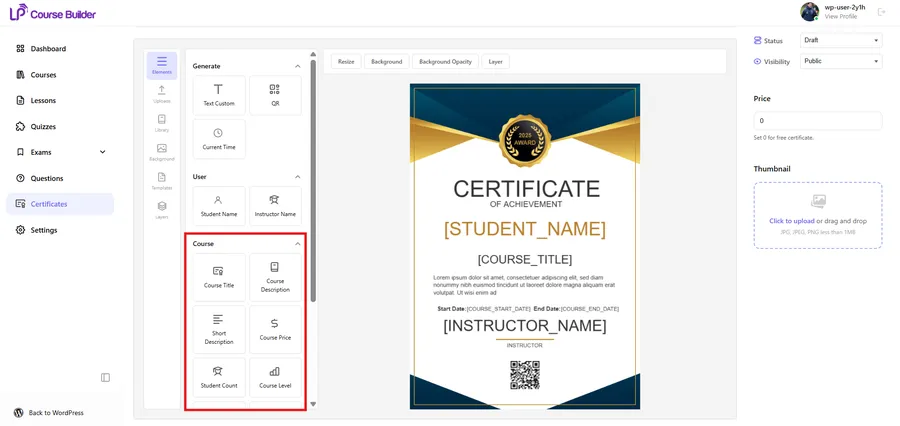
- Native Course Builder Integration: You can now build and manage certificates directly inside the LearnPress Course Builder! We have added a dedicated Certificates menu where you can view your list, add new certificates, select templates, and use the builder without ever leaving the course setup screen. The entire UI has been redesigned to perfectly match the LearnPress core design system.
- Privacy-Controlled Student Sharing: Students now get a dedicated, shareable link for their earned certificates. Even better, we have added a privacy configuration allowing students to toggle their certificate link between “Public” and “Private” as they see fit.
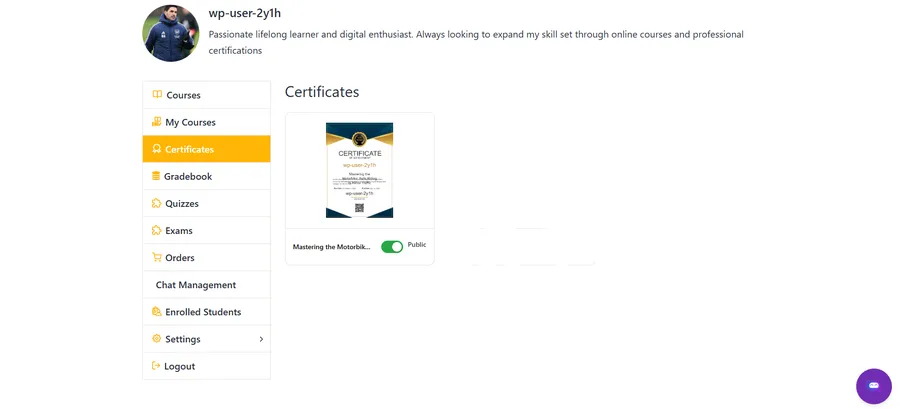
- “Earn a Certificate” Course Indicator: Want to boost enrollments? You now have the option to display a “Certificate” indicator directly on the external Course Item display (similar to platforms like Coursera). Potential students will immediately know that your course offers a verified reward.
- Massively Expanded Course Elements: We have added a wealth of new dynamic data elements to the builder. You can now drag and drop course-specific details directly onto your certificate, including:
- Course Description & Course Image
- Course Level & Lesson Count
- Total Enrolled Students
- Course Price
- Plus, you can now easily insert [format] tags into the middle of text blocks and seamlessly replace placeholders.
Technical & Performance Enhancements
- True Image Rendering (Replacing Canvas): We have completely rebuilt the frontend rendering logic. Previously, certificates relied on loading via HTML5 Canvas. Now, when a student finishes a course, the system automatically generates and saves the certificate as a high-quality image. Whether it is viewed in a pop-up, on the course detail page, or via a profile link, it will load instantly as an image—drastically improving page speed and user experience.
- Universal Theme Compatibility: The core CSS styles for certificates have been heavily optimized, ensuring they display beautifully and accurately across almost any WordPress theme.
- UI & Library Updates: We have updated the color library and modernized the Certificate settings UI located inside the traditional Edit Course page for a smoother admin experience.
Ready to upgrade? Update your LearnPress Certificate Add-on today via your WordPress dashboard to unlock these powerful new features and optimizations!
Contact US | LearnPress:
Website: https://learnpresslms.com/
Fanpage: https://www.facebook.com/learnpresslms
Email: [email protected]
Read more: LearnPress MCP integration: 7 Best Steps to Automate