Employee learning is the ongoing process of helping staff gain the knowledge, skills, and confidence they need to do their jobs well and grow in their careers. Companies that treat it as a habit, not a one-time event, keep good people longer and adapt faster when the work changes.
This guide explains how to plan, deliver, and measure learning at work, with clear steps, examples, and a look at how to run it on your own WordPress site.
LearnPress – WordPress LMS Plugin
We provide an amazing WordPress LMS plugin to create & sell online courses. Let’s find out!
Try NowTable of Contents
What employee learning means
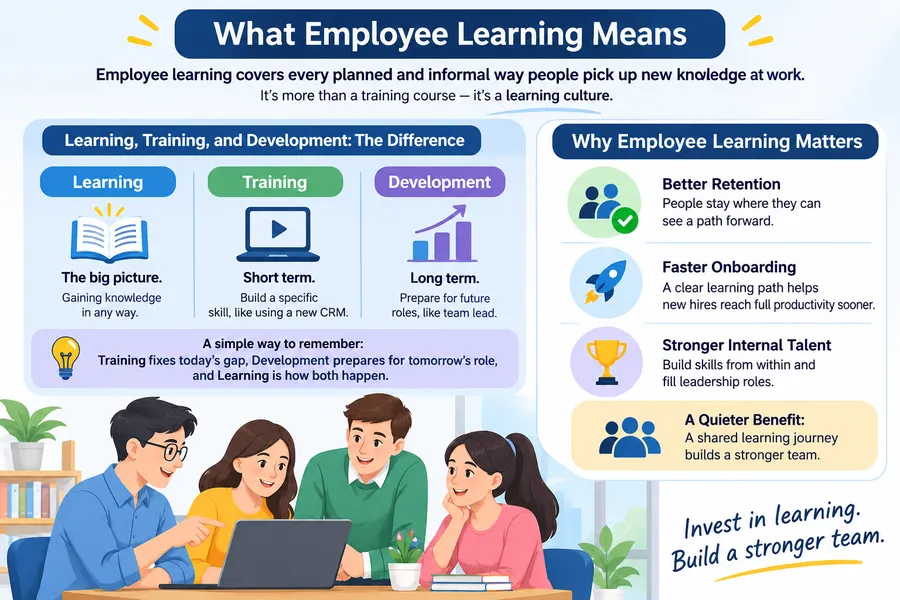
Employee learning covers every planned and informal way people pick up new knowledge at work, from a first-day orientation to a manager coaching someone through a hard project. It is wider than a training course. A good learning culture mixes structured lessons, hands-on practice, and daily conversations.
Before you build anything, it helps to be clear about the words you use. Teams often mix them up, and that leads to plans that miss the real need.
Learning, training, and development: the difference
Training is short term and task focused. It teaches a person how to do a specific job duty, such as using a new CRM or following a safety procedure. Development is long term and career focused. It prepares a person for future roles, such as team lead or department head. Learning is the umbrella term. It describes the act of gaining knowledge, whether through a course, a mentor, or trial and error.
A simple way to remember it: training fixes today’s gap, development prepares for tomorrow’s role, and learning is how both actually happen.
Why employee learning matters
Skills go out of date. Tools change, customer needs shift, and rules get updated. Teams that keep learning can respond without panic. A well-designed learning management system (LMS) can help organizations organize learning activities and deliver training more consistently. There are three practical benefits that most managers notice first.
- Better retention. People stay where they can see a path forward. When staff feel stuck, they start looking elsewhere.
- Faster onboarding. A clear learning path helps new hires reach full productivity sooner and reduces the number of questions that land on busy colleagues.
- Stronger internal talent. When you build skills from within, you fill leadership roles without the cost and risk of hiring from outside.
There is also a quieter benefit. Staff who learn together share a common language, and that makes everyday teamwork smoother.
Types of employee development programs
Employee development programs are structured plans that help staff build skills for their current role and prepare for the next one. Most organizations use a mix of the types below, matched to the needs of each team.
Onboarding programs
Onboarding covers the first 30 to 90 days. It introduces company values, tools, and expectations. The best versions go beyond paperwork. They give a new hire a buddy, a short list of early wins, and a schedule of short lessons spread across the first weeks instead of one overloaded day.
Technical and role-based skills programs
These programs teach the hard skills needed for a job, such as data analysis, customer support tools, accounting software, or machine safety. They work best when they end with a practical task, not only a quiz. For example, a support agent finishes the course by handling three practice tickets.
Leadership and management programs
New managers often get promoted for being good at their old job, not for knowing how to lead. A leadership program covers giving feedback, running one-to-ones, handling conflict, and setting goals. It usually runs over several months and mixes lessons with coaching.
Compliance and safety programs
Some training is required by law or by industry rules. Examples include workplace safety, data protection, and anti-harassment training. These programs need good records, so tracking who finished what and when is the main feature to look for. Using online exams and assessments can also help evaluate employee knowledge.
Soft skills programs
Communication, time management, teamwork, and problem solving fall into this group. They are hard to measure but have a big effect on daily work. Short scenario-based lessons tend to work better than long lectures.
Quick comparison of program types
| Program type | Main goal | Typical length | Best delivery method |
|---|---|---|---|
| Onboarding | Help new hires settle in and become productive | 30 to 90 days | Mixed: online lessons plus buddy support |
| Technical skills | Build job-specific abilities | 2 to 8 weeks | Online lessons with practical tasks |
| Leadership | Prepare future and new managers | 3 to 12 months | Workshops, coaching, and online modules |
| Compliance | Meet legal and safety requirements | 1 to 3 hours, repeated yearly | Online courses with tracked quizzes |
| Soft skills | Improve communication and teamwork | 1 to 4 weeks | Short scenarios, role play, peer sessions |
How training programs can be used to support employee development
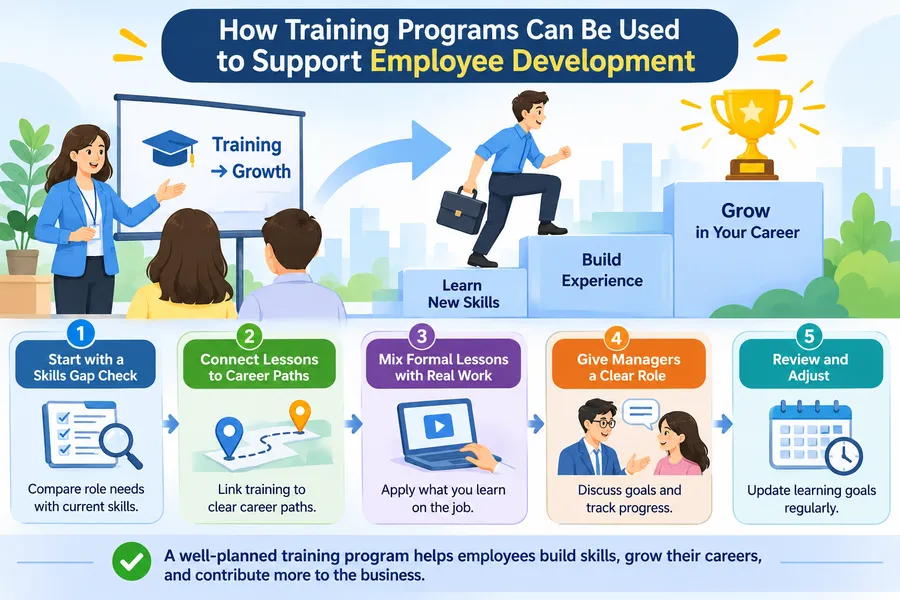
Training programs support employee development when they are tied to a person’s career path and not offered as a random list of courses. The link between the two is a clear plan: where the person is now, where they want to go, and which lessons close the distance.
Many companies run plenty of training but see little growth because the courses have no connection to real roles. Fixing that connection is the quickest way to get more value from the budget you already spend.
Start with a skills gap check
A skills gap check compares what a role requires with what the person can currently do. You can run it with a short survey, a manager review, or a mix of both. Keep the list of skills specific. “Communication” is too vague. “Writing clear status updates for clients” is something you can teach and test.
Once you have the gaps, rank them by business impact and by how much the employee wants to learn them. A gap that matters to the company and also excites the person is the best place to start.
Connect lessons to career paths
Write down two or three common career paths in each department. For each step, list the skills and experience needed. Then link training to those steps. A junior designer, for example, might see a path to senior designer that includes a course on design systems, a project lead task, and a peer review round.
When people can see the map, they take learning more seriously. It stops feeling like homework and starts feeling like progress.
Mix formal lessons with real work
Formal courses explain the theory. Real work builds the habit. The strongest development plans pair the two. After a lesson on running meetings, the employee leads the next team meeting and receives feedback from a manager. After a course on budgeting, they build the budget for a small project.
Give managers a clear role
Managers are the link between a training program and daily work. Ask them to hold a short career conversation with each team member at least twice a year, agree on one or two learning goals, and check progress in regular one-to-ones. Without manager support, even well-designed programs fade after the first few weeks.
Review and adjust
Plans change. Roles shift, and so do interests. Review each person’s learning goals every quarter, drop what no longer fits, and add what does. A short review keeps the plan alive and shows staff that the company takes it seriously.
Online employee training: what works and what does not
Online employee training means delivering lessons, quizzes, and materials through a digital platform so staff can learn from any location at a time that suits them. It is now the default method for many teams, especially those that are remote, spread across offices, or working in shifts.
Benefits of online training
- Flexibility. Staff can learn between tasks, on a different shift, or from home.
- Consistency. Every employee gets the same core message, which matters for compliance and brand standards.
- Easy tracking. A learning platform records progress, scores, and completion dates without extra paperwork.
- Lower cost at scale. Once a course is built, you can reuse it for every new hire.
- Easy updates. When a process changes, you edit one lesson and everyone sees the new version.
Limits you should plan for
Online training is not perfect. Completion rates drop when courses are long or boring. People can click through slides without absorbing anything. Hands-on skills, such as operating equipment, still need in-person practice. And without a human touch, some learners feel isolated.
The fix is not to avoid online learning. It is to design it well. Keep lessons short, add practice tasks, and pair the course with a live check-in or a discussion board.
Formats that keep people engaged
- Micro-lessons. Five to ten minute lessons focused on one skill.
- Scenario-based quizzes. Short stories where the learner chooses what to do next.
- Video demonstrations. Screen recordings that show how to complete a task in your own tools.
- Downloadable job aids. One-page checklists staff can keep next to their desk.
- Live webinars with recordings. Useful for Q&A, and the recording serves staff who could not attend.
- Certificates. Simple proof of completion that motivates many learners and helps with compliance records.
Employee to employee training
Employee to employee training is a method where staff teach and learn from each other, using the knowledge that already exists inside the company. It is one of the lowest-cost ways to build skills, and it often feels more relevant than outside courses because the teacher knows the real work.
Why peer learning works
Your own people already know your tools, customers, and unwritten rules. An experienced support agent knows how to calm an upset customer in a way no generic course can match. Peer learning captures that knowledge before it walks out the door when someone leaves or retires.
It also helps the teacher. Explaining a task to someone else forces a person to think clearly about it, which deepens their own understanding and builds confidence.
Common formats
- Mentoring. A more experienced employee meets regularly with a less experienced one to share advice and feedback.
- Job shadowing. A learner follows a colleague for a day or a week to see how the work is really done.
- Lunch and learn sessions. A short talk where one employee shares a skill or lesson learned.
- Peer review. Colleagues review each other’s work and give structured feedback.
- Communities of practice. Staff with a shared interest, such as data or customer service, meet regularly to swap ideas.
- Recorded how-to videos. Employees record short screen demos of tasks they do well and add them to the shared library.
Tips to make peer learning work
Peer learning does not run itself. A few simple habits make a big difference.
- Give teachers time. If sharing knowledge is squeezed into evenings, it will not last. Count it as real work.
- Offer light training for trainers. A one-hour session on how to explain a task, give feedback, and structure a short lesson helps a lot.
- Recognize contributors. Mention good mentors in team meetings, add it to performance reviews, or give small rewards.
- Capture the content. Record sessions and store them where anyone can find them. This turns a one-time chat into a lasting resource.
- Match people with care. Pair people with a clear goal, not just by availability.
Training ideas for employees you can start this quarter
Good training ideas for employees are simple, tied to real work, and easy to repeat. You do not need a large budget to begin. The list below mixes low-cost options with ones that need a little more planning.
Low-cost ideas
- Weekly 15-minute skill share. One person demonstrates a tip, shortcut, or lesson learned. Keep it informal.
- Book or article club. A small group reads one item per month and meets to discuss how to apply it.
- Internal job swaps. Two employees trade roles for a day to understand each other’s work.
- Question of the week. Post one work-related question in your team chat and let people share answers.
- Shadow a leader. Let an interested employee join a senior leader for meetings and see how decisions are made.
Ideas that need a little planning
- Learning paths by role. Bundle five to eight short courses in a set order for each job family.
- Stretch projects. Assign a task slightly beyond a person’s current level, with a mentor on hand for support.
- Cross-department training. Ask finance to explain budgets to the marketing team, and marketing to explain campaigns to finance.
- Certification support. Cover the cost of a respected industry certificate and give study time at work.
- Learning days. Block one afternoon each month with no meetings so staff can complete courses.
Choosing the right idea
Ask three questions before you pick. Does this solve a real problem the team has right now? Can we repeat it without much extra effort? Will the people involved actually want to take part? If the answer to all three is yes, you have a good candidate.
How to build development programs for employees, step by step
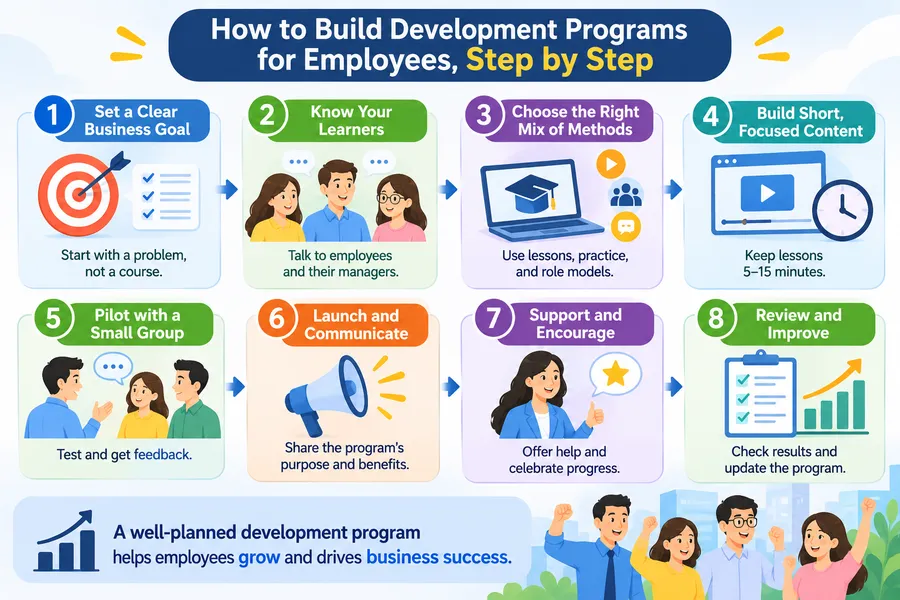
Development programs for employees work best when you build them in a clear order: define the goal, understand the audience, design the content, deliver it, and then check the results. Skipping a step usually shows up later as low interest or no visible change.
Step 1: Set a clear business goal
Start with a problem, not a course. Examples include “reduce customer complaints about response time” or “prepare three team leads for management roles within a year.” A clear goal tells you what to build and how to judge success.
Step 2: Know your learners
Talk to a small group of employees and their managers. Ask what slows them down, what they would like to learn, and when they have time. This takes a few days but prevents building content nobody wants.
Step 3: Choose the right mix of methods
Match the method to the skill. Knowledge, such as policies, suits online lessons. Skills, such as giving feedback, need practice and coaching. Attitudes, such as customer care, grow through stories, role models, and discussion.
Step 4: Build short, focused content
Break each topic into lessons of five to fifteen minutes. Open each lesson with a simple objective, such as “After this lesson, you can set up a project folder using our naming rules.” End with a short task or quiz.
Step 5: Pilot with a small group
Test the program with five to ten people before rolling it out. Ask what was unclear, what took too long, and what they would change. Fix those items first.
Step 6: Launch and communicate
Tell staff why the program exists, how long it takes, and what is in it for them. Ask managers to mention it in team meetings. Make the first step easy, such as a single link to start.
Step 7: Support and encourage
Send short reminders, share early success stories, and make a person available to answer questions. A little attention during the first two weeks has a big effect on completion.
Step 8: Review and improve
Collect feedback, check completion and quiz data, and look at business results. Update lessons that confuse people and retire the ones that no longer fit.
Comparing delivery methods
Each delivery method has strengths and weaknesses, and most programs use more than one. This table gives a quick view of how they compare.
| Method | Cost | Flexibility | Best for | Main drawback |
|---|---|---|---|---|
| Online self-paced courses | Low after setup | High | Policies, tools, product knowledge | Lower engagement without support |
| Live classroom or workshop | High | Low | Complex skills, team building | Hard to schedule, harder to scale |
| Live virtual sessions | Medium | Medium | Q&A, remote teams | Time zone and attention issues |
| Mentoring | Low | Medium | Career growth, company culture | Depends on quality of the mentor |
| On-the-job practice | Low | High | Hands-on skills | Needs clear goals and feedback |
| Peer-led sessions | Low | Medium | Sharing local knowledge | Needs time and light structure |
A blended approach is usually best. For example, a new sales hire might complete online product lessons, shadow a senior rep for a week, join a live role-play workshop, and then meet with a mentor every two weeks.
Running employee learning with LearnPress
If your company already runs on WordPress, LearnPress is a practical way to host your own employee learning portal. LearnPress is a free WordPress LMS plugin from ThimPress that lets you create courses, lessons, and quizzes and manage students from your WordPress dashboard. It suits small and mid-size teams that want control over their content without paying per-user fees to a separate platform.
It is not the right choice for every company. Very large enterprises with complex HR system requirements may need a dedicated corporate learning suite. But for many teams, a WordPress-based setup is simple, affordable, and flexible.
Why LearnPress fits employee training
- Course builder. You build a curriculum with sections, lessons, and quizzes in a clear drag-and-drop style editor. Staff see the structure and know what comes next.
- Quizzes and progress. Quizzes check understanding, and course progress is visible to the learner.
- Your own site, your own data. Content lives on your WordPress install, so you control branding, access, and privacy settings.
- Works with your theme. LearnPress is designed to work with WordPress themes, including education-focused ones, so the portal can match your company brand.
- Add-ons. The plugin has add-ons for extras such as certificates, assignments, course reviews, and paid access options. Check the current add-on list on the LearnPress site, since availability can change between releases.
How to set up a basic employee learning portal
The steps below describe a typical setup. Menu names may differ slightly by version, so check the official documentation for your release.
- Install WordPress and a lightweight theme. Use a fast theme and keep the site on reliable hosting. Learning portals have many logged-in users, so good hosting matters.
- Install and activate LearnPress. Go to Plugins, then Add New, search for LearnPress, and activate it. Run the setup wizard to create the key pages, such as the course list and the student profile.
- Create your first course. Add a title, a short description, and a featured image. Build sections for each topic, then add lessons and quizzes.
- Set access rules. Decide whether the course is open to all logged-in staff or limited to selected groups. For internal use, keep the site behind login.
- Add certificates or badges if needed. For compliance and motivation, enable a certificate add-on and design a template with your company name and logo.
- Invite your team. Create user accounts or let staff register with a company email. Send a short welcome message with a link to the first course.
- Review reports. Check who started, who finished, and where people struggle. Use that information to improve weak lessons.
A realistic example
Imagine a 60-person logistics company that wants to train new drivers on safety rules. The HR lead builds one course with five short lessons, each ending with a three-question quiz. A final quiz must be passed before a certificate is issued. Drivers complete the course on their phones before their first shift, and managers check the completion list each week. The setup takes a few days, and updating a rule later means editing a single lesson.
Honest limits to keep in mind
LearnPress needs someone to look after the WordPress site, including updates, backups, and security. If you have no technical person on staff, plan for that support. Some advanced features, such as deep HR system integration, may need extra plugins or custom work. Test the plugin on a staging site first, and confirm that each add-on works with your version of WordPress and your theme.
How to measure results
You measure employee learning by checking whether people learned, whether they changed how they work, and whether the business improved. Tracking only course completion tells you who clicked through, not whether anything changed.
A well-known framework for this is the Kirkpatrick model, developed by Donald Kirkpatrick and widely used in workplace training. It has four levels.
| Level | What it measures | Example method |
|---|---|---|
| 1. Reaction | How learners felt about the training | Short feedback survey |
| 2. Learning | What they actually learned | Quiz scores, practical tests |
| 3. Behavior | Whether they apply it on the job | Manager observation, work samples |
| 4. Results | The effect on business goals | Fewer errors, faster delivery, better customer scores |
Practical metrics to track
- Completion rate. The share of enrolled staff who finish a course.
- Quiz and assessment scores. Look at the questions people miss most often, since they point to unclear lessons.
- Time to productivity. How long new hires take to reach full performance.
- Internal promotion rate. The share of open roles filled by current employees.
- Retention. Whether staff who join development programs stay longer than those who do not.
- Manager feedback. A short check at 30 and 90 days after a course on whether the skills are being used.
A note on honest reporting
Be careful with cause and effect. If sales rise after a training course, other factors may have played a part. Compare groups where you can, collect feedback from managers, and describe results as likely contributions rather than guaranteed proof.
Common mistakes to avoid
Most failed learning programs share a few predictable problems. Watching for them early saves time and money.
- Courses without a goal. If no one can say what should change after the training, it will not change.
- Content that is too long. Hour-long modules lose attention. Split them up.
- No time to learn. Asking staff to learn after hours leads to low completion and resentment.
- No manager involvement. Managers who ignore the program signal that it does not matter.
- One size fits all. A new graduate and a ten-year veteran need different paths.
- No follow-up. Learning fades without practice and reminders.
- Ignoring feedback. If learners say a lesson is confusing and nothing changes, they stop giving feedback.
FAQs
How often should employees receive training?
Employees should have some form of learning every month, even if it is short. A common pattern is a few hours of structured learning each quarter, plus smaller activities such as skill shares or micro-lessons in between. Compliance topics usually follow their own schedule, often once a year, so check the rules that apply to your industry.
What is the 70-20-10 model for learning?
The 70-20-10 model suggests that about 70 percent of learning comes from on-the-job experience, 20 percent from other people through feedback and coaching, and 10 percent from formal courses. It came from research by Morgan McCall, Michael Lombardo, and Robert Eichinger at the Center for Creative Leadership. Treat the numbers as a guide, not a strict rule, and use them to remind yourself that courses alone are not enough.
How much should a company spend on employee learning?
There is no single correct figure, because it depends on company size, industry, and goals. A useful approach is to start with a pilot for one team, measure the result, and then expand. Free and low-cost options, such as peer sessions and a WordPress-based learning platform, can stretch a small budget a long way.
How can you motivate employees who do not want to take part?
Start by finding out why. Common reasons include lack of time, unclear value, or past bad experiences with dull courses. Link the learning to real career goals, shorten the lessons, give protected time during work hours, and let managers and respected colleagues take part first. Voluntary programs with visible benefits usually work better than forced ones.
Conclusion
Employee learning works best when it is planned around real business goals, linked to career paths, and built into the normal working week. A mix of methods gives the strongest result: short online lessons for knowledge, peer sharing for local know-how, and hands-on projects with feedback for real skill. Start small, test with one team, listen to feedback, and expand what works.
Whether you choose online employee training, mentoring, or a full set of structured development programs, the aim is the same: help people grow so the company can grow with them. If your team already uses WordPress, LearnPress offers a flexible and affordable way to host your own courses and track progress. Choose one idea from this guide, set a clear goal, and launch a small pilot this month.
Read more: Employee Learning: A Practical Guide for HR Teams