SCORM authoring is the process of building online course content and packaging it so any SCORM compliant LMS can load it, track it, and report on it. If you have ever built a course in one system and found it would not run in another, SCORM is the standard that fixes that problem.
This guide shows you how to plan, build, test, and publish your first SCORM course, even if you have never done it before.
LearnPress – WordPress LMS Plugin
We provide an amazing WordPress LMS plugin to create & sell online courses. Let’s find out!
Try NowTable of Contents
What SCORM authoring is and why it still matters
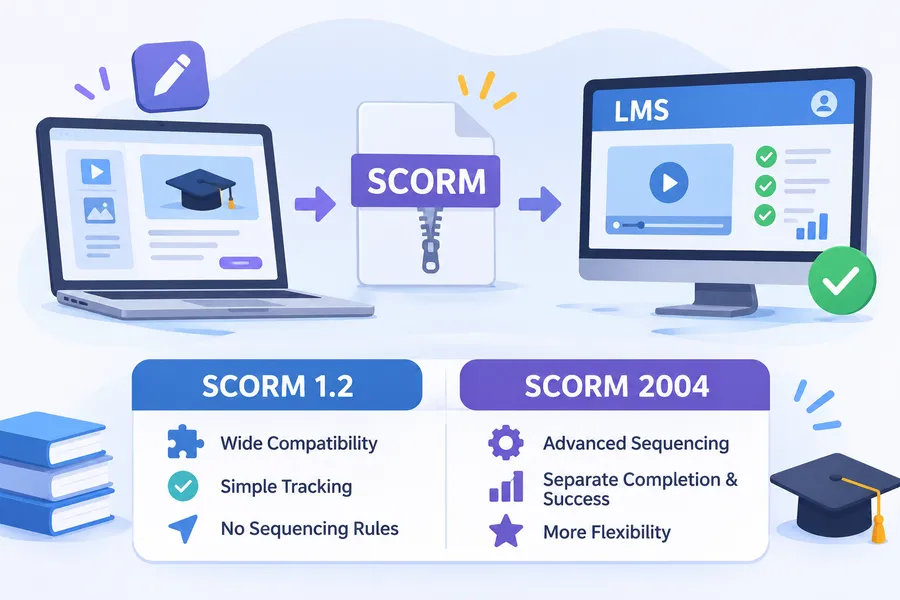
SCORM stands for Sharable Content Object Reference Model. It is a set of technical rules that lets course content and a learning management system (LMS) talk to each other. In practice, SCORM authoring means you design a course in an authoring program, export it as a SCORM package, and upload that package to an LMS.
The standard is old, but it is still the default for corporate training, compliance courses, and many university programs. Most LMS vendors list SCORM support as a basic requirement, so content you build once can move between systems without being rebuilt.
What a SCORM package contains
A SCORM package is a ZIP file. Inside it you will find your course pages (HTML, CSS, JavaScript, images, and video) plus a file called imsmanifest.xml. That manifest tells the LMS which file to launch first and how the course is organized.
The package also includes a JavaScript layer that sends data to the LMS. That data covers completion status, score, time spent, and where the learner stopped. When something goes wrong with tracking, the problem is usually in this layer or in the manifest.
SCORM 1.2 vs SCORM 2004
You will see two main versions. SCORM 1.2 is simpler and works almost everywhere. SCORM 2004 adds sequencing rules, so you can control the order in which learners see content, and it separates “completed” from “passed.”
Here is a quick comparison.
| Feature | SCORM 1.2 | SCORM 2004 |
|---|---|---|
| Compatibility | Almost every LMS | Most modern LMSs |
| Status tracking | One combined status | Separate completion and success status |
| Sequencing and navigation rules | Not supported | Supported |
| Setup difficulty | Easier | More complex |
| Best for | Simple courses, wide reach | Branching or rule-based courses |
If you are not sure which to choose, start with SCORM 1.2. It is the safer pick for a first course, and you can move to SCORM 2004 later if you need sequencing.
What you need before you start SCORM authoring
Good SCORM authoring starts before you open any software. A few decisions up front will save you hours of rework later.
Define the learning goal and audience
Write one sentence that says what the learner should be able to do after the course. For example: “After this course, a new support agent can handle a refund request using our policy.” Then note who the learners are, what devices they use, and how long they can spend per session.
Short goals lead to short courses, and short courses finish better. Most beginners try to put too much into the first build.
Check what your LMS supports
Before you pick SCORM software, find out which version your LMS accepts, what file size limit it has, and what it reports back. Ask your LMS admin or read the vendor documentation. If you are still choosing a system, only shortlist SCORM compliant learning management systems that clearly document their SCORM version support.
This one check matters more than people expect. A package built for SCORM 2004 will not always behave in a system that only handles SCORM 1.2.
How to choose SCORM software
SCORM software falls into a few groups, and the right one depends on your skills, budget, and how often you will build courses. Picking the wrong type is the most common reason beginners stall.
Types of SCORM tools compared
The table below compares the main kinds of SCORM creation tools. Product names are examples, not rankings. Check current pricing and features on each vendor’s website.
| Type of tool | Examples | Best for | Skill level | Typical cost |
|---|---|---|---|---|
| Slide-based authoring | iSpring Suite, Adobe Captivate | Teams that already work in PowerPoint | Beginner | Paid subscription or licence |
| Full course builders | Articulate 360 (Storyline, Rise) | Interactive, branded courses | Beginner to intermediate | Paid subscription |
| Open-source frameworks | Adapt Framework | Responsive courses with developer help | Intermediate to advanced | Free, but needs setup time |
| Simple open-source editors | eXeLearning | Basic courses on a tight budget | Beginner | Free |
| Cloud-based builders | Browser-based course tools | Quick builds and shared team work | Beginner | Subscription |
Features to check in a SCORM editor
A good SCORM editor does more than export a ZIP file. When you compare options, look for these features:
- Export options: Both SCORM 1.2 and SCORM 2004 (and ideally xAPI too).
- Responsive output: Courses should resize properly on phones and tablets.
- Quiz tools: Multiple question types, scoring rules, and pass marks.
- Reuse: Templates and a content library so you do not start from zero each time.
- Accessibility: Keyboard navigation, alt text fields, and captions for video.
- Preview and publish settings: The ability to set completion rules and a mastery score.
If you only build a few courses a year, a free tool may be enough. If training is a core part of your work, paying for a mature authoring suite usually saves time.
A note on SCORM compliant software
You will see many products described as SCORM compliant software. The phrase is loose. It can mean a tool that exports SCORM packages, or a system that plays them. Always check which one the vendor means, and test with your own file before you commit.
How to create a SCORM course step by step
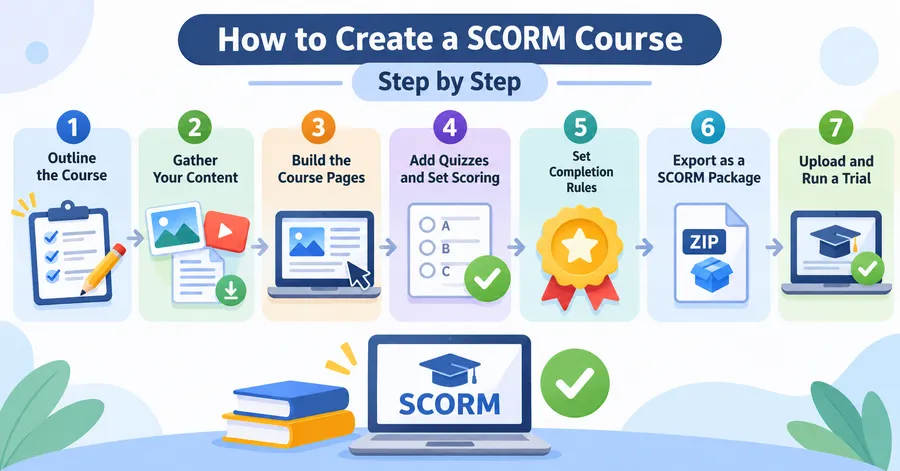
This is the core workflow. It applies to almost every authoring program, even though button names differ.
Step 1: Outline the course
Break your goal into three to seven short modules. Write a title and a one-line objective for each. Keep each module to about five to ten minutes of learning time. A clear outline makes the build go much faster.
Step 2: Gather your content
Collect text, images, video, and any documents before you start building. Compress images and trim videos now. Large media files are a leading cause of slow loading and failed uploads.
Step 3: Build the pages in your SCORM editor
Open your chosen SCORM editor and create a new project. Set the slide or page size first, then add a consistent layout for titles, body text, and buttons. Build one module, preview it, and only then repeat the pattern for the rest.
Use short paragraphs, plain language, and one idea per screen. Add interactions such as drag-and-drop, hotspots, or scenarios only where they help learning, not just for decoration.
Step 4: Add quizzes and set scoring
Add knowledge checks after each module and a short final quiz. Decide the pass mark (70% to 80% is common) and how many attempts learners get. Tie the score to the course’s completion rule so the LMS receives a clear “passed” or “failed” result.
Step 5: Set completion rules
This is where many first courses break. Decide what counts as complete: viewing all pages, passing the quiz, or both. Set that rule in your publish settings. If the rule is vague, the LMS may never mark the course as finished.
Step 6: Export as a SCORM package
Choose the publish or export option and pick SCORM 1.2 or SCORM 2004 to match your LMS. Give the course a clear title, set the mastery score, and export as a ZIP file. Do not unzip it or rename files inside it. The LMS needs the imsmanifest.xml file at the root of the ZIP.
Step 7: Upload and run a trial
Upload the ZIP to your LMS, enroll a test learner, and go through the whole course from start to finish. Then move on to the testing steps below. Do not skip this, even for a short course.
How to test your SCORM package
Testing is the most overlooked part of SCORM authoring. A course that plays fine in a preview can still fail to report completion once it is inside an LMS.
Use a neutral test environment first
Before you blame your LMS, run the package in a neutral SCORM player. SCORM Cloud, from Rustici Software, is a widely used option for this. If the course works there but fails in your LMS, the issue is probably an LMS setting. If it fails in both, the package itself needs fixing.
What to check during testing
Go through this short checklist on at least two browsers and one mobile device:
- The course launches without errors or blank screens.
- Navigation buttons work and the learner can leave and resume.
- Quiz scores appear correctly in the LMS report.
- The status changes to “completed” or “passed” at the right moment.
- Audio, video, and interactive elements play on mobile.
- The course does not trap the learner when they close the browser window.
A common problem is a pop-up blocker stopping the course window from opening. Another is a learner closing the window before the final slide, so the LMS never receives the completion call. Setting the completion trigger earlier in the course often solves this.
SCORM compliant learning management systems and LearnPress
Once your course is built, you need a place to host it. The right home depends on your audience, your budget, and how much control you want over your site.
What to look for in an LMS
SCORM compliant learning management systems should do four things well: import SCORM 1.2 or 2004 packages, record scores and completion, show reports, and let you manage learners. Many systems do this. The differences are in price, ease of use, and how well they fit the rest of your website.
Where LearnPress fits
If your website runs on WordPress, LearnPress is a free LMS plugin that lets you build and sell courses directly on your own site. You can create lessons, quizzes, and course curricula, manage students, and add features through add-ons. It is a practical choice for teachers, trainers, and small businesses that want full control of their content and branding without paying per-user fees to a hosted platform.
An honest note on SCORM: LearnPress does not play SCORM packages natively. Courses you build inside LearnPress use its own lesson and quiz system. If you need to run packages made in another SCORM editor, you can add a third-party integration plugin, such as the GrassBlade xAPI Companion with its LearnPress add-on, or a SCORM connector that lists LearnPress support. Compatibility depends on the plugin version, so check each plugin’s page and test with a sample package before you roll out to learners.
There is also a simpler route. If you do not need to reuse content across several systems, you can build your course directly in LearnPress, skip the packaging step, and still track lesson progress and quiz results. Many site owners start this way and only add SCORM later if a client or partner requires it.
| Need | Best approach |
|---|---|
| Content must run in many different LMSs | Build with SCORM authoring tools and export |
| Content lives only on your WordPress site | Build directly in LearnPress |
| You already own SCORM packages | Add a SCORM integration plugin to LearnPress and test first |
Common SCORM authoring mistakes
Most failed first courses share the same few problems. Knowing them in advance saves time.
Building before planning
Jumping straight into the software leads to bloated courses and messy navigation. Spend a short time on the outline and learning goal first.
Ignoring file size and media weight
A course packed with large videos may exceed your LMS upload limit or load slowly on mobile. Compress media, and host long videos externally if your LMS allows it.
Choosing the wrong SCORM version
Exporting SCORM 2004 for an LMS that only supports SCORM 1.2 is a classic mistake. Confirm the version before you export.
Skipping accessibility
Missing captions, poor colour contrast, and mouse-only navigation shut out learners and can create legal risk for organizations. Most modern SCORM tools include accessibility settings, so use them.
Not testing before launch
Always test in a neutral player and in your own LMS. A five-minute test can prevent a week of support emails.
Locking yourself into one tool
Some authoring formats are hard to edit once exported. Keep your original source files in a safe, shared location, and name versions clearly so anyone on your team can update the course later.
FAQs
Is SCORM still used in 2026?
Yes. SCORM remains one of the most widely supported formats in corporate and academic e-learning. Newer standards such as xAPI and cmi5 are growing, but most LMS vendors still support SCORM, and many organizations hold large libraries of SCORM content.
Do I need coding skills to create SCORM content?
No. Most modern authoring programs work like presentation software, so you can build and export a course without writing code. Coding skills only become useful if you use an open-source framework, add custom interactions, or debug a package that fails to report completion.
What is the difference between SCORM and xAPI?
SCORM tracks learning inside an LMS, mostly completion, scores, and time spent. xAPI can record learning activity from many places, such as mobile apps, simulations, and offline events, and it sends that data to a learning record store. SCORM is simpler and widely supported. xAPI is more flexible but needs extra setup.
How long does it take to build a SCORM course?
A short course of 15 to 30 minutes usually takes a beginner a few days from outline to testing. Time depends on how much content you already have, how interactive the course is, and how many review rounds you need. Plan extra time for testing, since fixing tracking problems often takes longer than building the pages.
Conclusion
SCORM authoring is easier than it looks once you follow a clear process: plan the learning goal, pick SCORM software that fits your skills, build in small modules, set clear completion rules, export the right version, and test before launch. The right SCORM editor and a reliable test routine matter more than any single advanced feature.
Start small. Build one short course with a SCORM 1.2 export, run it through a test player, and upload it to your LMS. If you run a WordPress site and want to host and sell courses yourself, LearnPress is a free place to start, and you can add SCORM support later through a compatible plugin if your project needs it.
Read more: What Is Bespoke Elearning Content? A Practical Guide