
This screen provides an overview of your membership system, including revenue, orders, and registered users. It also allows you to manage transactions, including issuing refunds.
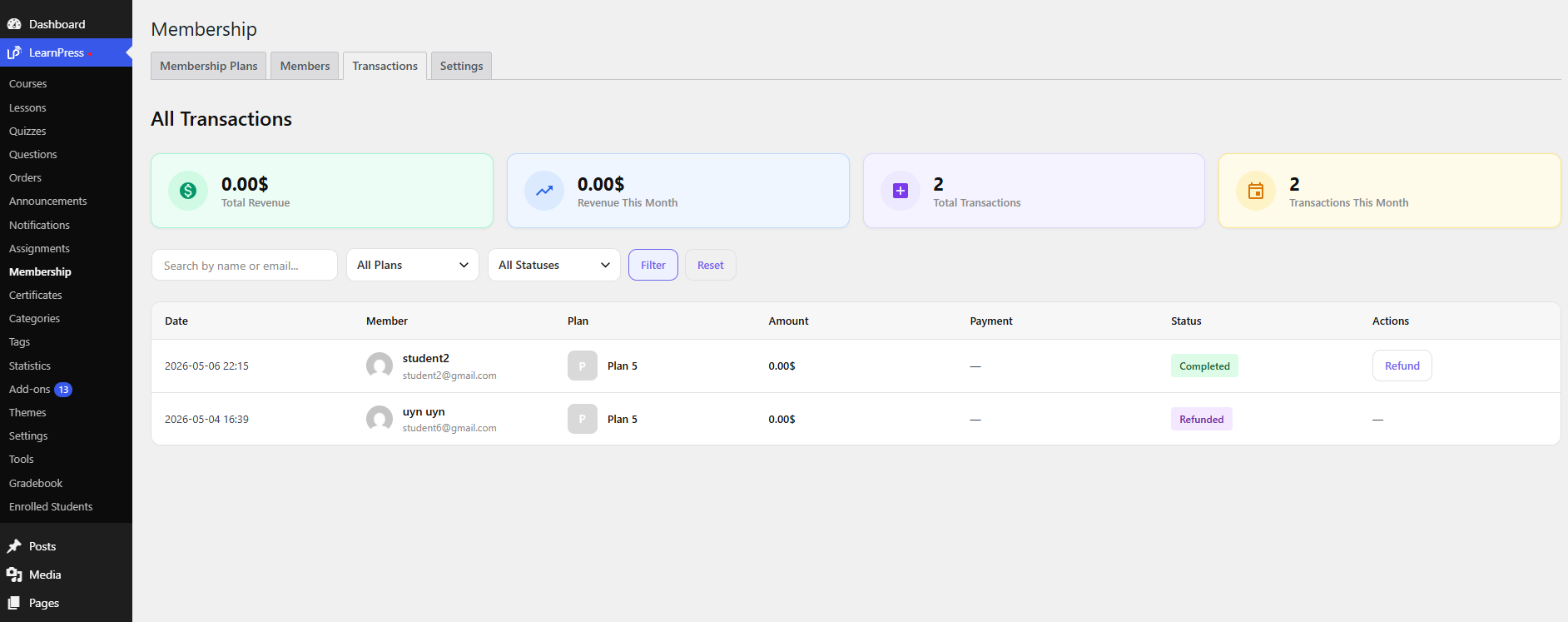
In typical membership systems, this dashboard centralizes data such as purchases, renewals, and refunds, helping track revenue flow and user activity ().
Overview
At the top of the screen, you will see key metrics:
- Total Revenue
Total income generated from all membership plans. - Total Orders
Total number of orders, including new purchases and renewals. - Total Members / Users
Total number of users subscribed to membership plans.
Orders / Members List
Below is a detailed table showing user or order data:
- User
The member who purchased the plan. - Plan
The membership plan assigned to the user. - Amount
The order value. - Status
Order status (e.g., Completed, Pending, Refunded). - Date
The date of purchase or registration.
Management Actions
- Refund
Allows you to refund an order directly from the list.
The order status will be updated after the refund. - Search / Filter (if available)
Helps you find or filter users by plan, status, or keyword.
This screen acts as a central hub for managing revenue and users, allowing you to monitor performance and handle transactions efficiently.