Are you looking for migrate LearnDash to LearnPress?
If you run an online academy, your data is the lifeblood of your business. Your courses, quizzes, and student progress records are invaluable. For years, thousands of educators have relied on the “LearnPress Export/Import” plugin to manage this content.
However, the e-learning landscape is changing. Course creators are actively looking for ways to cut down on expensive annual renewal fees from premium online course platforms. They want the freedom and cost-effectiveness of LearnPress, but the technical fear of losing data holds them back.
Today, we are thrilled to announce a massive evolution of our plugin. We have officially rebranded to the LearnPress – Backup & Migration Tool.
Alongside this new name comes our most highly anticipated feature yet: a streamlined, automated way to migrate LearnDash to LearnPress.
If you want to escape high costs, explore better LifterLMS alternatives, or simply switch without losing a single student record, here is exactly why this update is the ultimate game-changer for your e-learning business.
Table of Contents
LearnPress – WordPress LMS Plugin
We provide an amazing WordPress LMS plugin to create & sell online courses. Let’s find out!
Try NowWhy We Rebranded to “LearnPress – Backup & Migration Tool”
You might be asking, why change a name that people already know?
The answer is simple: “Export/Import” no longer captures the true power of what this add-on can do. We wanted a name that immediately tells you exactly how it protects and scales your business.
The new name highlights two distinct, powerful capabilities:
- Total Data Security: It functions as a comprehensive LearnPress Backup system. You can secure your entire course architecture, ensuring data recovery in case of system failures.
- Seamless Platform Transitions: It acts as a dedicated LearnPress Migration Tool, built to intelligently move massive amounts of complex educational data across different platforms with zero coding required.
By updating the name, we are making it incredibly easy for users to find the exact LMS migration plugin they need in the WordPress directory.
The Big Update: Migrate LearnDash to LearnPress Seamlessly
Over the past year, we have heard a recurring plea from the WordPress community: “I am tired of paying expensive yearly fees for LearnDash and its add-ons. I want to switch to LearnPress, but I have thousands of enrolled students. How can I move them safely?”
We heard you loud and clear. High operational costs should never hold your business hostage. That is why our development team engineered a cutting-edge cross-platform transfer feature. You can now migrate LearnDash to LearnPress with just a single click.
What Exactly Gets Transferred?
Data migration is traditionally terrifying, but we have optimized our LMS migration plugin to be completely automated and strictly reliable. When you initiate the process to migrate LearnDash to LearnPress, the tool intelligently maps and transfers:
- Courses & Curriculum: All course content, titles, descriptions, featured images, and your hard work in planning course structure are transferred accurately.
- Lessons & Media: Text, images, videos, attachments, and the time you spent formatting lesson content related to your lessons are migrated seamlessly.
- Quizzes & Assignments: Questions, answers, score settings, and grading data are perfectly preserved, maintaining the integrity of your assessments.
- Student Data: This is crucial. Student profiles, course enrollments, and real-time progress data are transferred so learners can pick up right where they left off.
- Instructors: Instructor profiles and course assignments are migrated, ensuring your teaching staff retains their roles.
- Categories & Tags: Your entire course organization remains intact.
You no longer need to hire expensive developers or spend weeks manually copying and pasting text. The LearnPress Migration Tool handles the heavy lifting, saving you immense time and effort.
A Reliable LMS Migration Plugin You Can Trust
We know that when you decide to migrate LearnDash to LearnPress, you are moving your core business infrastructure. Trust is everything.
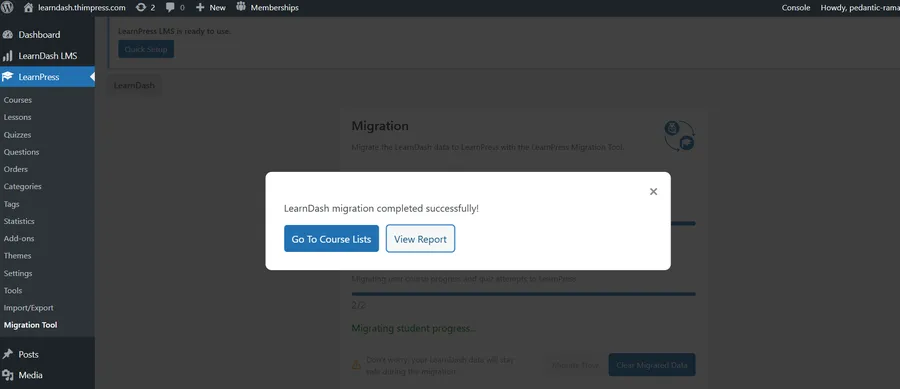
This feature was built with safety as the top priority. The automated data mapping ensures that different data structures between the two systems are perfectly aligned. Furthermore, the tool provides real-time progress tracking, allowing you to monitor the transfer step-by-step.
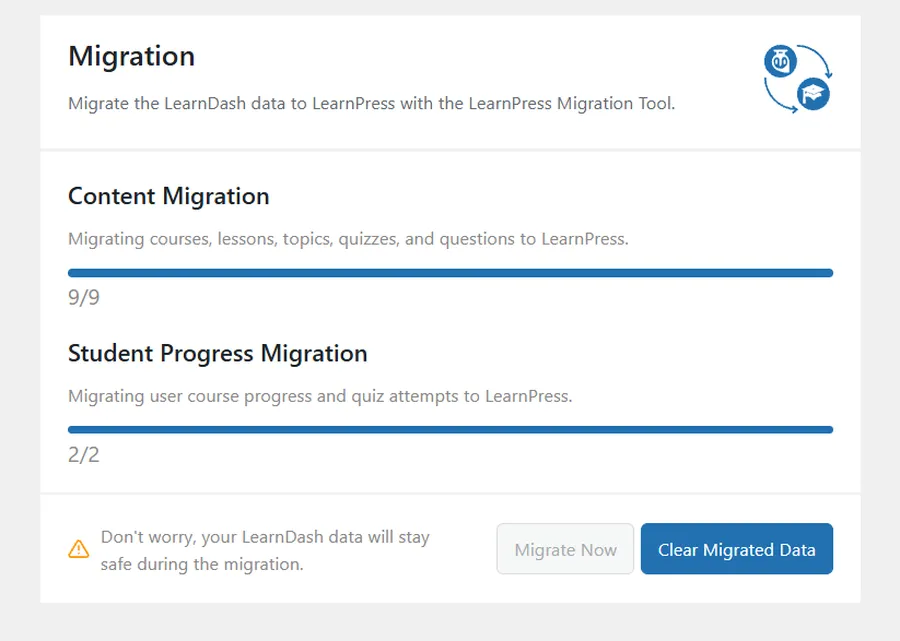
Best of all? Old LMS Data Preservation. When you use our LMS migration plugin, it maintains the data of your previous setup. If you ever need to restore the migration data, your original LearnDash content remains completely untouched and safe on your server.
Core Functionality Beyond Migration
While the ability to migrate LearnDash to LearnPress is our exciting new highlight, this plugin remains the ultimate utility belt for any LearnPress user.
Here is what else you can do with it:
- Reliable LearnPress Backup: Create full backups of your courses. This LearnPress Backup feature ensures quick recovery in case of accidental deletions or server crashes.
- Easy Course Duplication: Want to create a variation of an existing course? The LearnPress Migration Tool allows you to clone courses instantly, saving hours of setup time for course creators.
- Selective Export/Import: You do not always have to move an entire academy. You can selectively export or import specific elements, like a single quiz or a specific module.
- Site-to-Site Transfer: If you are moving your LearnPress site to a new server or domain, the tool simplifies the entire process.
How to Prepare for Your Migration
Are you ready to cut costs and migrate LearnDash to LearnPress? The process is remarkably user-friendly, even for those with no technical background.
- Install Both Plugins: Ensure both LearnDash and your new platform are active. If you are starting fresh, begin by properly installing LearnPress on your WordPress site.
- Run a LearnPress Backup: We always recommend creating a full website backup before executing major database changes.
- Ensure Stability: Make sure your hosting environment is stable, as migration time varies depending on the size of your data.
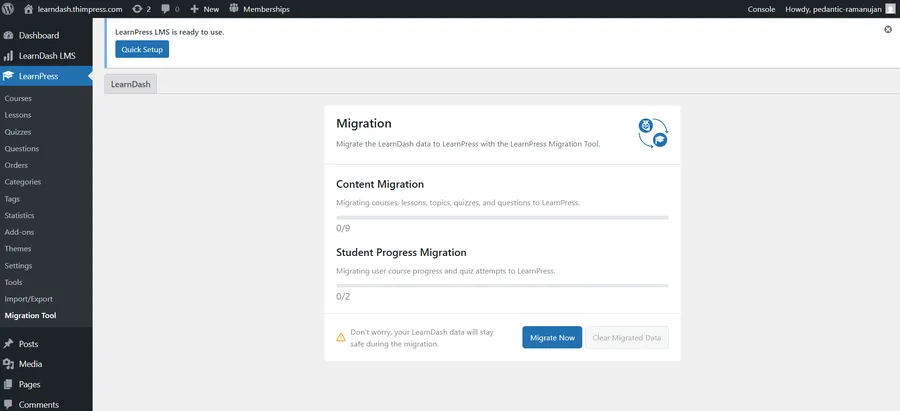
- One-Click Start: Navigate to the LearnPress Migration Tool dashboard within your LearnPress settings, select your source LMS, and click migrate.
By automating this complex database manipulation, this free LMS migration plugin saves you thousands of dollars in developer fees.
Verification: Your courses are ready!
Once the process is finished, clicking “Go To Course Lists” will show you all your migrated content organized perfectly within the LearnPress dashboard. You can immediately see your curriculum structure—sections, lessons, and quizzes—just as they were in LearnDash. If you want more details, the “View Report” option provides a comprehensive log of every item successfully transferred, ensuring nothing was left behind.
It Is Time to Make the Switch
There has never been a better, safer time to take full ownership of your e-learning business and maximize your profit margins.
If you are tired of being locked into an expensive ecosystem, your escape route is officially here. It is time to migrate LearnDash to LearnPress and experience the flexibility of the world’s best WordPress LMS.
For our existing users, utilizing the robust LearnPress Backup functionality ensures your hard work is never lost.
Don’t wait! Update to the latest version of the plugin today, or download the new LearnPress – Backup & Migration Tool for free from the WordPress repository.
Contact US | LearnPress:
Website: https://learnpresslms.com/
Fanpage: https://www.facebook.com/learnpresslms
Email: [email protected]