The blinking cursor on a blank page is the biggest enemy of every educator. You have the expertise, the experience, and the desire to teach. Yet, the sheer volume of work required to draft a syllabus, write fifty distinct lessons, and create engaging quizzes is paralyzing.
What if you could skip the tedious drafting phase entirely?
Imagine if you could simply define a topic and watch an AI course creator build complete courses for you in minutes. This is not science fiction; it is the new standard for digital marketers and educators using WordPress. To build a course with ai is no longer a futuristic dream—it is a practical necessity for staying competitive.
In this guide, we will transform the way you approach instructional design. By combining the speed of automation with your unique expertise, you will learn how to use a smart ai course outline generator and content engine to launch your academy in three effortless steps.
Table of Contents
LearnPress – WordPress LMS Plugin
We provide an amazing WordPress LMS plugin to create & sell online courses. Let’s find out!
Try NowThe Shift: Why Creating Courses with AI is Essential
Before we dive into the “how,” we must address the “why.” Traditional course creation is slow. It often takes months to research, outline, write, and format a single training program. By the time you finish a course on a trending topic like “TikTok Ads,” the platform algorithms may have already changed.
When you decide to build a course with ai, you gain three massive advantages:
- Speed: You can turn a rough idea into a structured curriculum in minutes, not weeks, effectively using the tool as an instant ai course outline generator.
- Scalability: You can launch multiple academies in different niches simultaneously.
- Consistency: An ai course creator builds complete courses with a unified tone and structure, ensuring a professional student experience.
Let’s stop staring at the blank page and start building.
Step 1: Context and The “Director” Mindset
To successfully build a course with ai, you must stop thinking like a writer and start thinking like a director. Your job is not to type every word; your job is to provide the vision.
As noted by industry experts, the quality of your AI output depends entirely on the quality of the context you provide. An AI tool cannot read your mind, but it can follow clear instructions. This is crucial when using online course builders tailored for automation.
Using an AI Course Outline Generator
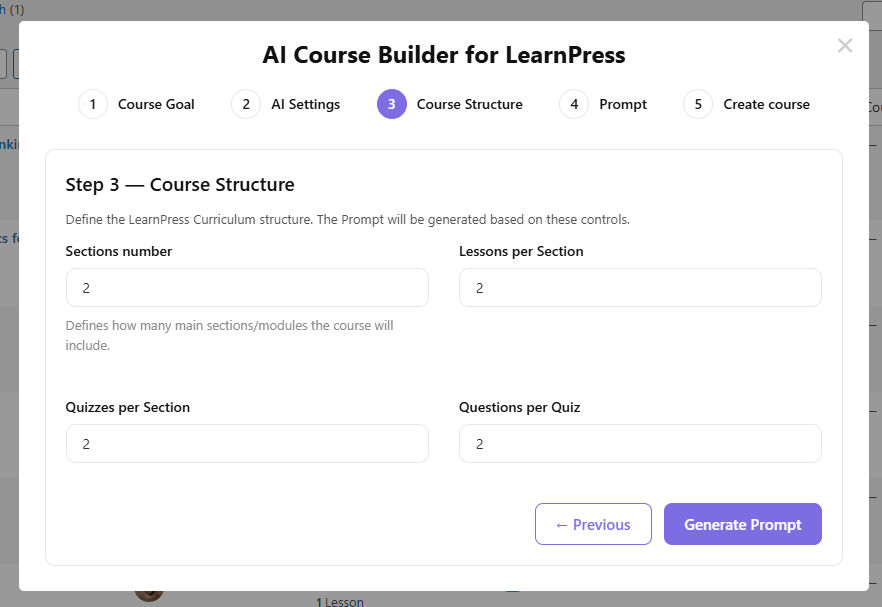
The first hurdle is always the structure. Instead of spending days arranging sticky notes on a whiteboard, you can use an ai course outline generator (often built directly into plugins like LearnPress) to do the heavy lifting.
Actionable Tips:
- Define the Role: Tell the AI exactly who is teaching. For example, “Act as a Senior Digital Marketing Strategist.”
- Define the Audience: Are you teaching beginners or experts? As Darius Foroux discovered, validating your idea and defining the audience is crucial. This aligns with finding the best course platforms that support your specific teaching style.
- Set the Goal: Be specific. Instead of “Teach SEO,” try “Teach advanced on-page SEO techniques for e-commerce sites.”
When you input these parameters, the system acts as a sophisticated ai course outline generator, ensuring that when the ai course creator builds complete courses, the foundation is solid. The AI will propose a logical flow—Introduction, Core Concepts, Advanced Tactics, and Summary—that you can review and approve instantly.
Step 2: Generation—The 38-Second Magic
This is the step where the magic happens. Once your approved outline is ready, you initiate the generation process.
In the past, this was the “grind” phase. You would have to write scripts, design slides, and format text manually. Now, you simply click a button.
How the AI Course Content Creator Works
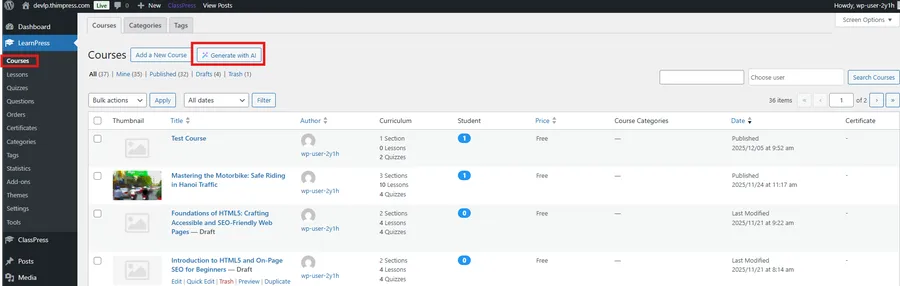
Modern tools integrated into WordPress LMS solutions (like LearnPress) take your approved outline and flesh it out. The ai course content creator engine works in the background to:
- Draft Lessons: It writes comprehensive lesson content based on your headers, ensuring you have engaging content.
- Generate Quizzes: It automatically creates relevant questions and answers to test student retention, simplifying quiz design.
- Select Media: It suggests or generates images that align with the lesson context.
This process is incredibly fast. Case studies show that AI can reduce months of work into just a few weeks or even minutes.
The Advantage of “Native” Generation
Unlike external tools that require you to export a SCORM file and upload it to an LMS, a native WordPress AI tool builds the course directly on your site.
Many educators initially look for a thinkific ai course creator, thinking a hosted platform is easier. However, they soon realize that such platforms often lock you into high monthly fees and restrict your data. LearnPress gives you that same AI power but lets you own your data completely right on your WordPress site, without the recurring subscription costs.
When you watch the ai course creator build complete courses inside your WordPress dashboard, you are saving hours of administrative work. The lessons are already categorized, the quizzes are already linked, and the pricing is already set.
Pro Tip: Don’t fear the “Generic” trap. You might worry that AI content will sound robotic. However, by setting the “Tone” settings (e.g., Witty, Professional, Persuasive) before you start, you ensure the draft is 90% ready for publication. If you are using a WordPress LMS AI, these tone settings are often built-in.
Step 3: Refinement and The Human Touch
The final step is where you transform a “good” course into a “great” course.
While it is impressive to see an AI course creator build complete courses automatically, the human element is non-negotiable. You are the subject matter expert. The AI provides the structure and the draft; you provide the soul.
Reviewing the Output
Walk through the generated lessons as if you were a student. Even when you build a course with ai, you need to audit the final product:
- Fact-Check: AI can occasionally hallucinate facts. Verify specific data points or dates.
- Add Personal Stories: As Darius Foroux emphasizes, personal experience and storytelling are what make a course unique. Add a case study from your own career into “Lesson 3” or a personal anecdote into the “Introduction.”
- Internal Linking: Link to your other blog posts or products to keep users on your site. For example, guide them to your Best WordPress LMS comparison to show authority.
Enhancing with Multimedia
An ai course content creator provides excellent text, but students love video. You don’t need a Hollywood studio. You can record simple screen-share videos over the AI-generated slides or use your smartphone to record quick intros. Learning Incorporating Video and Audio correctly can significantly boost engagement.
By focusing your energy here—on refinement and media—rather than on typing basic definitions, you maximize your value. You let the ai course creator build complete courses, while you focus on building relationships with your students.
Why Marketers Are Switching to AI Workflows
The adoption of these tools is driven by necessity. In a fast-paced business environment, training cannot lag behind product updates.
Creating Courses with AI vs. Manual Drafting
| Feature | Manual Creation | AI Course Creator |
| Time to Market | 3 – 6 Months | 2 – 14 Days |
| Cost | High (Time/Freelancers) | Low (Software/API) |
| Updates | Painful rewrite | Instant regeneration |
| Scalability | Linear (1 by 1) | Exponential |
When you adopt a workflow where you let an ai course creator build complete courses, you are future-proofing your business. You can update a “Facebook Ads” course the same week Facebook updates its interface, keeping your content valuable and relevant. This is crucial for maintaining a competitive edge against Udemy alternatives.
Boosting Engagement After Launch
Once your course is live, the work isn’t over. You need to ensure students actually complete the material.
- Gamification: Use Gamification Plugins to reward students with badges and points for completing lessons.
- Community: Build a space for students to talk. Integrating Membership Plugins can turn a simple course into a thriving community.
- Support: Don’t let students feel abandoned. Deploying an AI Chatbot can solve the top problems students face, like lost passwords or basic curriculum questions, instantly.
Conclusion: Start Your Academy Today
The barrier to entry for online education has never been lower. The fear of the blank page, the exhaustion of outlining, and the cost of hiring instructional designers are problems of the past.
We have entered a new era where you can confidently let an ai course creator build complete courses that are professional, structured, and ready to sell.
You have the knowledge. The world is waiting for it. Don’t let manual labor stop you. Use creating courses with ai as your secret weapon to launch your academy, scale your revenue, and share your expertise with the world.
Ready to see it in action?
Download LearnPress today and experience the power of the ai course creator build complete courses feature firsthand. Your first course is just 3 steps away. Don’t forget to check out our guide on 11 Proven Ways to Promote Your Online Course once you are live!
FAQs: Building Courses with AI
1. Is the content unique when an AI course creator builds complete courses?
Yes. The AI generates content based on your unique prompts and context. No two courses are exactly alike because no two "Objectives" or "Target Audiences" are identical
2. Can I use an AI course outline generator for complex topics?
Absolutely. An ai course outline generator excels at structuring complex information. Whether it is "Advanced Data Science" or "Corporate Compliance," the AI can break down heavy topics into digestible modules. You can even use it to create specific All-New LearnPress Collections for different student levels.
3. Do I need technical skills to build a course with AI?
No. The ability to build a course with ai does not require coding. If you can type a sentence describing what you want to teach, you can use these tools. The interface handles the formatting.
Contact US | LearnPress:
Website: https://learnpresslms.com/
Fanpage: https://www.facebook.com/learnpresslms
Email: [email protected]