Building an LMS with Next.js involves more than designing course pages. Learners need to enroll, access lessons, complete assessments, and return to their saved progress. Behind those interactions, a learning system must manage courses, permissions, and records.
Next.js provides the framework for building the application, but not the LMS itself. Developers can build their own learning backend or reuse an existing one. Even after choosing a backend, they still need to decide whether to build the learner-facing frontend from scratch or start with an existing implementation.
This article compares those development paths, including how LearnPress and WordNext can reduce the amount of LMS functionality a team needs to build itself.
LearnPress – WordPress LMS Plugin
We provide an amazing WordPress LMS plugin to create & sell online courses. Let’s find out!
Try NowTable of Contents
Next.js provides the framework while an LMS needs the learning product.
Imagine you’re building an online course platform with Next.js. You start with the obvious parts: a homepage, a course catalog, and a page where students can watch lessons. Next.js handles the application structure, routing, and rendering. So far, you’re building a website. Then someone asks a reasonable question: what happens when a student enrolls?
Now you need to know who the student is, which courses they’re enrolled in, and which lessons they can access. That information needs to exist somewhere, and your application needs rules for using it.
Displaying the questions in a quiz is straightforward. But where do the questions come from? Who records the attempt? What counts as a passing score? If the student closes their browser halfway through, what happens to their answers? Suppose passing the quiz is required to unlock the next lesson. Now the result affects what the student can access.
Meanwhile, an instructor wants to add a lesson, rearrange the curriculum, and check how students are performing. They need an interface for doing that, too. So somewhere along the way, you began building an LMS.
None of this is a limitation of Next.js. The Next.js documentation describes a framework for building web applications, not a ready-made learning management system. It gives you the tools to implement these behaviors, but the course rules, learning records, and administration still need to come from somewhere. You could build that system yourself. But if your courses follow learning workflows that an existing LMS already supports, you have another option: reuse the backend.
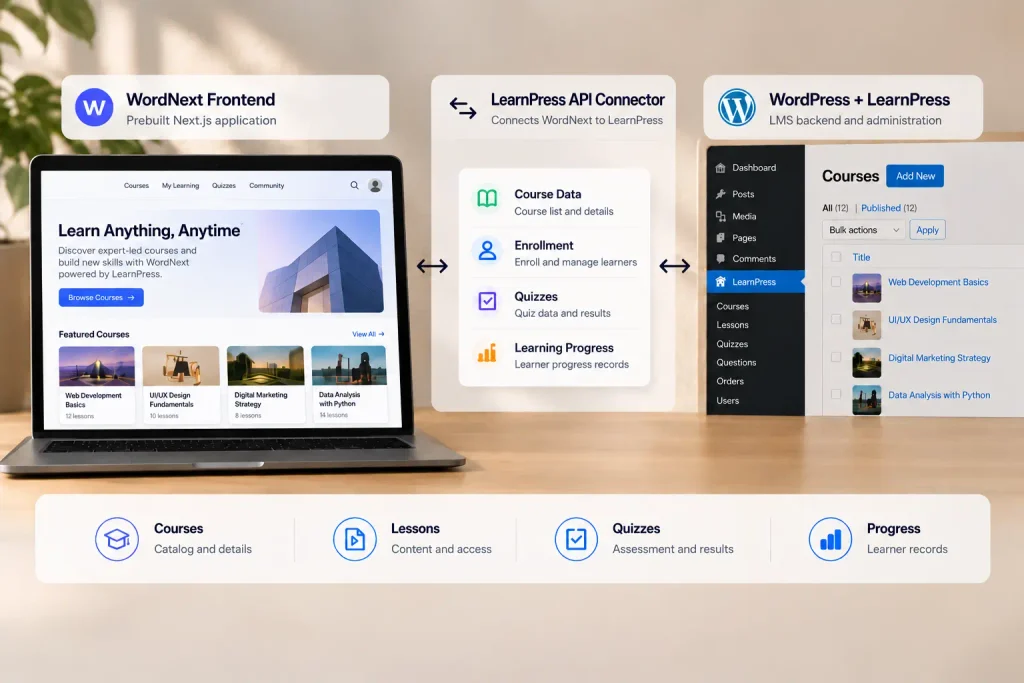
LearnPress provides course management and learning functionality through WordPress. WordNext provides an existing Next.js frontend application designed for LearnPress. Distributed as source code, it includes course catalog and detail pages, lesson and quiz interfaces, learner accounts, progress displays, and checkout flows. These features provide an implementation that developers can modify rather than building the initial application independently.
When is building your own LMS backend worth it?
Building a custom backend for an LMS with Next.js gives developers control over course structures, enrollment conditions, assessments, progress tracking, and administrative workflows without having to adapt those requirements to an existing LMS.
That control matters when the learning model itself is unusual. A platform with complex organization-specific permissions, proprietary assessment rules, or tightly integrated business processes may need capabilities that an existing LMS cannot support without extensive modification.
For a more typical course website, however, the requirements are familiar. Students browse courses, enroll, complete lessons and quizzes, and track their progress. Administrators create curricula, manage learners, and review course activity. These are important capabilities, but they aren’t necessarily ones your team needs to build from scratch.
Developing them independently means implementing learning rules, maintaining records, creating administration tools, and supporting those systems as the platform evolves. Whether that investment makes sense depends on how different your requirements are from what an existing LMS can already provide.
If an existing LMS already supports your learning model, reusing it can be a more sensible starting point. That is where LearnPress enters the picture.
LearnPress supplies the LMS management you would otherwise have to build
If you’re building an LMS with Next.js without developing a custom backend, you still need a system to manage courses and enforce learning rules. That’s where LearnPress can help.
LearnPress is a WordPress LMS plugin that provides course creation and management, including curricula built from lessons and quizzes. Instructors and administrators can work with those courses through WordPress instead of waiting for your development team to build a separate administration application.
Course administration is only part of what LearnPress provides. It also handles learning operations that a frontend needs to interact with.
For example, displaying a quiz requires more than retrieving questions. The system must recognize the learner’s attempt, record answers, and calculate results. LearnPress provides operations for these workflows, and its REST API documentation covers enrollment, lesson completion, course completion, retakes, and quiz actions.
This allows developers to build a Next.js frontend around existing learning functionality rather than implementing the underlying LMS behavior themselves.
What WordNext changes in the frontend workload
For an LMS with Next.js, using LearnPress as the backend reduces the need to implement course management, enrollment, assessments, and progress tracking from scratch. However, developers still need a learner-facing Next.js application.
Developers building that frontend independently would need to create the learner-facing pages, retrieve and display course information, connect enrollment and authentication flows, and integrate lessons, quizzes, and progress tracking with LearnPress. They would also need to handle navigation, application state, and the responses returned by the LMS.
WordNext provides an existing Next.js frontend application designed for LearnPress. Distributed as source code, it includes course catalog and detail pages, lesson and quiz interfaces, learner accounts, progress displays, and checkout flows. These features provide an implementation that developers can modify rather than building the initial application independently.
Developers can customize the application structure, styling, navigation, and supported learning interfaces to suit their project. They remain responsible for configuring the LearnPress connection, deploying the Next.js application, and implementing requirements that fall outside WordNext’s existing functionality. Compatibility with additional LearnPress plugins and custom workflows also needs to be evaluated separately.
WordNext therefore does not replace LearnPress or eliminate frontend development. It reduces the amount of initial frontend implementation required when building a Next.js learning application around an existing LearnPress backend.
A different starting point for the development backlog
The benefit becomes clearer when expressed as work. What changes when you reuse the backend and frontend?
| Development work | Custom LMS + Next.js | LearnPress + custom Next.js | LearnPress + WordNext |
|---|---|---|---|
| Course management | Build the LMS backend and admin tools | Use LearnPress | Use LearnPress |
| Enrollment and learning records | Implement backend rules and storage | Use LearnPress’s supported operations | Use LearnPress’s supported operations |
| Learner-facing pages | Build the frontend | Build the frontend | Adapt WordNext’s existing pages |
| Frontend integration | Design and implement backend connections | Integrate with LearnPress APIs | Adapt WordNext’s supported integrations |
| Project-specific features | Develop as required | Develop as required | Develop as required |
The middle option is important. Using LearnPress does not require using WordNext. A team can keep LearnPress as its backend and develop a completely custom Next.js frontend.
WordNext changes that second decision. Its value is not that it makes LearnPress possible to use with Next.js, but that it provides an existing frontend implementation for developers who would otherwise build one themselves.
The choice therefore depends on how closely WordNext’s supported interfaces and workflows match the application the team wants to deliver.
What WordNext doesn’t build for you
Starting with WordNext reduces the need to implement a LearnPress frontend from scratch, but it doesn’t turn the project into a no-code setup.
You still need a WordPress site running LearnPress, the required API connector, and an environment for running and deploying the Next.js application. Developers remain responsible for connecting the systems, adapting the source code, and maintaining the deployed frontend.
The learning content and business configuration also remain your responsibility. Courses need to be created, enrollment and assessment rules configured, and payment methods set up where applicable. WordNext provides interfaces for supported workflows; it doesn’t supply your curriculum or configure your business operations.
Compatibility deserves particular attention. An add-on working inside WordPress does not automatically mean its learner-facing features are implemented in WordNext. Custom learning activities, payment requirements, and other integrations should be checked against the actual product capabilities.
For example, the current WordNext product FAQ notes that its instructor application page does not submit applications. A platform that relies on that workflow would need additional implementation.
Before committing to the stack, identify the learning features your project cannot operate without and confirm that LearnPress and WordNext support them. The WordNext setup guide covers the technical requirements and installation process in more detail.
Choosing the right starting point
For an LMS with Next.js, a custom backend makes sense when your learning model requires rules, data structures, or administrative workflows that an existing platform cannot reasonably support.
If LearnPress already meets those requirements, rebuilding the same backend functionality may add work without improving the learner experience. You can keep LearnPress for course management and focus development on the Next.js application.
That frontend can be built independently, especially when the project calls for a highly specialized interface. But when its requirements overlap with WordNext’s supported learner flows, starting with the existing source code is worth evaluating before building everything yourself. Build the parts that make your learning product different. Reuse the parts that don’t need to be different.
Explore the WordNext demo to examine the learner experience, and review the product details and setup requirements before choosing your development approach.
Frequently Asked Questions
Can you build an LMS with Next.js?
Yes. You can build an LMS with Next.js by developing the learner-facing application and connecting it to a backend that manages courses, enrollment, assessments, and progress. Next.js provides the web application framework, but it does not include LMS functionality by default. You can build a custom backend or use an existing system such as LearnPress.
How does LearnPress Next.js integration work?
LearnPress Next.js integration connects a Next.js frontend to LearnPress running on WordPress. The frontend communicates with the LMS through supported API endpoints to retrieve course information and interact with learning functionality. WordNext is designed for this setup and requires the separate LearnPress Mobile App API connector. Developers still need to configure the connection and verify compatibility with their project’s requirements.
Do you need a custom backend for an LMS with Next.js?
Not necessarily. An LMS with Next.js needs a backend to manage courses, enrollment, assessments, and learning records, but developers do not always need to build that backend themselves. LearnPress can provide existing LMS functionality through WordPress, allowing the Next.js application to focus on the learner-facing experience.
Can you customize the frontend of an LMS with Next.js using WordNext?
Yes. WordNext provides a Next.js frontend source-code package that developers can modify to fit their project. For an LMS with Next.js, this includes customizing layouts, styling, navigation, and supported learner interfaces without building the entire frontend from scratch.
Custom features and integrations may require additional development, while changes to learning rules must remain compatible with the LearnPress backend.
Is WordNext required to build an LMS with Next.js?
No. Developers can build an LMS with Next.js using their own frontend and backend, or connect a custom Next.js frontend to LearnPress. WordNext is an optional starting point that provides an existing Next.js frontend source-code package designed for LearnPress, reducing the need to implement supported learner-facing workflows from scratch.
Contact US | LearnPress:
Website: https://learnpresslms.com/
Fanpage: https://www.facebook.com/learnpresslms
Email: [email protected]