If you run courses on WordPress, you already know the hardest part of going digital isn’t building the lessons, it’s trusting the results. Every course creator who moves testing online eventually asks the same question: how do you prevent cheating in online exams when a student could have three browser tabs open and a phone in their lap? The good news is that you don’t need an enterprise proctoring budget to get real answers. A handful of settings, question design choices, and a bit of policy work can close most of the gaps that make cheating easy.
This guide walks through five strategies that actually work on a WordPress LMS site, why each one matters, and how to set it up without turning your course into a surveillance exercise.
LearnPress – WordPress LMS Plugin
We provide an amazing WordPress LMS plugin to create & sell online courses. Let’s find out!
Try NowTable of Contents
Why online exam cheating prevention matters more in 2026
Stopping cheating on assessments used to mean keeping students from texting each other the answers. That’s not the real threat anymore. AI has also changed the cheating landscape. Students can now use generative AI tools, browser extensions, and other technologies to find or generate answers much faster than before. This makes traditional approaches such as using the same questions for every student less effective. Traditional tricks like copying a screenshot into a search bar have been joined by browser extensions that read a question off the screen and generate an answer in seconds.
This doesn’t mean every course needs facial recognition and a lockdown browser. A certification exam for a professional credential and a weekly quiz inside a hobby course have completely different risk profiles. What it does mean is that the old default of “one exam, one attempt, same questions for everyone” is no longer enough if the results need to mean anything. The strategies below are ordered roughly from lowest effort to highest, so you can match the level of protection to what’s actually at stake.
1. Randomize questions and build a real question bank
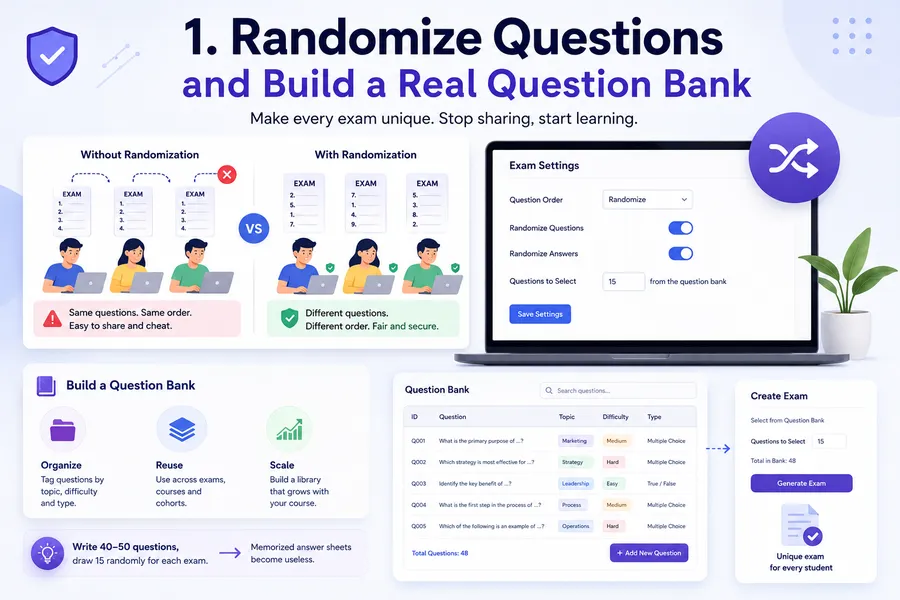
Question randomization is one of the simplest and most cost-effective ways to make online exams harder to game, and it’s usually a single checkbox in your LMS settings. When every student sees the same ten questions in the same order, the exam turns into something that can be photographed, shared, and passed around a class group chat within minutes of the first attempt. Randomizing the order, and pulling from a larger pool so no two students see an identical set, breaks that chain immediately.
Build a question bank, not a single quiz
A question bank is a reusable library of questions tagged by topic and difficulty that you draw from every time you build an exam. Instead of writing 15 questions for one quiz, write 40 to 50 covering the same learning objectives, then configure the exam to randomly select a subset for each attempt. This does two things at once: it makes memorized answer sheets useless, and it gives you a resource you can reuse across cohorts without writing new content every term.
If you’re running exams with the Exam Add-on for LearnPress, question randomization and a searchable Question Bank are both built into the exam editor. You can pull questions from the bank into any exam or create new ones directly, which makes it easy to keep a growing library instead of rebuilding quizzes from scratch every time you want a fresh set.
2. Set tight time limits and control exam access windows
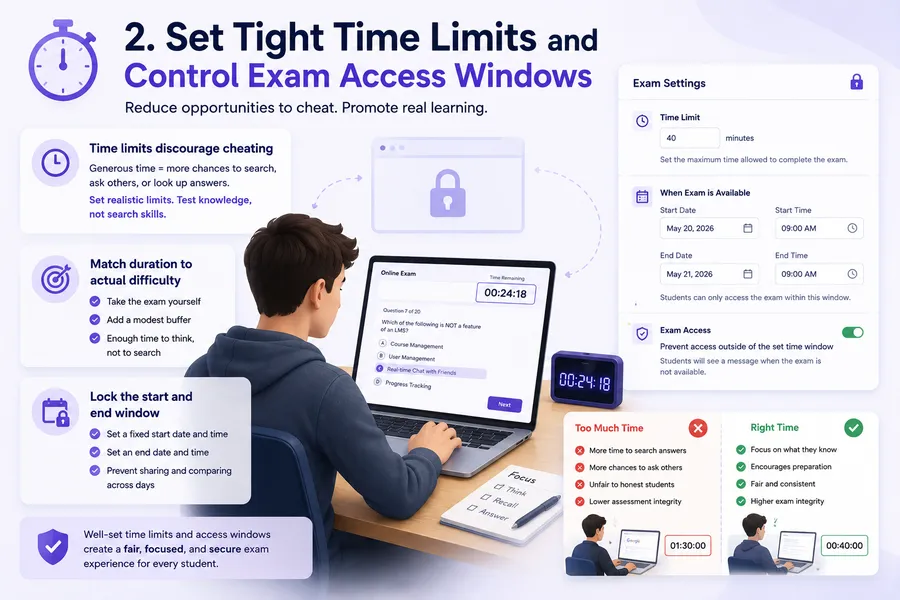
A generous time limit is one of the most common, and most overlooked, ways instructors accidentally invite cheating. If a 20-question quiz gives students 90 minutes, that’s 90 minutes to look everything up, message a classmate, or run each question through a search engine one at a time.
Set a realistic time limit based on the number and difficulty of questions. The goal is to give students enough time to demonstrate what they know without leaving excessive time for searching for answers or communicating with others
Match duration to actual difficulty
Time your own exam attempt first. Whatever it takes you to answer every question comfortably, add a modest buffer, not double the time. A well-calibrated duration pressures students to rely on what they know rather than what they can find, without making the exam feel unfair to someone who genuinely studied.
Lock the start and end window
Beyond duration, control when the exam is available at all. Opening access for a fixed 24-hour or 48-hour window, rather than leaving a quiz open for two weeks, prevents students from comparing notes across attempts taken days apart. Most WordPress exam tools, including the LearnPress Exam Add-on, let you set a specific start date and time and end date and time, so the exam simply isn’t accessible outside that window unless you explicitly allow late access.
3. Limit retakes and track every submission
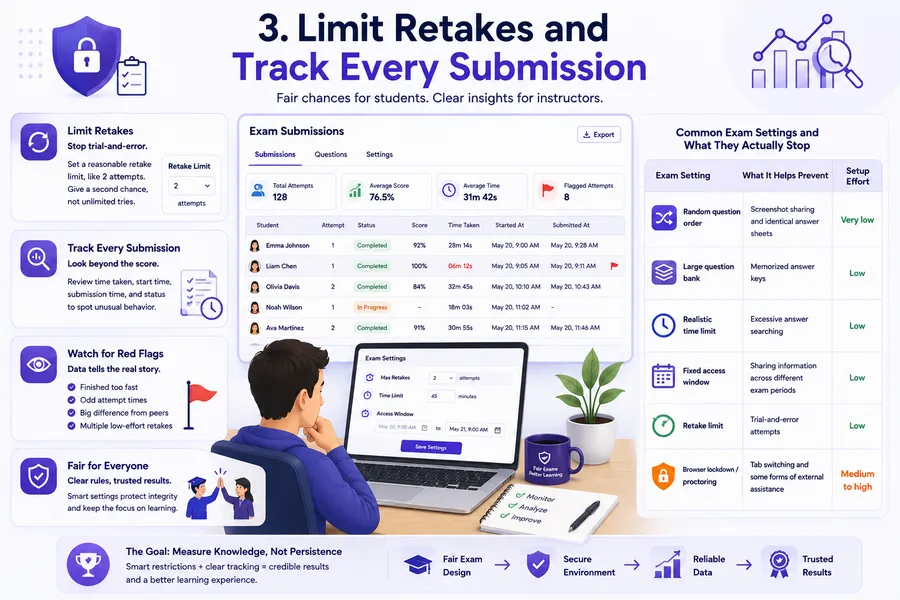
Unlimited retakes turn an exam into trial and error. If a student can fail, see which questions they missed, and try again immediately, the exam stops measuring knowledge and starts measuring persistence. Setting a retake limit, two attempts is a common middle ground, keeps room for a genuine second chance without allowing the exam to be reverse-engineered one attempt at a time.
Watch the submission data, not just the score
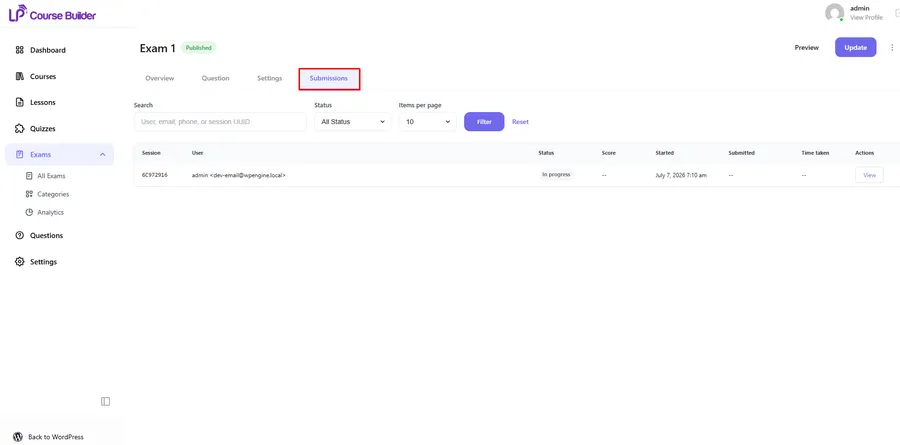
Every attempt leaves a trail: how long the student spent on the exam, when they started, when they submitted, and how that compares to their classmates. A student who finishes a 45-minute exam in six minutes with a perfect score is worth a second look. Reviewing submission logs regularly, rather than only checking the final grade, is one of the few habits that costs nothing and takes almost no extra setup while still catching dishonest attempts. The Submissions tab in the LearnPress Exam Add-on shows session details, status, score, and time taken for every student, so unusually fast or oddly timed attempts are easy to spot without any extra plugin.
Comparison of common exam settings and what they actually stop
| Exam setting | What it helps prevent | Setup effort |
|---|---|---|
| Random question order | Screenshot sharing and identical answer sheets | Very low |
| Large question bank | Memorized answer keys | Low |
| Realistic time limit | Excessive answer searching | Low |
| Fixed access window | Sharing information across different exam periods | Low |
| Retake limit | Trial-and-error attempts | Low |
| Browser lockdown / proctoring | Tab switching and some forms of external assistance | Medium to high |
4. Use proctoring and browser lockdown tools where it counts
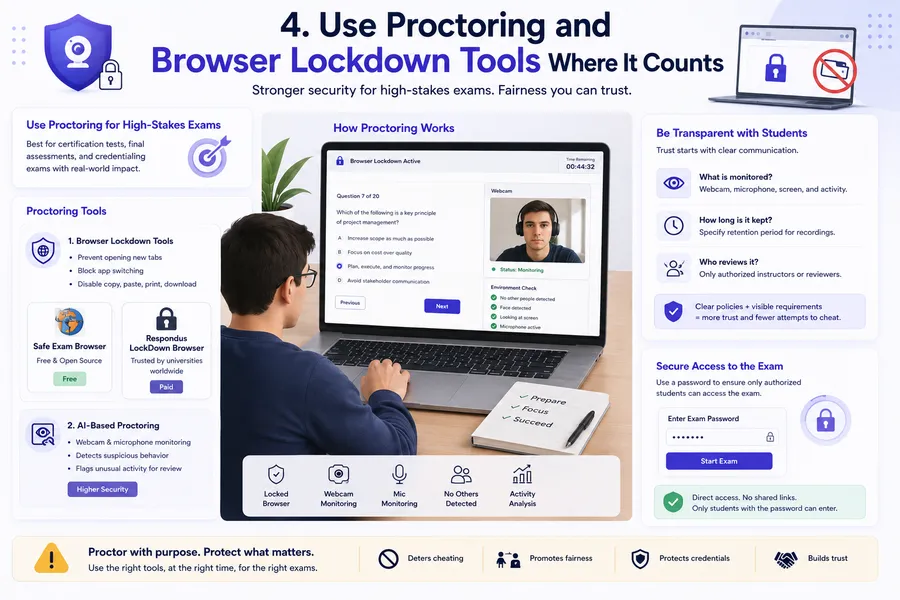
Online exam proctoring is the strongest layer of defense, and also the most intrusive, so it’s worth reserving for exams where the stakes justify it: certification tests, final assessments, or anything tied to a credential someone can put on a resume. Proctoring tools generally fall into two categories. Browser lockdown tools like Safe Exam Browser, which is free and open source, or Respondus LockDown Browser, a paid option common in higher education, prevent students from opening new tabs, switching applications, or copying and pasting during the exam. AI-based proctoring adds webcam and microphone monitoring on top of that, flagging unusual behavior like someone else entering the room or the student looking away from the screen for extended periods.
Be upfront about what’s being monitored
Proctoring only works if students trust the process. Tell them in advance exactly what’s being recorded, how long the recording is kept, and who reviews it. A password-protected exam combined with clear instructions and a visible webcam requirement discourages casual cheating far more effectively than a tool students discover mid-exam. If your exam includes a password field, as the LearnPress Exam Add-on’s Overview tab does, use it to make sure only students who received direct access, rather than a shared link, can open the exam at all.
5. Design questions that are harder to look up
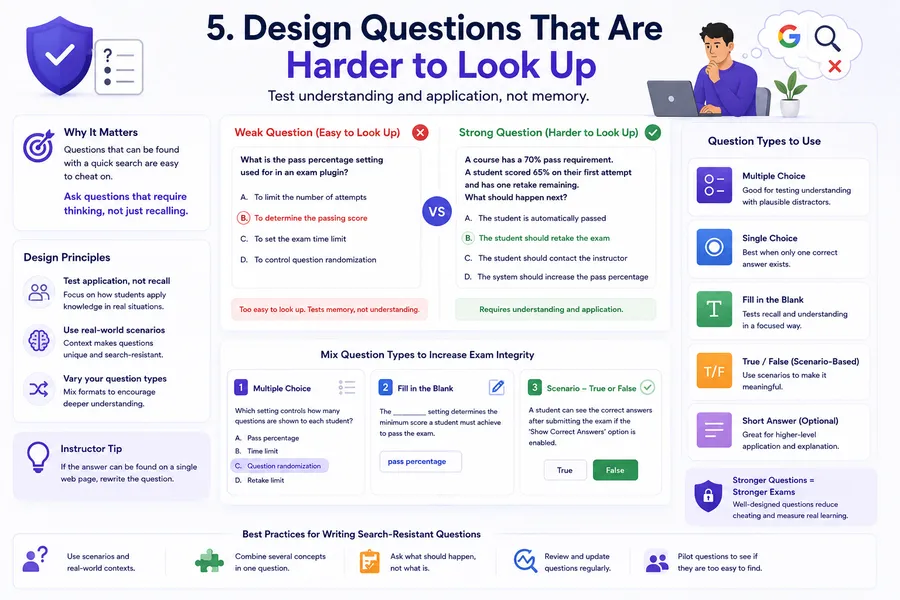
No setting can fully compensate for a quiz built entirely from definitions copied straight out of the course material. If a question can be answered by pasting it into a search engine, it will be. The most durable fix is to write questions that test application and reasoning instead of recall.
Favor scenarios over definitions
Instead of asking “What is the pass percentage setting used for in an exam plugin?”, ask a student to review a short scenario, “A course has a 70% pass requirement and a student scored 65% on their first attempt with one retake remaining, what should happen next?”, and pick the correct outcome. Scenario-based and applied questions are far harder to solve with a quick search because the answer isn’t sitting on a single page anywhere online.
Mix question types
Relying only on multiple choice makes an exam easy to brute-force with AI tools that scan text and return an answer instantly. Mixing in fill-in-the-blank and short scenario-based true or false questions, alongside multiple and single choice, forces more active thinking and breaks the pattern that automated cheating tools are built to exploit.
How to choose the right mix of strategies
Not every course needs every layer described above. A low-stakes practice quiz benefits from randomization and a reasonable time limit and not much else. A certification exam that unlocks a paid credential deserves the full stack: a large question bank, a tight access window, a strict retake limit, proctoring, and application-based questions. The goal isn’t to make every exam feel like an interrogation. It’s to match the friction of keeping exams secure to what a passing score actually unlocks for the student.
Start by listing what’s at risk if someone cheats on a specific exam. If the honest answer is “not much,” a randomized question bank and a sensible timer are enough. If the honest answer is “a certificate someone will use to get hired,” layer in access controls, submission monitoring, and proctoring without hesitation.
FAQs
What is the most effective way to prevent cheating in online exams?
Combining a large, randomized question bank with a tight time limit stops the majority of casual cheating, since it removes both the ability to share identical questions and the time needed to look answers up. For high-stakes exams, add browser lockdown software or AI proctoring as a second layer, since no single setting catches every method on its own.
Can WordPress LMS plugins detect cheating automatically?
Most WordPress exam tools don’t run automated cheating detection out of the box, but they do log the data needed to spot it manually, including start time, submission time, and time taken per attempt. Reviewing that submission data for unusually fast completions or repeated identical timing patterns is a practical substitute for automated detection on smaller sites.
Is online exam proctoring worth it for small course creators?
Proctoring makes the most sense for certification exams or assessments tied to a credential, where the cost of a false pass is high. For everyday quizzes and practice tests, question randomization, time limits, and well-designed questions usually deliver enough protection without the added cost or the friction of webcam monitoring.
How many retakes should an online exam allow?
Two attempts is a common balance point: it gives students room for an honest mistake, like a technical issue or a moment of nerves, without turning the exam into repeated guessing. Pairing a retake limit with a reshuffled question set for the second attempt keeps the process fair while still discouraging trial-and-error attempts.
Should I use the same questions for every online exam?
Using exactly the same questions for every student makes an online exam easier to share and memorize. A better approach is to maintain a larger question bank and randomly select questions for each attempt. You can still test the same learning objectives while changing the specific questions students receive. For example, if your exam covers five topics, create several questions for each topic and require the LMS to select a balanced set. This makes the exam more consistent and fair while reducing the value of screenshots, shared answer sheets, and leaked questions. It also gives you a reusable collection of questions for future courses and exam attempts.
How can I prevent students from using AI during online exams?
There is no single setting that can completely prevent students from using AI during an online exam. Instead, combine technical controls with better assessment design. Set realistic time limits, randomize questions, limit attempts, and use a larger question bank so students cannot easily copy an exam into an AI tool. More importantly, write questions that require students to apply concepts to specific scenarios rather than simply recall definitions. For high-stakes assessments, browser lockdown or proctoring can add another layer of protection. Clear exam rules also matter: tell students whether AI tools, search engines, notes, or other resources are allowed before the exam begins.
Conclusion
Preventing cheating in online exams isn’t about picking one perfect tool. It’s about stacking a few low-effort settings, randomized questions, sensible time limits, controlled access windows, and retake limits, on top of better question design, then reserving proctoring for the exams where the outcome genuinely matters. Most of this is already available inside your WordPress LMS setup; the work is in actually turning it on and checking the submission data once in a while. Get those basics right, and the exam results on your site will actually reflect what your students know.
Read more: How to Create and Manage a Question Bank in LearnPress for Reusable Exams?