
You can configure a course to be accessible via membership plans, or allow both membership and individual purchase.
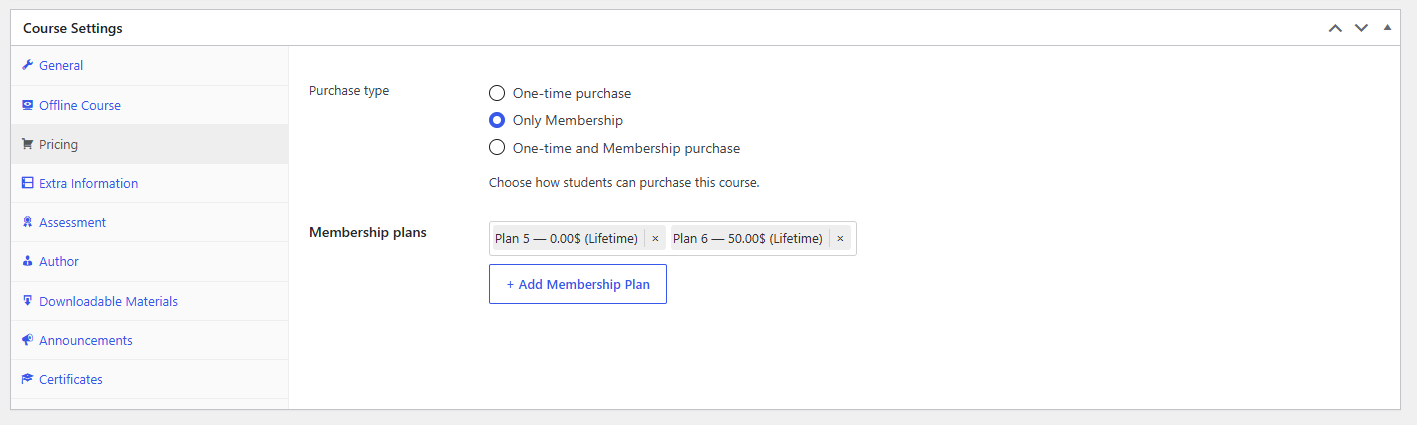
To set this up:
From the WordPress dashboard, go to LearnPress → Courses, select a course and click Edit.
In the Course Settings section, open the Pricing tab.
Purchase Type
In Purchase type, choose how users can access the course:
- One-time purchase
Users can buy the course individually. - Only Membership
The course is only accessible via membership plans. - One-time and Membership purchase
Allows both options:- Buy the course individually
- Or access via membership
Membership Plans
- Membership plans
Select one or more membership plans that grant access to this course. - Add Membership Plan
Click to add plans to the course.
How it works
- Only Membership → only members can access the course
- One-time and Membership purchase → users can either buy the course or access it via membership
This setup allows flexible monetization strategies for your courses.