The e-learning industry is projected to reach new heights this year. Whether you are an individual instructor or an educational institution, creating an online course is the best way to share knowledge and monetize your expertise.
While there are many WordPress LMS plugins on the market, LearnPress remains the comprehensive, free, and user-friendly choice for millions of users.
In this guide, we will walk you through exactly how to create an online course with LearnPress from scratch—covering everything from the curriculum setup to pricing and assessment settings.
Let’s dive in!
Install & Setup LearnPress Before Creating an Online Course
In case you have not set up LearnPress:
- You can refer to the LearnPress documentation and how to set it up.
- Our quick setup guide LearnPress in blog format may be helpful if you don’t want to read the documentation.
How To Create An Online Course with LearnPress
To create a course in LearnPress, you should open your WordPress Dashboard and go to LearnPress.
On the sidebar dashboard, you will find and hover your mouse over Courses, then click on the “Add New” part.
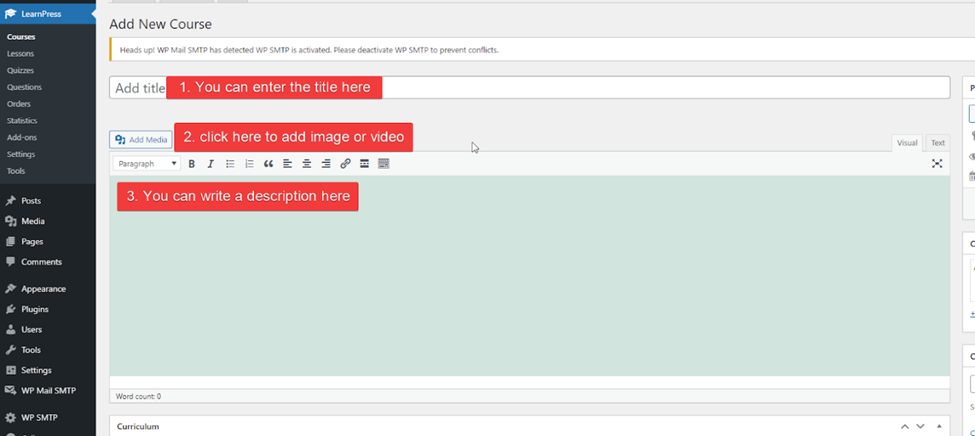
You can add the course title, click to add images or videos, and write the course description here. Also, you can freely edit your course with options such as font, color, alignment, etc.
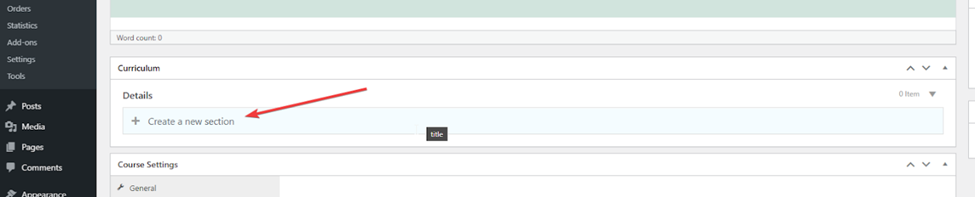
Next, let’s go ahead and scroll down to the curriculum part to create a new section.
Then, you will type your section name and press enter.
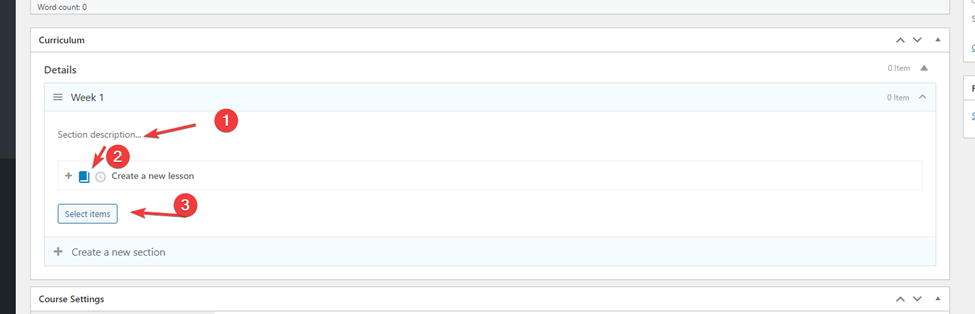
Then, you can add text to the LearnPress section description. Also, you can select items or create new lessons, quizzes, and questions, depending on your choice.
If you click on the small book icon, you can create a lesson. If you click on the small clock icon, you can create a quiz.
Below, you can see the button “Select items.” If you have a lot of questions and quizzes, you can always check them here. Each week, you can make as many lessons as you need. Remember to check your course regularly to avoid mistakes.
And that’s all for how to create a course with LearnPress. In addition, we have also published the article “LearnPress Course Setting Options” guide. You can read and understand more about how to set up courses in LearnPress.
Don’t forget to try Eduma, the WordPress theme that will transform your online learning experience. With its powerful features and intuitive design, Eduma is the perfect platform for creating an engaging and effective online learning environment.
If you are concerned about how to install Eduma, don’t worry, detailed instructions on how to install Eduma on WordPress by ThimPress are right here for you!
Read more: 5+ Best Free LearnPress WordPress Themes to Launch Your Online Course
Contact US | LearnPress:
Website: https://learnpresslms.com/
Fanpage: https://www.facebook.com/learnpresslms
Email: [email protected]