The landscape of online education is constantly evolving, and maintaining a high-performing learning platform requires robust tools. Today, we are incredibly excited to announce the latest LearnPress Update. This major release brings a structural overhaul to our ecosystem, introducing two highly anticipated features: a native enrolled students dashboard and a completely revamped certificate design experience.
Whether you are an instructor managing hundreds of learners or a developer optimizing backend performance, this LearnPress Update delivers significant improvements. We have listened closely to your feedback. As a result, this release focuses on improving learning engagement, giving instructors more control, and ensuring peak database performance.
In this comprehensive post, we will explore exactly what is new, how these tools function, and why this LearnPress Update is a game-changer for your online academy.
LearnPress – WordPress LMS Plugin
We provide an amazing WordPress LMS plugin to create & sell online courses. Let’s find out!
Try NowWhy This LearnPress Update Matters for Your WordPress LMS Plugin
Managing a successful eLearning website involves two critical components: tracking your learners efficiently and rewarding them effectively upon completion. Historically, tracking exactly who was participating in a specific course required navigating through separate order menus or relying on third-party integrations. Additionally, generating certificates sometimes caused database bloat.
This LearnPress Update directly addresses both of these challenges. By updating to LearnPress Core v4.3.3 and LearnPress Certificate v4.2.0, you are not just getting a fresh coat of paint. You are receiving a massive architectural upgrade aimed at improving your WordPress LMS plugin performance, ensuring bulletproof code stability, and giving both instructors and learners a much smoother experience.
Let us dive deeply into the two main pillars of this release.
Effortless Course Management: The Native Enrolled Students List
Managing your learners just got a whole lot easier. We know that tracking class participation is vital for instructors to provide timely support and maintain engagement. Listening to your feedback, starting from LearnPress Core v4.3.3, we have officially integrated a dedicated enrolled students list directly into the core system.
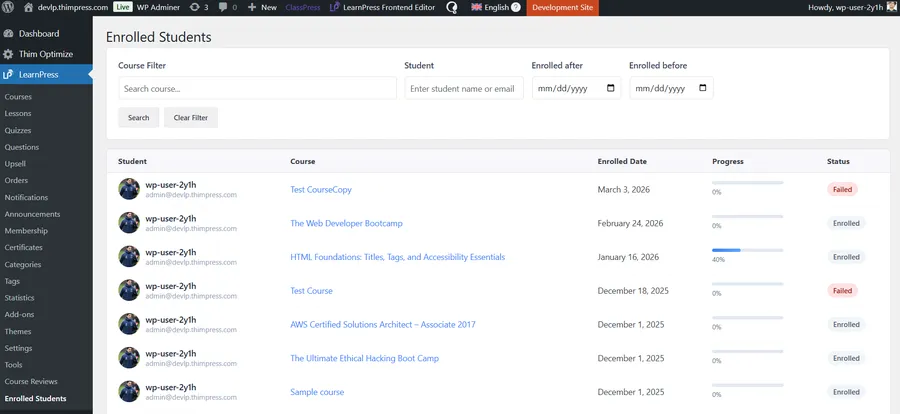
This built-in feature gives you back your time and full control over your classroom. You no longer need to check individual WooCommerce orders to see who is actively studying. Here is what makes this new management screen a powerful addition to your daily workflow:
Advanced Filtering System
Stop scrolling endlessly through disjointed data. Instructors can now instantly filter their enrolled students list by specific courses. Furthermore, the dashboard includes a precise search bar to find a student’s name or email immediately. You can even sort the list by enrollment date ranges (Enrolled after or before specific dates), making cohort management incredibly simple.
Visual Progress Tracking
Keeping an eye on your students’ performance is easier than ever. The new dashboard features a clear, intuitive percentage progress bar. At a single glance, an instructor knows exactly how far along each learner is within their curriculum. This allows educators to identify students who might be falling behind and offer them proactive assistance, effectively lowering student drop-offs.
Real-time Status Tags
Clarity is crucial in course management. The new interface includes eye-catching status badges. You can instantly see if a student is currently “Enrolled” (in progress), has successfully “Completed” the course, or has unfortunately “Failed.” These visual cues streamline administrative tasks and improve reporting accuracy.
With native dashboard access on both the backend and the frontend profile page, managing your digital classroom has never been more intuitive.
The Massive Architectural Upgrade: LearnPress Certificate Builder V2.0
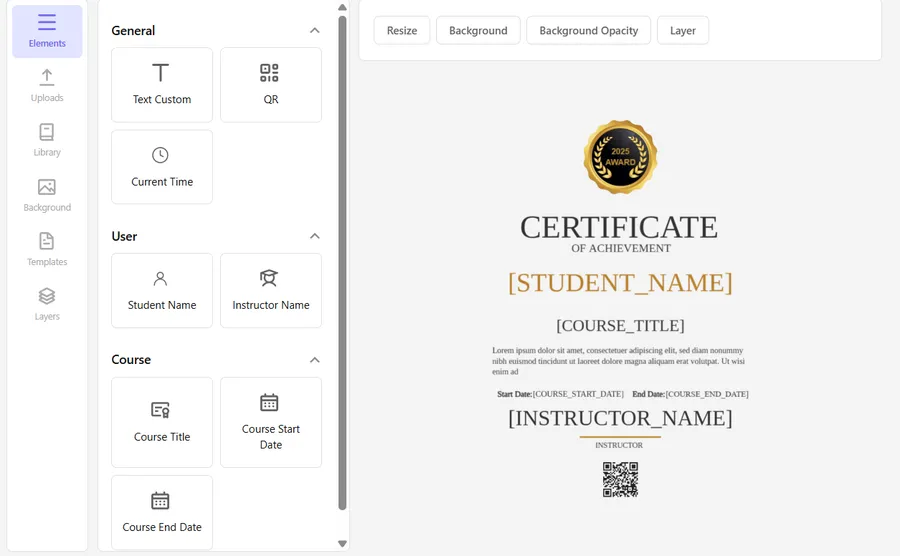
Rewarding learners for completing an entire course is an essential part of the educational journey. Certificates celebrate learner achievements and encourage higher completion rates. The heart of this new LearnPress Update is the entirely revamped LearnPress Certificate Builder (v4.2.0).
To ensure maximum stability and a lag-free drag-and-drop experience, our development team has completely rebuilt the interface from the ground up.
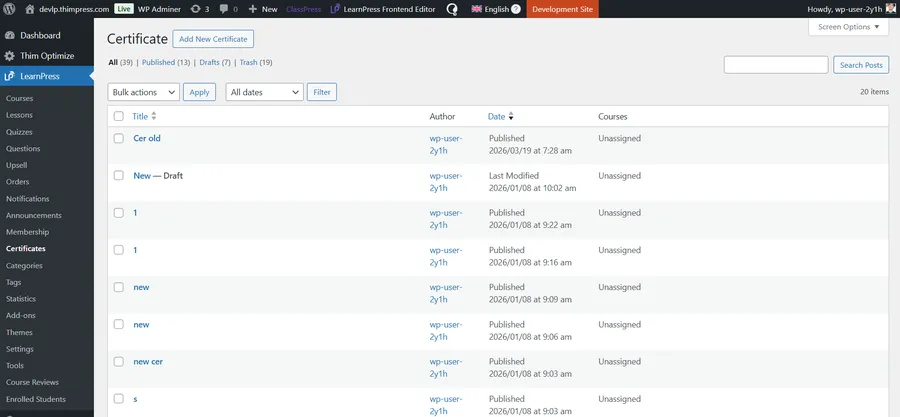
A Modular, Lightning-Fast User Interface
We have abandoned outdated dependencies. The new LearnPress Certificate Builder is built using pure Vanilla JS and the latest Fabric.js library. This means the JavaScript code is incredibly clean, module-oriented, and easy to reuse.
When you open the builder, you will immediately notice the smooth, responsive elements panel on the left. You can easily drag text layers, QR codes, dynamic student names, and course dates directly onto the canvas.
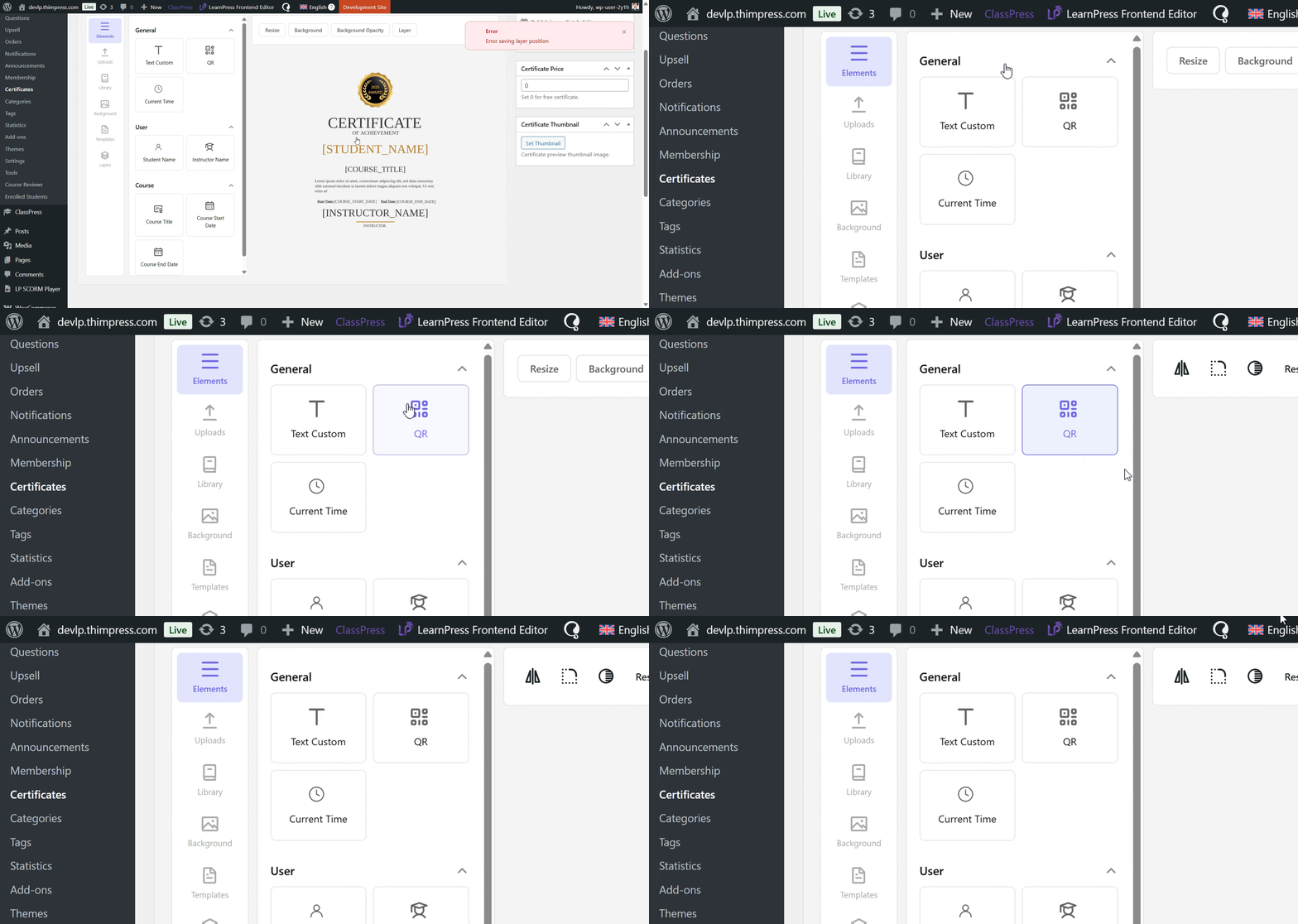
Furthermore, we introduced a powerful TemplateHook system. This ensures that the certificate user interface is highly adaptable. It can be seamlessly reused in multiple environments, including the Backend Admin, the Frontend Profile, and the Course Builder.
(Note for users: To ensure a smooth transition, the new V2.0 UI is currently displayed directly inside the existing certificate edit screen. We have kept your workflow familiar while upgrading the engine underneath).
The result? A highly professional, fully customized course completion certificate that your students will be proud to share with the world.
Massive Database Refactoring for Peak Performance
One of the most crucial technical changes in this LearnPress Update revolves around how data is stored. This is a massive win for website speed and scalability.
Previously, certificates were saved as standard WordPress posts. However, since certificates do not require frontend post views or search engine optimization like a regular blog post, keeping them in the standard wp_posts table caused unnecessary database bloat. For large academies issuing thousands of credentials, this could slow down the server.
To dramatically speed up WordPress, we are transitioning certificates to a dedicated, lightweight custom database table. The streamlined structure now handles data efficiently:
- ID (bigint)
- Title (varchar 255)
- Price (varchar 100)
- Extra (JSON) – This securely stores all layout configs, layers, and templates.
Converting old data from standard tables to this new custom table is a delicate process. Therefore, the actual database upgrade process will be executed cautiously. We ensure all core functionalities are thoroughly tested with the old data structure before proceeding with the final migration.
Under the Hood: Bulletproof Code Stability
For our developer community building upon our WordPress LMS plugin, you will be pleased to know that the new add-on strictly follows the WordPress PSR-4 coding standard.
To guarantee 100% backward compatibility and system stability, all new features have been written in completely new files. We have strictly avoided overriding any old code. This means your current customizations remain safe. Additionally, all PHP data handling is now processed securely and efficiently through LearnPress\Ajax\AbstractAjax rather than relying on external APIs. This significantly reduces server requests and improves security.
Summary of the LearnPress Update Changelog
Before you update your plugins, here is a quick recap of the technical changes introduced in these two major releases.
LearnPress Core v4.3.3 Highlights:
- New: Added native enrolled students list feature for better course management directly on the Profile Page and Backend Dashboard.
- Update: Improved data filtering and visual status tags for student progress tracking.
LearnPress Certificate v4.2.0 Highlights:
- New: Developed an entirely new UI for Certificate List management and the Create/Edit builder.
- New: Reusable TemplateHooks allowing implementation across multiple environments.
- New: Core strictly follows the PSR-4 coding standard using new files (no overriding).
- Update: Rebuilt frontend with Vanilla JS and the latest Fabric.js library for a modular codebase.
- Update: PHP data processing is handled securely via AbstractAjax.
- Optimization: Massive database refactoring to custom tables, preventing wp_posts bloat and improving site speed.
Next Steps: Upgrade and Optimize
This monumental LearnPress Update continues our commitment to making online learning more powerful, seamless, and scalable for both learners and instructors. From smarter course management tools to expanded, high-performance certification features, this update builds a rock-solid foundation for the future of your eLearning business.
We highly recommend updating to LearnPress Core v4.3.3 and LearnPress Certificate v4.2.0 today to experience a more complete, connected, and flexible way to teach.
Do you need a step-by-step guide on how to design your first certificate with the new builder or how to export your student data? Check out our official documentation and tutorials area for detailed walkthroughs.
FAQs About LearnPress Update
Q1: What are the main changes in the LearnPress Certificate update (v4.2.0)?
The biggest upgrade is the introduction of Certificate Builder V2.0. We have completely rebuilt the interface using pure Vanilla JS and the latest Fabric.js for a smoother drag-and-drop experience. Additionally, we implemented a massive database refactoring process to store certificates in a custom, lightweight table instead of wp_posts, significantly improving your WordPress LMS performance.
Q2: Will this update break my existing certificates or override my old code?
No, your site is completely safe. To ensure 100% stability, this update strictly follows the PSR-4 coding standard. All new features are written in newly created files, and we absolutely do not override any of the old code.
Q3: Why is the database being refactored in this LearnPress Certificate update?
Previously, certificates were stored as standard WordPress posts. Because certificates do not require SEO or frontend views like a blog post, this caused unnecessary database bloat. By moving them to a dedicated, lightweight custom table, we drastically reduce server load and speed up your entire eLearning platform.
Q4: How will my old certificate data be transferred to the new database table?
Converting data from the old wp_posts and postmeta tables is a critical process. Therefore, we are rolling out the DB upgrade carefully. We will ensure all core Builder functionalities are thoroughly tested and working perfectly with the old data structure first before fully executing the automatic database conversion process.
Read more: 7 Best AI Powered LMS Innovations for Education
Contact US | LearnPress:
Website: https://learnpresslms.com/
Fanpage: https://www.facebook.com/learnpresslms
Email: [email protected]